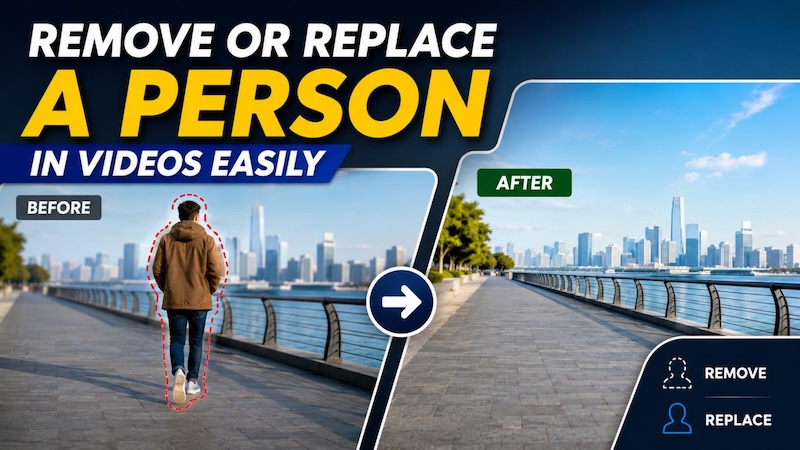
Being open and welcoming is a good people trait. But this doesn’t apply to videos and photos because who likes a photobomber, right? Unwanted people can easily walk into the frame and ruin an otherwise perfect shot. This is especially common when filming in crowded streets, tourist attractions, events, or public places. In the past, removing a person from a video required advanced editing skills and could take hours of manual work. Fortunately, AI-powered video editing tools have made this process much easier. Follow this guide to find the top 4 AI tools and learn how to remove a person from a video without sacrificing the original quality.
Part 1: Why Erase a Person From a Video?
How to remove person from video? Before finding out about the top tools to remove a person from a video, it is important to understand why this feature can be useful. Here are some common reasons to erase a person from a video:
- Video Bomber: One of the most common reasons to remove a person from a video is a video bomber. When a person unexpectedly walks into the frame, makes funny gestures, or stands behind the main subject, they can distract viewers from the actual content.
- Improve Video Quality: Another reason to remove a person from a video is to improve the video quality. Eliminating distractions from the video can help you create engaging and professional-looking videos.
- Protect Privacy: For some reasons, you may want to protect the privacy of your actors, friends, and family members who accidentally appear in your footage. Removing them from the video can easily protect their privacy.
- Remove Character from Video: If a character doesn’t fit into your video and makes it look unnecessary, removing the character from the video can help you fix the video instead of reshooting it.
Part 2: 4 Easy Ways to Remove a Person From a Video
There could be several reasons to remove a person from a video. Fortunately, modern AI video editing tools can easily erase a person from a video with a single click. Here is how to remove a person from a video with top AI tools.
1. HitPaw Edimakor
If you want to remove a person from a video without sacrificing the original quality, we recommend using HitPaw Edimakor. This all-in-one AI video editor offers an advanced object removal feature that can easily remove people, logos, text, watermarks, and distracting items from videos — without ruining the original quality. Instead of a removal brush or masking, HitPaw Edimakor uses text prompts to remove the object from the video. Simply upload your video and describe what you want to remove with a simple text prompt. AI will automatically recognize the target and remove it from the footage, making the process easier and effortless for beginner users. Once the person or object is removed from the video, HitPaw Edimakor intelligently analyzes the surrounding scenes and reconstructs the background area.
Key Feature of HitPaw Edimakor
- Erase Person From a Video: HitPaw Edimakor intelligently removes a person from a video with a simple text prompt — no editing experience or professional help required. Simply upload a video, enter the text prompt, and remove distractions effortlessly.
- Remove Multiple Objects: The standout feature of this tool is that it enables users to remove multiple objects from videos in a single click — without manually selecting each one. Users can remove multiple targets, such as people, objects, logos, and watermarks.
- Rebuild Missing Backgrounds: Most AI object removers failed to reconstruct the areas hidden by removed people, making the final look unnatural. HitPaw Edimakor intelligently analyzes the frame and recreates the missing background as naturally as possible.
- Advanced AI Video Editor: The best part of HitPaw Edimakor is that it offers advanced AI video editing features, allowing users to adjust videos according to their requirements. Users can change the background, add music, filters, effects, text, and more.
- Intuitive Interface: How to remove a person in video? HitPaw Edimakor offers an easy-to-use interface, allowing non-tech and beginner users to remove people or unwanted objects from video without editing experience or professional help.


2. Runway ML

Runway ML is a high-end AI platform designed for creators who want more control. It includes multiple advanced object removal features, including frame-by-frame inpainting and motion tracking. With Runway ML, users can easily select the element they want to remove, and the AI analyzes the surrounding frames to fill the selected area with a suitable background. Its tracking capabilities can also help maintain consistent results when the unwanted person moves throughout the scene.
Key Features
- How to remove a person from video? Runway ML includes multiple tools to remove objects from video, including frame-by-frame inpainting and motion tracking.
- It is a cloud-based tool and accessible from any device that supports an internet connection, such as Android, iOS, Windows, and macOS.
- Offers advanced AI capabilities, such as an online video editor, high-quality downloads, and AI video generation.
Pros
- Removes objects without sacrificing quality.
- Download videos in multiple formats, such as MP4 and MOV.
- Seamlessly fills in the missing background.
Cons
- Requires a stable internet connection.
- Learning curve for beginners.
3. Clipfly
Clipfly is an AI-powered tool and an excellent platform for removing a person from videos online. It offers tools for background removal, object erasing, and automatic subtitles. Users can upload their footage and select the unwanted person or object they want to remove without needing advanced editing experience. Since Clipfly works online, users can access its editing features directly through a browser without installing complex video editing software.
Key Features
- Clipfly easily removes or replaces backgrounds from videos without a physical green screen.
- Motion tracking seamlessly tracks the removed object as it moves throughout the video. This helps maintain consistency.
- Apply cinematic looks or creative filters with AI-driven color grading. Plus, it completely restyles your footage.
Pros
- Offers shape-based masking.
- Includes an auto-removal feature to remove backgrounds.
- Free to use.
Cons
- Limited editing features available.
- May reduce export quality
4. Media.io
The last tool on how to remove a person in a video on our list is Media.io. The program uses advanced AI technology to automatically detect and remove a person from a video without requiring complicated editing skills. It can be useful for removing unwanted people, distractions, objects, and more.
Key Features
- Enables users to remove an object or a person from a video without sacrificing the original quality.
- Offers an intuitive and beginner-friendly interface, which is ideal for non-tech and beginner users.
- Includes powerful tools such as text-to-video, image-to-video, AI video editor, AI video enhancer, and more.
Pros
- Web-based tool; no software downloading required.
- Quick edits and simple workflow.
- Free and easy to use.
Cons
- Limited file size and duration.
- Active internet connection required.
Final Thoughts
In this guide, we have mentioned the best tools on how to remove people in videos. Among them, HitPaw Edimakor is the best option. It enables users to remove multiple people, objects, and other elements from videos with a simple text prompt.
Leave a Comment
Create your review for HitPaw articles