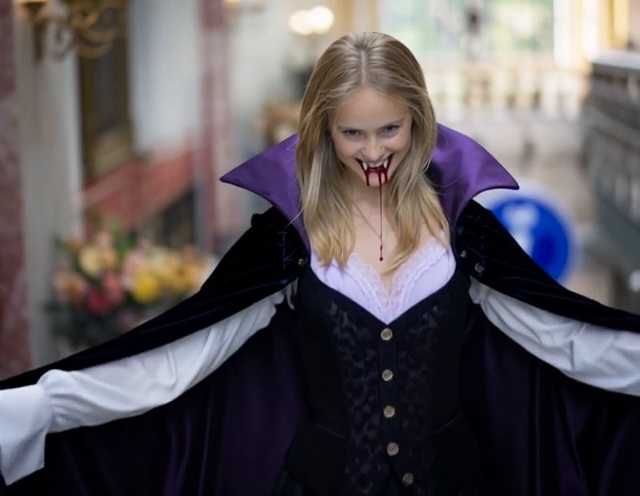
Scrolling through a gallery of creative ideas, a user seeks ways to capture intense, cinematic visuals for their project. Using blood look photo prompts can provide guidance on achieving realistic effects, dramatic lighting, and striking compositions without crossing into graphic or unsafe territory.
These prompts serve as a foundation for experimenting with color, texture, and mood, helping artists and photographers bring their dark, edgy visions to life. In this article, we’ll explore how to use these prompts effectively, share creative approaches, and provide practical tips for anyone looking to create bold, blood-inspired imagery .
Part 1. 10 Best Blood Look Photo Prompts And Ideas
The right prompts can spark ideas, help experiment with color, lighting, and composition, and guide you in achieving dramatic, cinematic effects safely. To make this process easier, here’s a curated list of the 10 best blood look photo prompts and ideas that artists, photographers, and creators can use to bring intensity and realism to their visuals:
1 10 Blood Look Photo Ideas
Here are 10 creative bloody photoshoot ideas, focusing on artistic, dramatic, or cinematic aesthetic:
-
Red Ink in Water:
Droplets of red ink swirling in clear water, creating abstract “blood-like” patterns.

- Red Powder Explosion: Using red powder mid-air to simulate a splatter effect.
- Red Paint Handprints: Hands dipped in red paint pressing against glass or canvas for a dramatic silhouette.
-
Red Liquid Drip on Glass:
Close-up of a viscous red liquid slowly dripping down a windowpane.
- Red Smoke or Fog: Backlit red smoke in a dark room for a moody, eerie atmosphere.
-
Red Wine Spill:
A broken wine glass spilling onto a reflective surface, resembling blood.
- Red Food Art: Pomegranate seeds, beet juice, or ketchup arranged for a blood-inspired abstract photo.
-
Silhouetted Figure with Red Light:
A person illuminated by a single red light in darkness, evoking suspense.
- Red Fabric Flowing: Long red fabric in motion, mimicking the fluidity of blood in an artistic composition.
-
Mirror Reflection with Red Streaks:
Smearing red paint or liquid on a mirror with a reflected face or hands.
2 10 Blood Look Photo Prompts
Here are 10 AI image generation prompts for a blood draw image you can use with tools to generate high-quality images:
- Dark, cinematic scene: Red liquid dripping down a glass, moody lighting, hyper-realistic horror aesthetic.
- Close-up of red ink swirling in water, abstract patterns resembling blood, soft lighting, and great detail.
- Red smoke envelops a silhouetted figure; eerie atmosphere; dramatic shadows; cinematic horror style.
- Hands covered in red paint pressing on frosted glass, moody cinematic lighting, and a suspenseful vibe.
- Spilled red wine on a black, reflective surface; artistic composition; realistic texture; dramatic contrast.
- Red fog over an abandoned room, subtle silhouettes in the background, horror cinematic lighting.
- Flowing red fabric in motion, dark background, artistic, abstract, blood-inspired aesthetic.
- Mirror smeared with red liquid, reflection of a shocked face, intense cinematic lighting, and realistic horror.
- Pomegranate juice dripping over a white surface, macro photography style, realistic blood-like appearance.
- Abandoned corridor with red streaks on walls, cinematic lighting, eerie horror atmosphere, and photorealistic.
Part 2. Best Way To Create Blood Look Photo | Image Editing
If you want to generate incredible blood looks pink videos from images, you can use tools like HitPaw Edimakor . This AI-powered tool lets you create videos with full customization according to your preferences. To learn how to use this tool, read the steps provided next:
Step 1. Access the AI Video Tool
Start by opening Edimakor on your device and selecting the AI Video option from the main screen to begin the process.


Step 2. Select an AI Effect
Navigate to the AI Effects panel from the left sidebar and browse through the available options to find an effect similar to blood look. After choosing the effect, click Create to move forward.
Step 3. Upload an Image and Generate the Video
On the next screen, upload the image you want to transform into a video. Adjust the Duration and Resolution settings as needed, then click Generate to create the aura photo frame video.
Step 4. Save and View the Video
Once the video is ready, locate it on your device by selecting the Open File Location option within the interface.
Part 3. Best Way To Create a Blood-look Photo From Text
To turn your idea into a blood moon photo, you can input the text to Edimakor's interface, and the tool will generate accurate results. Follow the steps mentioned below to learn how to generate videos from text using this tool:
Step 1. Open the AI Video Function
After launching the tool on your device, select the AI Video option directly from the homepage to get started.
Step 2. Enter a Prompt and Create the Video
On the next screen, select Text to Video from the left, type your text prompt into the provided field or let the AI generate one for you. Set the preferred duration and resolution, then click Generate to begin the creation process.
Step 3. Locate the Generated Video File
Once the video is complete, preview it within the interface and use the Open File Location option to find the saved file in your device’s storage.
Frequently Asked Questions
A1: Blood can appear pink when oxygen levels are lower or when light reflects off diluted blood in photos or certain artistic edits. Using Edimakor, you can adjust color tones to make your blood-look visuals appear more realistic or dramatic.
A2: Yes, a bloodmoon picture effect can be created by adjusting the moon’s hue, saturation, and contrast in photo editing software. Tools like Edimakor make it easy to achieve a rich, red-toned moon for your creative projects.
A3: The Blood game is a classic first-person shooter known for its dark, horror-themed visuals and intense gore elements. Using blood look photo prompts, you can recreate similar eerie aesthetics in fan art or digital designs.
A4: Yes, many horror and action games emphasize realistic blood effects to enhance immersion. With Edimakor, you can replicate these striking blood visuals in your own photo or digital projects.
To Conclude
This article provided a complete guide on how to generate content using blood look AI prompts. The article suggested some of the best ideas and incredible prompts that let you generate horror images. However, if you want to turn your text or images into bloody videos, you can use HitPaw Edimakor . This incredible tool allows you to generate high-quality content with complete customization.
Leave a Comment
Create your review for HitPaw articles