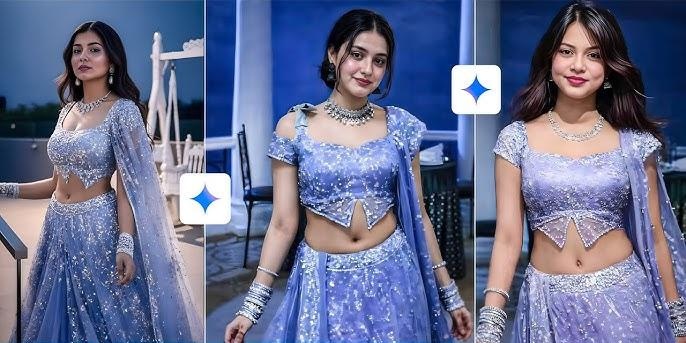
Dream lehenga AI photos is a virtual creative transformation that turns a selfie into a high-definition, cinematic image of a person wearing an intricate lehenga. Think of dream lehenga AI photo prompts as a digital tailor. You are giving the AI specific instructions to create a realistic Dream lehenga AI photo transformation.

Part 1: Best 6 Dream Lehenga AI Photo Prompts for Brides
To get the most realistic and "dreamy" results for an AI lehenga photoshoot, you need to describe the image in layers. Whether you are using Edimakor AI, Midjourney, DALL-E 3, or DreamShootAI, a great prompt covers the garment details, the setting, and the camera style. Here are a few ready-to-use prompt ideas categorized by the "vibe" they create:
1 The Classic Royal Bride Prompt
A hyper-realistic 8K full-body shot of a royal Indian bride in a deep crimson velvet lehenga. The skirt features heavy gold Zardozi embroidery with intricate peacock motifs. The blouse is a high-neck choli with sheer sleeves. She is wearing a double-layered dupatta, one sheer over her head and one draped across her shoulder. Accessories: heavy Kundan choker, matha patti, and a large nath. Background: A grand Rajasthani palace courtyard at sunset with golden-hour lighting. Cinematic, high-fashion editorial style.
2 The Modern Pastel Esthetic Prompt
A dreamy, soft-focus portrait of a bride in a contemporary lavender organza lehenga. The fabric is lightweight with delicate 3D floral appliqués and silver sequin clusters. Minimalist jewelry: a simple diamond necklace and soft waves in her hair. Background: A lush outdoor garden with blooming white roses and soft morning sunlight. Shot on a 50mm lens, f/1.8, creamy bokeh, Pinterest-style aesthetic.
3 The Bollywood "Night" Reception Prompt
A glamorous night-time photo of a woman in a midnight blue metallic lehenga with glass beadwork and mirror-work that reflects light. The choli is a modern corset style. Background: An upscale rooftop party in Mumbai with city bokeh lights and warm fairy lights. High-energy cinematic lighting, sharp details, realistic fabric folds, 4K resolution.
4 The Regal Heritage Look (Red & Gold) Prompt
Full-body cinematic shot of a stunning Indian bride wearing a heavy maroon raw silk lehenga with intricate antique gold Zardosi embroidery. The dupatta is a sheer net with a thick scalloped border, elegantly draped over her head. She is adorned with traditional heavy Polki jewelry and a signature nose ring (nath). Background: An ancient marble palace corridor with warm torchlight (mashaal) casting soft shadows. 8k resolution, photorealistic, Vogue India bridal editorial style.
5 The Fairy-Tale Pastel Look (Peach & Mint) Prompt
A dreamy, soft-focus portrait of a bride in a light peach and mint green organza lehenga featuring 3D floral thread-work and tiny pearls. The blouse is a sleeveless sweetheart neckline. She is wearing delicate floral jewelry and has a messy braid with baby's breath flowers. Background: A sun-drenched botanical garden with a blurred floral archway. High-end fashion photography, 85mm lens, f/1.8, soft bokeh, natural sunlight.
6 The Glamorous "Sangeet" Night (Mirror Work) Prompt
A dynamic shot of a bride in a shimmering silver and royal blue lehenga entirely covered in intricate mirror-work and sequins. The skirt is captured mid-twirl to show the heavy flare. Background: A luxury outdoor night event with hanging crystal chandeliers and bokeh fairy lights. The mirrors on the lehenga reflect the surrounding lights. Ultra-realistic, sharp focus, 4k, cinematic lighting, glamorous atmosphere.
Part 2: Create Dream Lehenga AI Photos with Prompts using Edimakor AI
To use Edimakor AI for Dream Lehenga photos, you will typically use its Image-to-Image tool. These tool allow you to upload a reference photo (like a selfie) and transform the outfit into a high-end lehenga while maintaining your facial likeness. Here's how to structure your prompts and process for the best results in Edimako AI:
Step 1: Launch the Edimakor software on your computer, go to the “Toolbox,” select “Image” and select “Reference Image”.


Step 2: Upload a reference image and scroll down to enter prompt. You can Use one of the suggested prompts below:
1. The Royal Sabyasachi Vibe (Rich Texture): This prompt is designed to emphasize the "heavy" embroidery that AI sometimes misses.
Transform the person in the photo into an Indian bride wearing a heavy maroon velvet lehenga. Detailed gold Zardosi embroidery, high-neck blouse, double dupatta draping. Authentic Kundan jewelry, matha patti, and nath. Background: Grand palace interior with warm ambient lighting. Hyper-realistic, 8k, fashion photography style.
2. The Lavender Sequin Dream (Modern Sparkle): Perfect for a Sangeet or Reception look with high-energy lighting.
Edit the uploaded photo to show the person in a glamorous lavender-blue lehenga covered in shimmering sequins and beadwork. Sheer glittery dupatta draped over the head. Luminous skin, soft glam makeup, sleek straight hair. Background: A luxury ballroom with soft bokeh city lights. High-end satin texture, realistic fabric folds, cinematic lighting.
3. The Floral Mehendi Aesthetic (Pastel & Fresh): Best for a bright, daytime, and airy "Dream Lehenga" look.
Transform the subject into a vibrant mint green and peach lehenga with floral thread-work and gota patti borders. Lightweight organza fabric, sleeveless choli. Fresh floral jewelry with baby’s breath in hair. Background: A sunlit garden with marigold decorations. Natural daylight, 8k resolution, crisp details, soft aesthetic.
Step 3: Scroll down again to select picture aspect ratio and output quantity before hitting the “Generate” button.
Step 4: Click on your result to preview it or hit the “+” icon to add it to the timeline. You can hit the folder icon to save and share your imgae.
Bonus Tips: Swap Dream Lehenga Dress in a Video with Prompts using Edimakor AI Image to Video
Swapping a dress in a video, often called a "Virtual Try-On" or "Clothing Swap," is more complex than a still image because the AI must track the movement of your body. Here's how to swap dream Lehenga dress in a video with prompts using the Edimakor AI:
Step 1: On the Edimakor AI toolbox, select “AI Tools” and scroll up to select “Image to Video”.
Step 2: Upload an image and crop it by selecting aspect ratio.
Step 3: Enter your prompt in the interface. Example Prompt: "Transform the subject into a dancing bride, dressed in a vibrant mint green and peach lehenga with floral thread-work and gota patti borders. Lightweight organza fabric, sleeveless choli. Fresh floral jewelry with baby’s breath in hair. Background: A sunlit garden with marigold decorations. Natural daylight, 8k resolution, crisp details, soft aesthetic."
Step 4: Scroll down to select video duration, resolution and toggle the button to generate background music before hitting the “Generate” button.
Step 5: Drag and drop your result to the timeline and hit the “Export” button to save and share.
Conclusion
Finally, combining Dream Lehenga AI concepts with Edimakor AI's video and image capabilities allows you to bridge the gap between imagination and a digital reality. AI-generated bridal photos serve as a digital "trial run" for one of the most important and expensive purchases of a wedding. Brides can see how specific silhouettes (A-line, mermaid, flared) and colors (traditional red vs. modern pastels) look on their own body before visiting a designer.
Leave a Comment
Create your review for HitPaw articles