Thai Pongal is a colorful and meaningful harvest festival celebrated by Tamil communities around the world. With modern AI tools, you can now create stunning festival visuals using carefully written Thai Pongal festival photo prompts . AI platforms like Gemini and HitPaw Edimakor make it easy to generate realistic Thai Pongal festival images.
Part 1: What Is Thai Pongal
Thai Pongal is a traditional Tamil harvest festival celebrated in the Tamil month of Thai.
It marks gratitude to the Sun God for agricultural abundance and is observed with rituals, decorations, and special food prepared at home.
The festival symbolizes prosperity, new beginnings, and respect for nature.
Families come together to cook Pongal dishes, decorate homes with kolam, and celebrate cultural heritage, making Thai Pongal one of the most important Tamil festivals.
Part 2: Best Gemini Thai Pongal AI Photo Prompts
Here are some of the best Gemini Thai pongal AI photo prompts:
1. Traditional Thai Pongal Celebration at Village Home
This prompt focuses on an authentic rural Tamil household celebrating Thai Pongal with family traditions and natural surroundings.
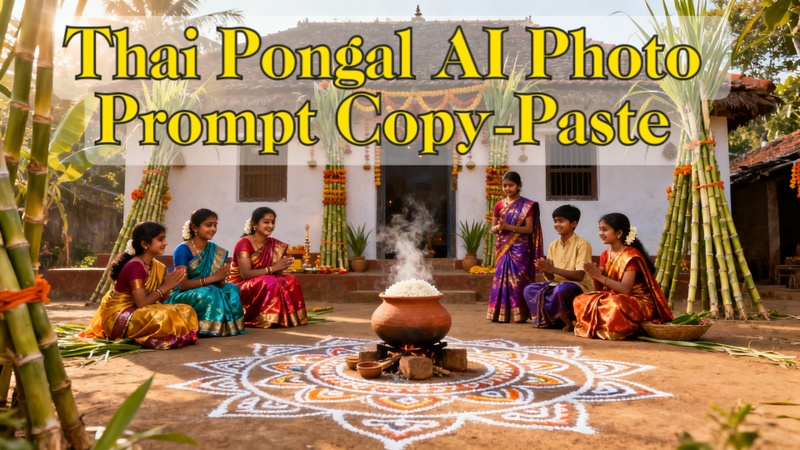
A traditional Tamil village home during the Thai Pongal festival, family members wearing colorful silk clothes, a clay pot boiling Pongal rice outdoors, sugarcane decorations, kolam designs on the ground, warm morning sunlight, realistic photography, ultra-detailed, cultural authenticity.

2. Thai Pongal Festival Dishes Close-Up
This prompt highlights popular Thai Pongal dishes with rich textures and festive presentation.
Close-up of traditional Thai Pongal dishes served on banana leaves, sweet sakkarai pongal and ven pongal, garnished with cashews and ghee, festive background, soft natural lighting, high-resolution food photography, realistic textures.
3. Tamil Thai Pongal Day Family Portrait
This prompt creates an emotional family-focused image celebrating Tamil Thai Pongal day.
Tamil family posing together on Thai Pongal day, elders and children smiling, traditional attire, decorated courtyard, sugarcane and clay pots in the background, bright daylight, cinematic framing, realistic festive portrait photography.
4. Thai Pongal Festival in the USA
This prompt represents how Thai Pongal is celebrated by Tamil communities living abroad.
Thai Pongal celebration in the USA, Tamil community gathering in a decorated community hall, traditional Pongal cooking setup, cultural attire, festive banners, warm indoor lighting, and realistic documentary-style photography.
5. Thai Pongal Featured Dish Cooking Scene
This prompt captures the cooking moment of the featured Pongal dish.
Traditional Pongal cooking scene with overflowing clay pot, rice and milk boiling, women in sarees chanting Pongalo Pongal, outdoor setup, sugarcane nearby, golden sunlight, ultra-realistic cultural photography.
6. Thai Pongal Festival Images with Kolam Art
This prompt focuses on decorative elements and cultural artistry.
Colorful kolam rangoli designs outside a Tamil home during the Thai Pongal festival, fresh flowers, clay pots, sugarcane, early morning light, sharp focus, realistic textures, traditional South Indian aesthetics.
Part 3: Create Thai Pongal AI Photo with Prompts
Now that you have powerful Thai Pongal AI photo prompts, the next step is turning them into high-quality visuals. Below are simple methods using popular platforms.
Create a Thai Pongal AI Photo with Prompts in Edimakor
You can easily create beautiful Thai Pongal AI photos by using prompts in HitPaw Edimakor’s Text-to-Image feature. This method is perfect if you want a fully AI-generated festival image without uploading any photos.
Step 1: Open Edimakor and Access the Text-to-Image Tool
Launch HitPaw Edimakor on your computer. From the main interface, go to the Toolbox section and select the Text-to-Image option. This tool allows you to generate images purely based on written prompts.


Step 2: Enter a Thai Pongal Photo Prompt
In the prompt box, paste any Thai Pongal prompt describing the scene you want, such as traditional Pongal celebrations, clay pots boiling over, sugarcane, kolam designs, bright sunlight, and people wearing traditional South Indian attire. You can also use the Prompt Generator option below the prompt box if you want help creating a new prompt.
Step 3: Adjust Image Settings
Choose your preferred aspect ratio, image style, and output quantity. Adjust these settings based on where you plan to use the image, such as social media posts or festival banners. Once everything is set, click the Generate button.
Step 4: Preview and Export the Image
Review the generated image from the My Creations section to ensure it looks festive and accurate. If you’re satisfied with the result, go to the export folder by selecting the folder icon from the top right of the output image and share it on social media or use it for creative projects.
Create a Thai Pongal AI Photo with Prompts in Gemini
You can create beautiful and festive Thai Pongal AI images using Gemini by describing the scene with detailed prompts. This method is ideal if you want a fully AI-generated festival image without uploading any photos.
Step 1: Open Gemini and Access Image Generation
Open Gemini on your device and go to the image generation feature by selecing Create Image option. Make sure you are signed in so you can generate and download images.
Step 2: Enter a Thai Pongal Photo Prompt
In the prompt box, type or paste a Thai Pongal-themed prompt describing the scene you want. You can mention elements like traditional Pongal celebrations, clay pots boiling over, sugarcane, kolam designs, bright sunlight, village backgrounds, and people wearing traditional South Indian outfits.
Step 3: Refine the Prompt if Needed
If required, refine your prompt by adding details such as camera angle, lighting style, color tone, or artistic mood. This helps Gemini generate a more detailed and visually appealing image.
Step 4: Generate the Thai Pongal AI Image
After finalizing the prompt, submit it and allow Gemini to generate the image. The AI will process your request and create a festive Thai Pongal visual.
Step 5: Preview and Download the Image
Review the generated image to ensure it captures the Thai Pongal atmosphere accurately. Once satisfied, download the image and use it for social media posts, greetings, or creative projects.
Key Takeaway
Using Thai Pongal festival photo prompts, anyone can create stunning festival visuals without design skills. With AI tools like Gemini and HitPaw Edimakor (Video Editor) , you can easily generate realistic Thai Pongal images for social media, blogs, and cultural celebrations in minutes.
Leave a Comment
Create your review for HitPaw articles