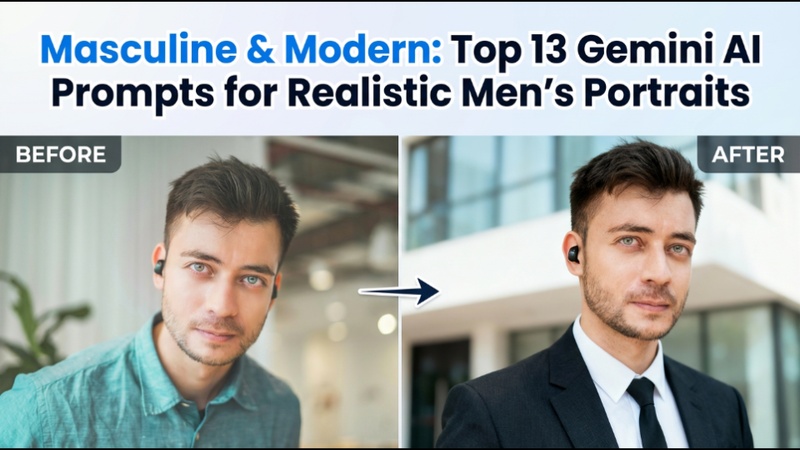

For males who desire professional photographs without costly photo shoots, Gemini AI has created new opportunities. The gemini ai photo prompt for men assists you in creating realistic, aesthetically pleasing, and social media-ready images with straightforward prompts.
Part 1: Best 6 Gemini AI Photo Prompts for Men
These prompts are intended to get results quickly. For immediate results, you can just copy and paste them into Gemini AI or other compatible picture generators.
1 Gemini AI Photo Prompt For Men With Rose
For romantic, artistic, or beautiful profile pictures, this prompt is ideal. It is well-liked on Instagram and aesthetic feeds because it combines soft lighting, emotional depth, and masculine face traits.
Prompt Example:
A realistic portrait of a confident man holding a red rose, cinematic soft lighting, shallow depth of field, sharp facial details, natural skin texture, dark aesthetic background, modern fashion style, and ultra-realistic photography.
2 Gemini AI Photo Prompt For Men In A Suit
This prompt is perfect for professional use and is useful for personal branding, LinkedIn, and resumes. It emphasises sleek styling, assertiveness, and self-assurance.
Prompt Example:
A professional headshot of a man wearing a tailored black suit, white shirt, neutral background, studio lighting, realistic skin tones, sharp focus, corporate photography style, high-resolution portrait.
Need more options? Browse our full Gemini suit prompt collection.
3 Gemini AI Photo Prompt For Men Retro
Men who wish to seem stylish but nostalgic are drawn to retro prompts. Creative portfolios and attractive social media profiles benefit greatly from this.
Prompt Example:
A retro-style portrait of a man inspired by 1980s photography, warm tones, grain texture, vintage outfit, cinematic lighting, realistic facial details, and classic film look.
4 Gemini AI Photo Prompt For Men With Car
This prompt produces a strong, manly lifestyle image that is ideal for personal branding and Instagram.
Prompt Example:
A realistic portrait of a man standing beside a luxury sports car, urban background, dramatic lighting, sharp focus, modern masculine style, high-detail cinematic photography.
5 Gemini AI Photo Prompt Copy Paste Man And Woman
Couples portraits, lifestyle branding, and beautiful narrative photography are frequently used with this challenge.
Prompt Example:
A realistic portrait of a stylish man and woman standing together, natural expressions, soft lighting, aesthetic background, modern fashion, cinematic depth of field, and high realism.
6 Trending Gemini AI Photo Prompt For Men Instagram
This assignment, which was created especially for social media, emphasises mood, style, and visual appeal.
Prompt Example:
A trendy Instagram-style portrait of a man, aesthetic lighting, modern outfit, blurred background, realistic facial features, high contrast, professional photography look.
Part 2: Best 7 Gemini AI Photo Professional Prompt For Men
These prompts are designed for professional and career-oriented images.
1 Nano Banana Prompt For Professional LinkedIn Photo
A simple, minimalist style that is ideal for business profiles.
Prompt Example:
A professional LinkedIn headshot of a man, neutral background, soft studio lighting, formal attire, realistic skin texture, confident expression, ultra-sharp focus.
2 Tech Entrepreneur Style
This approach, which is appropriate for artists and startup owners, combines professionalism with contemporary innovation.
Prompt Example:
A modern portrait of a tech entrepreneur, smart casual outfit, minimalist background, natural lighting, realistic facial details, professional yet creative look.
3 Healthcare Professional Look
Perfect for healthcare consultants, physicians, and nurses who want pictures that emphasise trust.
Prompt Example:
A realistic portrait of a male healthcare professional, clean environment, soft lighting, calm expression, professional attire, and high-resolution photography.
4 Academic/consultant Style
Clarity, authority, and intelligence are highlighted in this prompt.
Prompt Example:
A professional academic-style portrait of a man, glasses, neutral background, formal clothing, soft lighting, realistic textures, scholarly atmosphere.
5 Sales/client-facing Professional
Ideal for those in sales, marketing, or customer-focused positions.
Prompt Example:
A confident portrait of a sales professional, friendly smile, business casual outfit, warm lighting, realistic skin tones, and professional photography.
6 Pilot Style
A striking and well-organised style that is ideal for creative branding or profiles with an aviation theme.
Prompt Example:
A realistic portrait of a male pilot wearing a uniform, cockpit-inspired background, sharp lighting, cinematic realism, and great detail.
7 Engineering Style
This prompt emphasises contemporary professionalism and technical assurance.
Prompt Example:
A modern engineering-style portrait of a man, smart casual outfit, industrial background, realistic lighting, sharp details, and professional tone.
Part 3: Create an AI Photo For a Man With a Prompt
Using a personalised prompt, the HitPaw Edimakor reference picture generator enables you to produce excellent AI images of males. When you want a particular look, like that of a professional IT entrepreneur, startup founder, or corporate profile photograph, this method is perfect.
Step 1: Open Edimakor and Access the Reference Image Tool
Start by launching HitPaw Edimakor on your PC. Go to the toolbox and choose the reference image option from the image section. This tool is intended to preserve facial traits while converting an old photo into a new AI-generated style.


Step 2: Upload a Male Portrait
Once the reference image tool has been entered, upload a crisp, well-lit male portrait. Edimakor may create more realistic and polished effects by using a high-quality image, particularly for business or entrepreneur-style photos.
Step 3: Add a Professional Tech Entrepreneur Prompt
Enter a thorough prompt outlining the intended appearance when the image has been submitted. For instance, you may ask for a self-assured digital entrepreneur with a professional background who works in a high-tech office with soft lighting and is dressed in a contemporary suit. Adjust the resolution and aspect ratio of the output.
Step 4: Preview and Export the AI Photo
Edimakor will use your prompt and uploaded portrait to create the AI image. Examine the outcome carefully and, if possible, make any required changes. Once you are pleased, export the picture to use on social media, LinkedIn, portfolios, and business profiles.
Part 4: Create an AI Photo For a Man With No Prompt
HitPaw Edimakor Image Effects provides pre-built styles developed especially for guys if you want a quicker approach without writing prompts. For customers who desire quick results with little effort, this choice is ideal.
Step 1: Open Edimakor and Access the Image Effects Library
Start HitPaw Edimakor on your computer to get started. After the main interface displays, find the Image Effects option by scrolling down the screen. When you click on it, the AI effects library opens.
Step 2: Choose a Trending AI Effect
Once you are within the picture effects library, look through the available effects and pick the one that most closely resembles the style you want. Tap the Create option that shows up on the effect card after selecting an effect.
Step 3: Upload a Reference Image
Upload a clean reference image from your device to the next screen. A pre-generated prompt associated with the chosen effect will be automatically shown by Edimakor. If you want to add more information, you can either leave it exactly as it is or make minor changes.
Step 4: Preview and Export the Image
Edimakor will show a preview of your AI-generated photo after the image production process is finished. If everything appears to be in order, save the image to your device by clicking the Export button. You may then use it for commercial, social media, or profile photo purposes.
Once you've generated a high-quality male portrait, you can take it a step further by using Edimakor to animate the character into a realistic AI actor. Best for video marketing, presentations, or digital storytelling.
Final Words
Without the need for traditional photo shoots, Gemini AI photo prompt for men make it simple to produce realistic, masculine, and professional images. The correct suggestion can change your image, from polished LinkedIn headshots to beautiful Instagram looks. Anyone can rapidly and economically produce modern, high-quality outputs by combining HitPaw Edimakor (Video Editor) with copy-paste Gemini AI suggestions.
Leave a Comment
Create your review for HitPaw articles