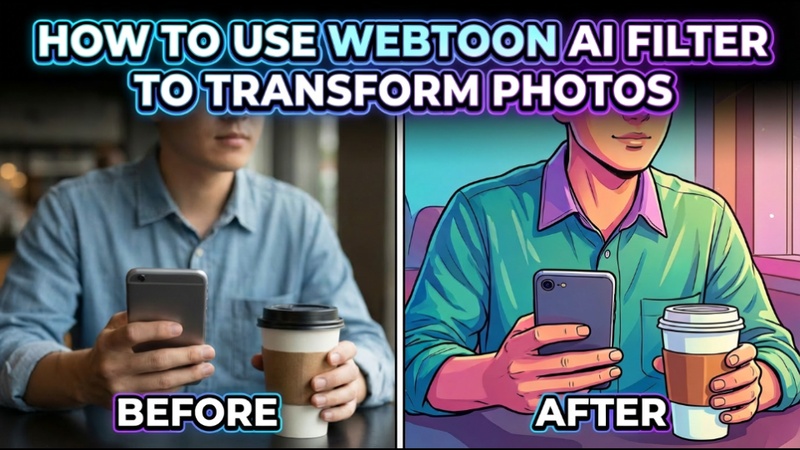
The emergence of AI-powered picture and video technologies has fundamentally altered the way content producers create visual content. The Webtoon AI filter, which turns commonplace images and videos into gorgeous Korean manhwa-style artwork, is one of the hottest trends. Let us learn more about this filter.
Part 1: What Is Webtoon AI Filter
It is crucial to grasp the fundamentals before delving into tools and prompts. Thus, let us examine how a webtoon style AI generator and filter function, what makes them special, and why artists favor them.
Overview of Webtoon AI Filter
An AI feature called a Webtoon AI filter online transforms images or videos into works of art influenced by manhwa comics and Korean Webtoons. In contrast to basic cartoon filters, these AI models replicate the crisp linework and expressive shading frequently found in Webtoon pictures by analyzing facial structure, lighting, colors, and artistic style.
Smooth contours, gentle gradients, crisp facial expressions, and vivid yet well-balanced colors are characteristics of the Korean Webtoon AI filter. Thousands of manhwa-like images are used to train AI Webtoon filters, which enable them to faithfully mimic this style. Because of this, users may quickly create Webtoon-style pictures using selfies, portraits, or movies.
Part 2: How to Transform a Photo with Webtoon AI Filter
Now that the concept is clear, it’s time to move forward. In this section, we’ll focus on how to use Webtoon AI filter, its practical usage, and how photos can be transformed easily.
Prompt of Webtoon AI Photo Filter
Transform this portrait into a vibrant Korean Webtoon manhwa art piece, featuring a dynamic character set against a dreamy urban backdrop, evoking a contemporary yet timeless atmosphere with a soft, pastel color palette; utilize clean line art and smooth shading to create depth; emphasize expressive eyes that convey emotion and connection; frame the composition with a slightly angled perspective to add dynamism; include soft ambient lighting to enhance the ethereal quality.
Turn a Photo into Webtoon Manhwa Art in Edimakor
To get off to a smooth start, follow the instructions below.
Step 1: Open Edimakor and Access Toolbox
First, go to the official website and download HitPaw Edimakor. Both Windows and macOS are compatible with the program. Once installed, launch Edimakor and find the Toolbox option in the panel on the left. To start transforming your Webtoon, click it, navigate to the Image section, and choose the Reference Image tool.



Step 2: Upload Your Image
Next, before you upload your photo, select an AI model. The Google Banana approach is suggested for the greatest Webtoon manhwa outcomes. Up to ten reference photos can be uploaded, which aids in the AI's comprehension of artistic direction, style preferences, and face attributes.
Step 3: Write the Prompt
Now, describe your desired Webtoon AI filter in a clear and detailed way. Talk about subtleties like fine shading, expressive eyes, flawless linework, and Korean manhwa art. Edimakor's built-in prompt generator can assist you in creating a thorough prompt utilizing text or image references if you are not sure how to construct one.
Step 4: Adjust the Settings
Proceed to the settings after writing the prompt. Here, you can modify the output quantity, aspect ratio, and resolution to suit your requirements. After everything is configured, click Generate to let the AI process your image.
Step 5: Preview and Edit
The result will be saved in the My Creations section after generation is finished. The image can also be added to the timeline for further editing or improvements if necessary.
Step 6: Export the Image
Lastly, click the Export icon in the upper-right corner after you are happy with the outcome, where you turn photo into Webtoon AI. To save your Webtoon manhwa graphic, click Export once more from the bottom-right corner of the screen.
Part 3: How to Restyle a Video with Webtoon AI Filter
A great technique to produce visually appealing content for social media and storytelling is to transform a regular video into a Webtoon AI filter video. With HitPaw Edimakor, you can use AI to transform brief videos into Korean Webtoon-inspired animations.
Prompt of Webtoon AI Video Filter
Convert this video into Korean Webtoon anime style, clean comic line art, smooth motion consistency, expressive manhwa characters, vibrant colors, cinematic lighting, Webtoon-style animation
Transform a Video to Webtoon Anime Style in Edimakor
To smoothly restyle your movie, follow the instructions below.
Step 1: Open Edimakor and go to Toolbox
Install HitPaw Edimakor on your computer after getting it from the official website. After installation, launch the program and search the left-side menu for the Toolbox option. Click it, then choose the Restyle Video tool from the Image section.
Step 2: Upload the Video
Upload the video that you wish to change. Remember that for optimal results, the video must be no longer than 16 seconds. Shorter clips typically result in Webtoon-style output that is smoother and more reliable.
Step 3: Choose the Style
From the options, choose an anime Webtoon filter or anime-style preset. Select the Custom Style option if the precise style you desire is not available. Write a thorough prompt outlining your desired video restyle, such as a Korean Webtoon anime aesthetic, crisp line art, fluid animation, and vivid colors. Click Generate.
Step 4: Preview and Edit
The output will show up in the My Creations section once the AI has completed processing. You can then make changes, recreate variations, and examine the outcome. In order to make more modifications, you can also add the video to the timeline.
Step 5: Export the Video
Click the Export option in the upper-right corner once you are happy with the outcome. Lastly, to download your Webtoon anime-style video, click Export once more from the bottom-right corner of the screen.
FAQs About Webtoon AI Filter
A1: A Webtoon AI Filter is an AI-powered tool that transforms your photos into webtoon-style artwork. It analyzes your facial features, expressions, and image details, then applies cartoon-inspired styles, colors, and effects to create a comic-like portrait. You can use it to turn selfies or personal photos into unique webtoon characters for fun, social sharing, or creative projects.
A2: You can use webtoon AI filter apps or online tools that support iOS browsers. Many AI generators work directly through mobile web platforms without needing downloads.
A3: To use a webtoon AI filter online, upload your photo or video to an AI generator, select a webtoon or manhwa style, adjust settings, and generate your result instantly.
To Sum Up
One of the most fascinating creative tools is the Webtoon AI filter. AI has made digital art more accessible than ever, from turning ordinary images into graphics in the style of Korean manhwa to restyling movies into animated Webtoon scenarios. With programs like HitPaw Edimakor (Video Editor) , without the need for sophisticated editing abilities, users may create professional-caliber Webtoon-style graphics and films.
Leave a Comment
Create your review for HitPaw articles