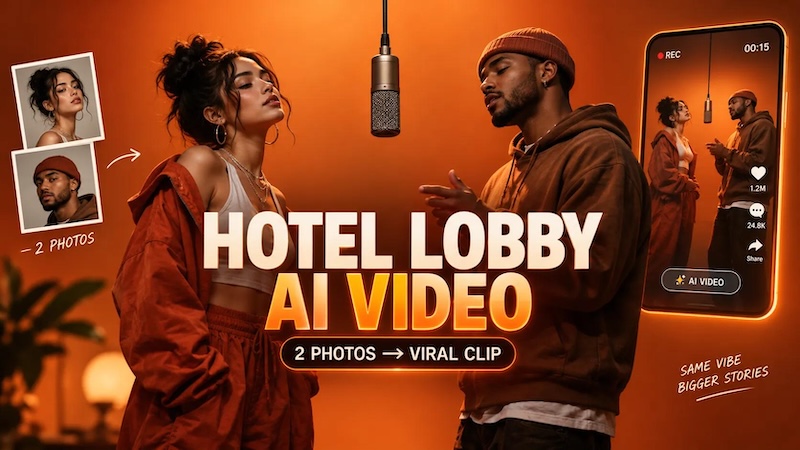
Want to know how to make hotel lobby AI video starring you and a friend? You’re in the right place. The Hotel Lobby AI trend is a viral short-video format in which AI-generated performers appear inside a minimalist orange recording studio, rapping and gesturing around a single microphone. This trend is becoming increasingly popular online. If you want to join this trend, read this guide till the end. The best part is that you don’t need a professional recording studio, expensive equipment, or advanced video editing skills to create your own version. In this guide, we’ll walk you through the steps to create a Hotel Lobby AI video.
Part 1: What is the Hotel Lobby AI Video Trend?

The Hotel Lobby AI video trend puts two people into one famous setup: a bare orange booth, a single microphone hanging between them, two performers trading a verse straight to camera. It comes from the COLORS performance of “Hotel Lobby” by Quavo and Takeoff, recorded as Unc & Phew in 2022. In 2026, people started replacing them with anyone they could get AI to recreate, including themselves, friends, celebrities, and fictional characters. One reason this trend is popular on social media is its unique combination of music, creativity, and AI technology.
Part 2: What Do You Need to Make a Hotel Lobby AI Video?
The Hotel Lobby AI trend replaces Quavo and Takeoff in their viral “Hotel Lobby” performance with you, a friend, a celebrity, or almost any two characters. To recreate this trend, you don’t need a professional recording studio, expensive camera, or advanced video editing skills. Here are a few things you’ll need to get started:
- Two Reference Images: To create this trend, you need two clear reference images, one for each person you want to feature in the video. Choose high-quality photos with visible facial features and good lighting so the AI can recreate both individuals more accurately.
- An AI Video Generator: The Hotel Lobby AI video trend is created using an AI tool, such as an AI video generator. These tools allow you to transform reference photos into animated videos featuring two people in the iconic orange studio setup.
- Detailed AI Prompt: If you want high-quality and accurate results, then having the right prompt is essential. A well-written prompt helps the AI video generator understand the scene, character appearances, background, lighting, and movements you want to recreate.
Part 3: Step-by-Step Guide to Making the Hotel Lobby AI Video Trend
How to make hotel lobby AI video? If you want to learn how to create this viral trend featuring yourself and a friend, you’re in the right place. Follow the instructions below to create your own Hotel Lobby AI video and share it on your favorite social media platforms:
Step 1: Two Reference Photos
Choose one photo for the first person and another photo for the second person. Before uploading, give each image a quick check:
- Make sure both faces are sharp and easy to recognize.
- Avoid blurry, pixelated, or dark photos that may affect the final result.
- Use individual photos with only one person clearly visible in each image.
Step 2: Select Hotel Lobby AI Video Generator
The next step is to choose the best Hotel Lobby AI video generator that will help you recreate this viral trend with minimal effort. Look for an AI tool that supports image-to-video generation, allowing you to use your two reference photos to create a video featuring both people in the iconic orange studio setup.
Step 3: Enter The Prompt and Upload Reference Images
Once you have the right AI tool, the next step is to upload your two reference images and enter a detailed prompt describing the hotel lobby AI video you want to create. For example:
“Create a cinematic, realistic video featuring the two people from the uploaded reference photos inside the iconic minimalist orange studio. Position them on opposite sides of a single hanging microphone, confidently performing and exchanging rap verses. Add natural hand gestures, subtle head movements, expressive facial reactions, and realistic lip movements. Use warm orange lighting, a static front-facing camera, and smooth animation. Preserve both individuals’ facial features, clothing, and identities. Maintain consistent proportions and a clean background throughout the video.”
Step 4: Select The Video Settings
Now, adjust the video settings to match the Hotel Lobby AI video trend and ensure your final clips look professional. Here are video settings to choose:
- For TikTok and Instagram Reels, use a vertical 9:16 aspect ratio.
- Video duration should be around 10 - 15 seconds for a compact performance.
- Choose a video resolution of 1080p for clear visuals and detailed facial features.
- Enable reference-image or character-preservation options if available.
Step 5: Generate and Download
After all the requirements are complete, click on the “Generate” button to begin the Hotel Lobby AI video creation process. The AI tool will process your reference images, follow your text prompt, and generate a video featuring both people in the iconic orange studio setup. Preview the final result and click on the “Download” button to save the video in popular formats, such as MP4.
Part 4: What Mistakes Should You Avoid?
Creating a Hotel Lobby AI video is simple, but a few common mistakes can affect the final results. Here are some common mistakes you should avoid while creating a Hotel Lobby AI video in 2026:
- Always use high-quality and clear photos. Blurry or heavily filtered photos can make it difficult for AI tools to reproduce facial features.
- Don’t use group photos. Group photos can confuse AI tools about which person to include in the video.
- A short or unclear prompt may produce a video that does not match the Hotel Lobby trend.
- Select a suitable aspect ratio, resolution, and duration before generating your video. A vertical 9:16 aspect ratio is perfect for TikTok, Instagram Reels, and YouTube Shorts.
Part 5: Best Tool to Make a Hotel Lobby AI Video in 2026
Above, we’ve mentioned the step-by-step instructions on how to make a hotel lobby AI video in 2026. Now, it’s time to choose the right tool to bring your idea to life. That is where Edimakor AI comes in. It’s an all-in-one AI Video Editor that also includes AI video creation capabilities, allowing users to turn static images into engaging videos within seconds. With the help of this tool, users can create engaging Hotel Lobby AI videos featuring themselves and their friends. One of the standout features of this tool is its motion control capability, which can help creators achieve more dynamic and expressive video results. Users can experiment with movement to make their characters appear more natural and bring the overall scene to life. Edimakor AI also provides a convenient workflow for creators who want to generate and edit their content in one place.
Create NowKey Features of Edimakor AI
- Image-to-Video: Edimakor AI offers image-to-video capabilities, allowing users to turn static images into engaging videos within seconds — without editing experience or professional help.
- Motion Control: The program offers motion control capabilities that help users add movement to AI-generated videos. This feature can help users add body movements, natural gestures, facial expressions, and more.
- Text-to-Video: This tool also offers a text-to-video feature, allowing users to create high-quality and engaging visuals with a simple text prompt. Simply enter the prompt, choose the AI model, and click on the “Generate” button.
- Easy-to-Use: One of the standout features of this tool is that it offers an intuitive interface, which is ideal for non-tech and beginner users. Its straightforward workflow helps creators explore AI video generation and editing without requiring professional skills.
Step-by-Step Guide:
Edimakor AI is a web-based AI tool, meaning no software downloading or installation is required to create Hotel Lobby AI videos. Here is how to do it:
Step 1: Find Reference Images and Videos
Find a reference image and video featuring the Hotel Lobby AI trend. Download both files and save them locally for use in the following steps.
Step 2: Generate a Hotel Lobby AI Image
Open Edimakor AI’s Image-to-Image feature. Upload the hotel lobby reference image and a photo of the person you want to include in the video. Generate an AI image that places the person in the hotel lobby scene.
Step 3: Create a Hotel Lobby AI Video
Open the Motion Control feature and upload the reference video you downloaded in Step 1. Then, upload the Hotel Lobby AI image you generated in Step 2. Generate your video to recreate the reference video's movements with your chosen character and hotel lobby scene.
Final Thoughts
Generating a Hotel Lobby AI video is now accessible to creators without professional video-editing experience. The simplest workflow uses two clear photos and a specialized AI generator to recreate the instantly recognizable orange-studio duet format. For creators who want greater control, we recommend using Edimakor AI. Its image-to-video and motion control features provide a convenient way to transform static images into dynamic video content.


Leave a Comment
Create your review for HitPaw articles