Have you seen those eye-catching toy car to real car transition videos on TikTok? These clips show a miniature car transforming into a full-size vehicle, creating a satisfying visual effect that grabs viewers' attention. With AI image and video generators, you can create a similar effect without filming a real car. In this guide, you'll learn how to generate matching car images, animate the transformation with Edimakor AI, and polish your video for TikTok and other social media platforms.
What Is the Toy Car to Real Car Transition?
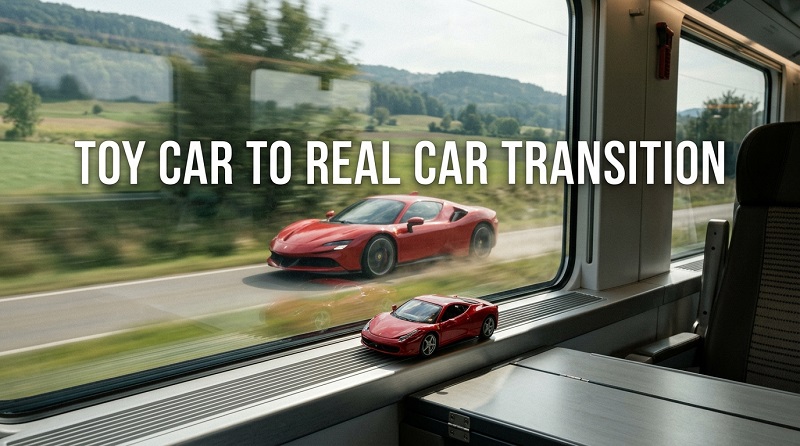
The toy car to real car transition is an AI video trend that transforms a miniature toy vehicle into a realistic, full-size car. It often features creative scene changes that feel surprising and cinematic.
One popular version is the Toy Car Train Window Transition , where a train window and passing scenery create a visual transition from a miniature toy car to a real vehicle. This effect is especially suitable for TikTok and other short-form videos.
There are several ways to create a toy car to real car video:
- Size transformation: A small toy car gradually becomes a full-size vehicle.
- Material transformation: Plastic surfaces change into realistic metallic paint, glass, and rubber.
- Train window transition: A train window or passing scenery reveals a real car, creating a smooth visual change between the two scenes.
- Cinematic reveal: A close-up of a toy car transitions into a dramatic shot of the matching full-size vehicle.
How to Make a Train Window Car Transition with AI
Edimakor AI is an online AI creative platform that helps you generate images and videos for your toy car to real car transition. You can create the toy car scene, design its full-size counterpart, and explore AI video generation to bring the train window transition to life.
Why use Edimakor AI for the Toy Car Train Window Transition:
- Create Matching Car Images: Generate a miniature toy car and a realistic full-size version with similar colors and design details.
- Build Train Window Scenes: Use detailed prompts to create train interiors, window frames, and realistic outdoor settings for your transition.
- Animate the Transformation: Turn still images into video clips with available AI video generation tools to create a toy car to real car reveal.
- Explore Different Visual Styles: Experiment with car models, lighting, scenery, and camera angles to find a transition style that fits your TikTok video.
Step 1: Upload Your Toy Car Image
If you already have a toy car photo or an AI-generated toy car image, you can use it directly to create your toy car train window transition video. Open Edimakor AI, go to the available Image-to-Video tool, and upload your image if the selected model supports image input.
For the best results, choose a clear image that shows the car's shape, color, and details. If you don't have a suitable image, use Edimakor AI's text-to-image to create one first.
Create Now
Step 2: Enter a Prompt for the Train Window Transition
After uploading your image, enter a prompt describing how the toy car should appear in the train window scene and how the transition should unfold.
 Create a photorealistic 10-second cinematic video based on the uploaded image. The toy car must transform smoothly into the exact same full-size car, preserving its model, color, body shape, wheels, and design. Only its size and realism change.


  0–1.5s: A miniature sports car sits on a train windowsill at sunset. Warm light illuminates its glossy body as countryside passes outside.

  5–4s: The train enters a dark tunnel. Sunset fades, and tunnel lights streak past, reflecting on the car.

  4–6s: The toy car's red taillights gradually illuminate, casting a soft red glow across the windowsill and glass. The camera moves closer.


  6–8s: In one continuous shot, the camera glides through the train window. The windowsill seamlessly becomes an urban road, while the toy car gradually grows into a full-size, photorealistic car. Its headlights turn on, and its tires settle naturally onto the asphalt.


  8–10s: The car accelerates down a modern city street at night. Headlights illuminate the road as city lights reflect across its body. The camera follows from a low rear angle.
Step 3: Generate, Edit, and Share Your Video
Click the generate button and let Edimakor AI create your video. Once generation is complete, preview the result.
For more control over the final video, you can also use a desktop video editor to trim clips, add train ambience or engine sounds, and enhance the transition with visual effects.


Tips for a More Realistic Toy Car to Real Car Transition
Creating a convincing transformation takes more than a good prompt. The following tips can help you improve the consistency and visual quality of your AI-generated video.
Keep the Car Design Consistent
Use the same car color, body shape, and wheel design in both images. If the toy is a red sports car, the final vehicle should remain recognizably the same car. Reference-image features can help when supported by the selected AI model.
Match the Camera Angle
Generate the toy and real car images from similar angles. For example, if the toy is shown from a low front three-quarter angle, use the same perspective for the full-size vehicle. This reduces the visual jump between the two states.
Describe the Transformation in Stages
Instead of using a vague prompt such as "a toy car becomes a real car," explain how the change happens. Mention the wheels expanding, the body growing, and the plastic surface turning into realistic automotive materials. Clear instructions give the model a more specific direction.
Use Sound to Strengthen the Reveal
A gradual engine sound or a short musical build-up can make it feel more dynamic. Time the sound effect with the moment the full-size vehicle appears, but keep the audio balanced so it doesn't overwhelm the video.
FAQs About Toy Car to Real Car Transition
A1: First, generate an image of a miniature toy car. Then upload the toy image to an AI image-to-video generator and describe how the vehicle should grow and transform. Finally, edit the clip and add sound effects if needed.
A2: A useful prompt describes the toy's initial appearance, the transformation process, and the final realistic vehicle. For example:
A3: Some AI image and video generators offer free credits or limited trial access. However, the number of generations, available models, video length, and export options vary by platform.
A4: Yes. Some AI image-to-video generators can animate a single toy car image and interpret a prompt describing how it becomes a real vehicle. However, the final car may not match your intended design perfectly. If the selected model supports reference images or start and end frames, using a matching realistic car image may give you more control over the transformation.
A5: A short clip is often a good starting point for TikTok and other short-form platforms. The ideal length depends on how quickly the transformation happens and whether you include an opening shot or a final reveal. Keep the transition clear, remove unnecessary pauses, and make sure the main visual effect appears early enough to hold viewers' attention.
Conclusion
The toy car to real car transition turns a miniature-car concept into an imaginative automotive reveal. Whether you’re showcasing your dream car or creating a playful TikTok video, the appeal lies in making the impossible feel real. Bring your own vision to the trend with Edimakor AI , and give your next car video a creative twist.
Leave a Comment
Create your review for HitPaw articles