AI video trends come and go quickly, but some stand out because they capture attention and encourage people to share their creations. The viral zombie AI video trend is one such example, allowing creators to transform ordinary photos or clips into creepy, realistic zombie scenes using artificial intelligence. You don’t need professional editing skills or expensive software to participate in this trend. With the right AI tool, you can create spooky transformations, cinematic horror effects, and engaging short videos in just a few steps. In this guide, we’ll provide step-by-step instructions on how to create viral zombie AI videos in 2026.
Part 1: What is the Zombie AI Video Trend?

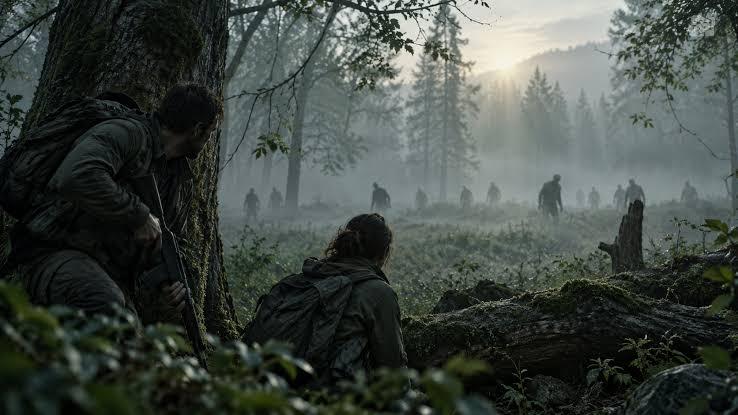
The zombie AI video uses artificial intelligence to transform ordinary photos into cinematic scenes featuring zombie transformations, apocalyptic environments, and terrifying horror effects. These videos show people turning into zombies, walking through abandoned streets, or surviving in a world overrun by the undead. AI-powered video generators make it possible to create these effects without complex editing techniques or professional filmmaking equipment. The trend has gained attention because creators can turn simple images into dramatic, realistic-looking horror clips with minimal effort. Whether you want to create a scary transformation, a post-apocalyptic scene, or a fun zombie version of yourself, AI tools offer a simple way to explore this viral video trend without advanced editing skills.
Part 2: Why Are Zombie AI Videos So Engaging?
There could be multiple reasons that make Zombie AI videos engaging and popular across social media platforms. These videos combine horror, creativity, and realistic-looking visual effects to capture viewers’attention within seconds. Here are some key reasons:
- Horror-Themed: As we all know, horror-themed videos are popular on social media, including TikTok, YouTube, and Instagram. Zombie AI videos give your ordinary images a creepy look, such as pale skin, glowing eyes, torn clothing, and frightening facial features.
- Easy to Create: Thanks to AI technology, creators don’t need professional video-editing skills or expensive equipment to make zombie AI videos. They can simply upload an image, enter the text prompt, and click on the “Generate” button.
- Personalized Visual Storytelling: Instead of using generic characters, creators can start with their own photos. This makes the final video feel more personal and unique. They can transform themselves into terrifying zombies, create fictional horror characters, and more.
- Endless Creative Possibilities: Creators can experiment with different zombie appearances, abandoned cities, dark environments, cinematic lighting, and dramatic transformation sequences. Each video can offer a unique visual experience.
Part 3: Step-by-Step Guide: How to Create Zombie AI Videos in 2026
Want to create zombie AI videos? You’re in the right place. Follow the step-by-step instructions below to transform ordinary photos into creepy, cinematic zombie videos without professional editing skills.
Step 1: Choose Your Character
Casting is one of the most essential parts of AI zombie videos. Start by deciding who or what you want to transform into a zombie. You can use your own photo, a fictional character, or an original image that fits your horror concept. For the best results, choose a clear, high-quality image with good lighting and a visible face.
Step 2: Choose an AI Video Generator
Once you’ve selected your character, the next step is to choose a zombie AI video trend generator that supports image-to-video creation. Look for a tool that supports image-to-video, motion control, high-quality output, popular format support, and more.
Step 3: Write a Detailed Zombie AI Prompt
The next step is to write a detailed zombie AI prompt. The prompt helps the AI tool understand your creative vision and generate a video that matches your expectations. For example:
“Transform the person in the reference image into a terrifying, realistic zombie while preserving their recognizable facial features. Gradually change their skin to pale, cracked textures, add glowing eyes, dark veins, and subtle horror details. Make the character slowly turn their head, open their mouth, and reveal an eerie expression. Set the scene in an abandoned city with drifting fog, flickering lights, and cinematic shadows. Use smooth movements, realistic animation, dramatic lighting, and high-quality horror movie visuals.”
Step 4: Upload Reference Images and Choose Video Settings
Upload reference images into the Zombie AI video trend generator to give the AI a clear visual starting point for your creation. Choose a high-quality photo with a clearly visible face, good lighting, and minimal background distraction. After uploading your images, select the video settings, such as duration, aspect ratio, resolution, and more.
Step 5: Generate and Download
Once all the zombie AI video requirements are complete, click on the “Generate” button. The AI tool will analyze your input and generate high-quality results according to your requirements. Preview the final results, and click on the “Download” button to save the video in your desired format, such as MP4, MOV, AVI, and more.
Part 4: Create Your Own AI Zombie Story With Edimakor AI
If you are looking for the best Zombie AI video trend generator, then don’t worry. We’ve got the right tool for you. Edimakor AI is a web-based video editing platform that also offers powerful AI tools such as image-to-video and text-to-video. With this tool, users can create high-quality zombie AI videos with a simple text prompt and by uploading static images. One of the key advantages of using Edimakor AI is that it makes AI video creation accessible to beginners. You don’t need advanced editing skills or professional filmmaking experience to bring your horror ideas to life. Another amazing feature of this tool is that it also offers Motion Control, allowing users to add natural-looking movements to AI-generated characters and create more dynamic video scenes.
Create NowKey Features of Edimakor AI
- Image-to-Video: One of the standout features of this tool is that it includes an amazing image-to-video tool, allowing users to turn static images into high-quality videos without editing experience or professional help. Users can create high-quality zombie AI videos without expensive equipment or a production team.
- Multiple AI Models: Edimakor AI offers multiple advanced AI models, each with unique features and capabilities. It includes AI models such as Google Veo 3, Kling, Wan 2.7, Seedance, Vidu Q3 Turbo, MiniMax, Happy Horse, Pixverse, Google Veo 3 Fast, and more.
- Advanced Customization: The program offers amazing video editing features, allowing users to adjust AI video according to their requirements. Creators can refine their clips, add text overlays, incorporate background music, apply visual effects, and more to achieve their desired look.
- Web-Based Tool: The best part of Edimakor AI is that it works entirely online, meaning no heavy software downloading or installation is required. Plus, it works with multiple devices and supports popular browsers, such as Windows, macOS, Google Chrome, Opera, Microsoft Edge, Firefox, and Apple Safari.
- Intuitive Interface: Edimakor AI offers an easy-to-use interface, which is ideal for non-tech and beginner users. The program's simple interface allows users to navigate and operate the program settings without professional help.
How to Use Edimakor AI in 2026?
Edimakor AI is an amazing AI tool that enables users to create high-quality AI videos by uploading static images. Here is how to do it:
Step 1: Find Reference Videos
Find a reference video that matches the AI Zombie Story style you want to create. Download and save the video locally for the next steps.
Step 2: Generate an AI Zombie Story Image
Open Edimakor AI’s Image-to-Image feature and upload a photo of the person you want to transform into a zombie. Add a prompt describing the desired zombie appearance and generate your AI zombie character image.
Step 3: Create an AI Zombie Story Video
Open Edimakor AI’s Reference to Video feature. Upload the AI-generated zombie character image and, if your video includes other characters, upload their images as well. Then upload the reference video you downloaded in Step 1 and enter a prompt describing the desired scene and actions. Generate your AI Zombie Story video.
Part 5: FAQs Related to Zombie AI Video Trend
A1: Yes, zombie AI videos are free for commercial use. You can easily upload these videos on popular platforms without copyright issues, such as YouTube, Instagram, TikTok, and Facebook.
A2: If you want the best and easy-to-use Zombie AI Video Trend Generator, then we recommend using Edimakor AI. It is an all-in-one AI tool that allows users to create engaging videos using text prompts and static images.
Final Thoughts
In 2026, creating the zombie AI video trend is easier than ever. With the help of the right tool, users can produce engaging videos with a simple text prompt or by uploading static images. If you’re looking for a beginner-friendly option, Edimakor AI is worth exploring. Its image-to-video, text-to-video, and Motion Control features provide different ways to bring your creative ideas to life.


Leave a Comment
Create your review for HitPaw articles