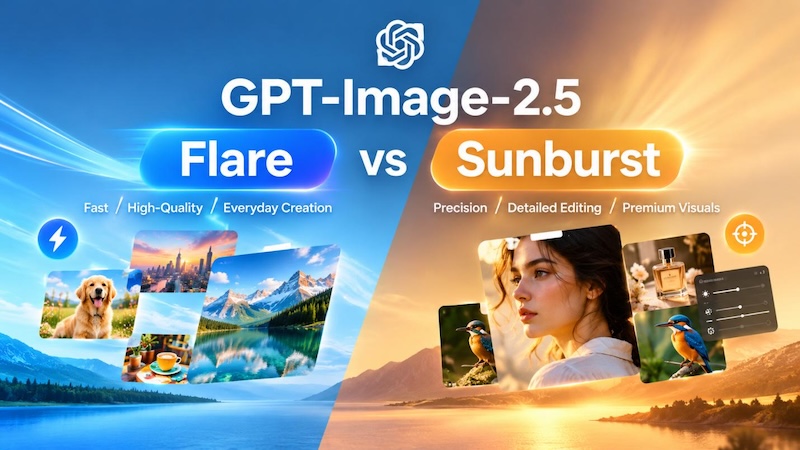
GPT-Image-2.5 introduces a new generation of AI image generation and editing, with sharper details, more natural lighting, improved subject preservation, and more reliable multi-turn editing. Alongside these improvements, OpenAI has introduced two API models: GPT-Image-2.5 Flare and GPT-Image-2.5 Sunburst. While both models deliver high-quality image generation and editing, they are designed for different creative workflows.
So, which one should you choose? Flare prioritizes speed and efficient everyday image creation, while Sunburst focuses on maximum capability and precise editing. Flare is designed for rapid prototyping, social content, product experiences, visual search, and high-volume generation. Sunburst is better suited to detailed creative workflows where precise control and polished final results matter most.
In this guide, we'll compare GPT-Image-2.5 Flare vs Sunburst across speed, image quality, editing precision, use cases, and pricing to help you choose the right model for your workflow.
Create NowPart 1. What Is GPT-Image-2.5 Flare and Sunburst?
GPT-Image-2.5 is OpenAI's latest image generation and editing model family, designed to improve both the quality of generated images and the precision of image editing. It supports text and image inputs, allowing users to create new visuals from prompts or edit existing images while maintaining important visual details. OpenAI highlights improvements in natural lighting, richer textures, reference-image fidelity, and consistency across multiple editing turns.

GPT-Image-2.5 Flare
GPT-Image-2.5 Flare is the faster option, built for high-quality everyday image generation. OpenAI describes it as the default choice for most applications, making it particularly suitable for workflows that require fast generation, frequent iterations, or large volumes of images. It supports both text-to-image and image-to-image workflows and offers multiple quality settings.
GPT-Image-2.5 Sunburst
GPT-Image-2.5 Sunburst is OpenAI's most capable model for image generation and editing. It is designed for workflows where editing precision matters most, including detailed creative work, production-ready campaign assets, and polished product imagery. Compared with Flare, Sunburst places greater emphasis on precise control, with longer generation times as a trade-off.
The key difference is therefore not simply quality vs. quality. Instead, it is a choice between faster, high-quality creation with Flare and more precise, capability-focused workflows with Sunburst.
Part 2. GPT-Image-2.5 Flare vs Sunburst: Key Differences
GPT-Image-2.5 Flare and Sunburst belong to the same GPT-Image-2.5 family, but they are optimized for different types of image workflows. The easiest way to understand the difference is to think of Flare as the speed-focused choice and Sunburst as the precision-focused choice.
| Feature | GPT-Image-2.5 Flare | GPT-Image-2.5 Sunburst |
|---|---|---|
| Primary focus | Fast, high-quality generation | Precise generation and editing |
| Generation speed | Faster | Longer generation time |
| Best for | Everyday and high-volume creation | Premium visual workflows |
| Image editing | Strong | More precision-focused |
| Rapid prototyping | Excellent | Less necessary |
| Social content | Excellent | Usually unnecessary |
| Product imagery | Good for most needs | Better suited to polished assets |
| Campaign creative | Good for variations | Better for production-ready work |
| Complex editing | Suitable | Better suited |
| Multi-turn refinement | Supported | Designed for tighter control |
Speed is the clearest advantage of Flare. OpenAI describes it as the default choice for most applications and says it delivers higher-quality images than GPT-Image-2 at 50% lower latency. This makes it particularly useful when users need to generate multiple concepts, test variations, or iterate quickly.
Precision is the key reason to choose Sunburst. OpenAI positions it for workflows where editing precision matters most, such as production-ready campaign creative and polished product imagery. It also supports the same major quality settings and image-input workflows as Flare.
So, the choice is not simply "good quality vs. better quality." Both are designed to produce high-quality images. Instead, the more useful question is whether your workflow values speed and iteration or tighter control and precise refinement.
Part 3. When to Use GPT-Image-2.5 Flare
GPT-Image-2.5 Flare is the better starting point when speed, iteration, or output volume matters. OpenAI specifically recommends it for creator and social content, product experiences, visual search, rapid image prototyping, and high-volume generation.
1 Social Media and Creator Content
For Instagram posts, TikTok visuals, YouTube thumbnails, blog graphics, and other everyday creative assets, Flare can be a practical choice. These projects often require multiple visual directions rather than one highly controlled final image. Faster generation makes it easier to test different subjects, compositions, styles, and formats without slowing down the creative process.
2 Rapid Prototyping and Concept Exploration
Flare is also well suited to brainstorming visual ideas. If you are exploring several concepts for an advertisement, product launch, poster, or editorial image, you can generate variations quickly and select the strongest direction before spending more time refining it.
3 High-Volume Image Generation
For workflows that require many images, Flare's speed becomes especially valuable. Examples include generating product variations, campaign concepts, visual-search assets, thumbnails, or multiple versions of social content.
4 Everyday Image Editing
Flare is not limited to text-to-image generation. It also accepts image inputs for editing, making it suitable for routine changes such as adjusting a visual style, modifying a background, or creating variations from an existing reference image. When the goal is to make useful changes quickly rather than preserve every detail through multiple rounds of refinement, Flare is usually the more efficient choice.
Choose Flare when: you need fast generation, frequent iterations, high-volume output, or everyday image creation and editing.
Part 4. When to Use GPT-Image-2.5 Sunburst
GPT-Image-2.5 Sunburst is better suited to visual workflows where precision matters more than generation speed. OpenAI describes it as its most capable model for image generation and editing and recommends it for premium workflows that require tighter control across edits.
Production-Ready Campaign Creative
When an image is going directly into an advertising campaign or other polished marketing material, unintended changes can be more costly. Sunburst is designed for this type of workflow, where the composition, visual identity, and specific details need to remain under tighter control while individual elements are refined.
Polished Product Imagery
Sunburst is a strong choice for product-focused visuals where details matter. For example, you may want to change the background or lighting while keeping the product itself consistent. This type of constrained editing aligns closely with Sunburst's precision-focused positioning.
Detailed Image Editing
The difference becomes more important when an image needs several rounds of targeted edits. Instead of broadly regenerating the image, you may want to change one specific element while keeping other visual elements intact. Sunburst is designed for workflows where this kind of editing precision is the priority.
Brand and Commercial Assets
For branded compositions, campaign key visuals, product presentations, and other commercial assets, the cost of an unintended change can be higher than the cost of waiting longer for generation. In these cases, Sunburst's precision-focused workflow can make more sense than optimizing purely for speed.
Choose Sunburst when: you need precise edits, polished product imagery, production-ready campaign creative, or multiple rounds of controlled visual refinement.
Part 5. GPT-Image-2.5 Flare vs Sunburst: Pricing and Quality Settings
GPT-Image-2.5 Flare and Sunburst currently use the same API pricing, so the choice between them is mainly about workflow needs rather than cost. Both models charge $5 per 1 million text input tokens, $8 per 1 million image input tokens, and $30 per 1 million image output tokens. Cached inputs are priced lower at $1.25 per million text tokens and $2 per million image tokens.
Both models also offer the same quality settings: Low, Medium, High, XHigh, Max, and Auto. Lower settings can be useful for faster or less demanding tasks, while higher settings are better suited to images that require more visual detail and refinement. Auto lets the model select an appropriate quality level for the request.
This means you do not need to choose Flare simply because you want to spend less. Instead, choose Flare when fast, high-quality generation and frequent iterations matter most, and choose Sunburst when precise image generation or editing is the priority. Since both models support text and image inputs, you can also adjust the quality setting based on the importance of each individual task.
Bonus Tip: Try GPT-Image-2.5 with Edimakor AI
If you want to try GPT-Image-2.5 without setting up an API or dealing with technical configurations, Edimakor AI is a convenient option. It integrates GPT Image models into a simple web-based workspace, allowing beginners and non-technical users to generate and edit images directly from prompts or reference images.
Create NowWhy Try Edimakor AI?
- No API setup required --- Generate images directly in your browser without configuring API keys or development environments.
- Beginner-friendly workflow --- Simply enter a prompt or upload a reference image, then generate your visual with a few clicks.
- Access GPT Image models easily --- Edimakor AI includes GPT Image among its available image-generation models, making it easier to experiment with advanced AI image creation.
- Text-to-image and image-to-image --- Create new visuals from descriptions or transform existing images using natural-language instructions.
- Create and edit in one place --- Generate images, adjust them, and use the results for social content, marketing visuals, and other creative projects without switching between multiple tools.
How to Use GPT Image in Edimakor AI
Step 1: Upload a Prompt or Image
Enter your image-generation prompt, or upload a reference image when you want to create or edit an image based on existing visuals.
Step 2: Adjust Image Settings
Choose your preferred output quantity, resolution, and aspect ratio to match your creative needs, such as social posts, portraits, or landscape visuals.
Step 3: Generate and Download
Click Generate to create your images. Preview the results, choose your favorite version, and download it for your next project.
FAQ About GPT-Image-2.5 Flare vs Sunburst
A1: GPT-Image-2.5 Flare is designed for fast, high-quality everyday image generation, making it suitable for frequent iterations and high-volume workflows. Sunburst is OpenAI's most capable image model, designed for workflows where precise generation and editing control matter most.
A2: Yes, Sunburst is the better choice when editing precision is the priority. OpenAI describes it as its most capable model for image generation and editing, making it particularly suitable for detailed edits, complex refinements, and workflows where preserving specific visual elements matters.
A3: Choose Sunburst for polished product imagery when precise edits, consistent product details, and production-ready results are important. Flare is a good choice for quickly generating product concepts, variations, or multiple visual directions where speed and iteration matter more.
A4: Yes. Both Flare and Sunburst accept image inputs and can generate edited images. Flare is suited to fast, everyday image editing, while Sunburst is better for edits that require greater precision and tighter control over the final result.
Conclusion
GPT-Image-2.5 Flare and Sunburst are built for different creative priorities. Flare is the better choice for fast, high-quality generation, frequent iterations, and everyday content, while Sunburst is better suited to detailed editing, polished product imagery, and production-ready creative work. The right model ultimately depends on your workflow, not simply image quality. If you want an easier way to create AI images without API setup, try Edimakor AI for a simple, beginner-friendly image generation and editing experience.


Leave a Comment
Create your review for HitPaw articles