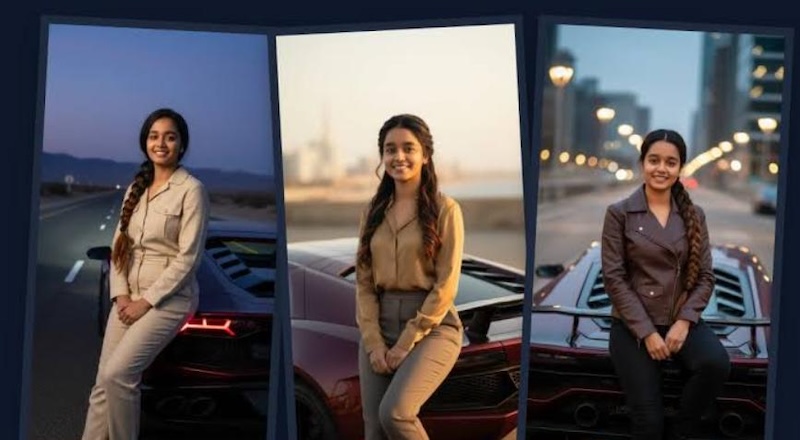
If you have seen those realistic car photos on Instagram where someone appears to be standing beside popular cars, such as BMW, Tesla, Ferrari, Lamborghini, and more, you may be wondering how these eye-catching visuals are created. The good news is that you don’t need advanced Photoshop skills to experiment with this style. With the right Car AI photo editing prompts, you can easily transform an ordinary image into a realistic, stylish, and cinematic car-themed portrait within seconds. In this guide, we’ll share some of the most viral and trending car AI photo editing prompts for boys and girls to try in 2026.
Part 1: Top 7 Car AI Photo Editing Prompts for Boys
Boys love to create stylish car images that showcase their personality, fashion sense, and passion for luxury or sport vehicles. Below, we’ve mentioned the top 7 Instagram Car AI photo editing prompts to try in 2026:
1 BMW Night Drive

“Use the uploaded portrait as the main subject and preserve his facial identity, hairstyle, skin tone, and natural body proportions. Place him standing confidently beside a sleek black BMW M4 on a modern city street at night. Add glowing streetlights, subtle neon reflections, wet asphalt, realistic shadows, and cinematic lighting. Dress him in a premium black jacket, fitted jeans, and clean sneakers. Create a photorealistic automotive editorial style with sharp vehicle details, natural reflections, realistic depth of field, and an upscale Instagram-worthy atmosphere.”
2 Mercedes-AMG Street Style
“Turn the uploaded photo into a premium street-style portrait featuring the subject leaning casually against a Mercedes-AMG GT. Maintain his original face, identity, hairstyle, skin tone, and natural proportions. Set the scene in a sophisticated downtown area with modern buildings and soft evening lighting. Give him a fashionable oversized jacket, dark cargo pants, sunglasses, and clean sneakers. Add realistic headlights, glass reflections, subtle pavement reflections, natural shadows, and shallow depth of field. Create a polished automotive magazine aesthetic with photorealistic textures and an effortlessly confident mood.”
3 Porsche Coastal Escape
“Transform the uploaded image into a luxury coastal car photoshoot featuring a silver Porsche 911 Carrera. Keep the subject's facial identity and natural appearance unchanged. Place him standing beside the car on a scenic coastal road overlooking the ocean during sunrise. Dress him in a relaxed premium outfit with a white shirt, beige trousers, sunglasses, and stylish sneakers. Add soft morning sunlight, realistic ocean reflections, detailed Porsche bodywork, natural shadows, gentle wind movement, and cinematic depth of field. Make the final composition look like an authentic luxury travel campaign photograph.”
4 Range Rover Adventure
“Convert the uploaded portrait into a rugged luxury adventure scene featuring a black Range Rover Sport. Keep the subject's facial features and identity consistent with the original image. Place him beside the vehicle on a dramatic mountain road surrounded by rocky landscapes and misty hills. Give him a practical yet fashionable outdoor outfit with a leather jacket, fitted jeans, boots, and sunglasses. Use overcast natural lighting, realistic terrain, detailed vehicle textures, natural shadows, atmospheric depth, and cinematic framing. Make the image look like a premium automotive adventure campaign.”
5 McLaren Supercar Photoshoot
“Edit the uploaded portrait into an exclusive supercar photoshoot featuring an orange McLaren 750S. Keep the subject's face, identity, hairstyle, skin tone, and body proportions realistic. Place him beside the car outside a contemporary luxury hotel during sunset. Dress him in a crisp white shirt, dark trousers, a luxury-style watch, and fashionable sneakers. Add warm golden-hour lighting, realistic car reflections, polished surfaces, subtle background bokeh, natural shadows, and professional camera depth of field. Create an elegant automotive editorial image that looks like it was captured by a professional photographer.”
6 Dodge Challenger Muscle-Car Look
“Transform the uploaded image into a powerful American muscle-car portrait featuring a black Dodge Challenger. Preserve the subject's facial features, identity, hairstyle, skin tone, and natural proportions. Place him standing beside the vehicle on an empty highway at dusk with dramatic mountains in the distance. Give him a rugged black leather jacket, dark jeans, boots, and sunglasses. Add glowing headlights, realistic road reflections, atmospheric clouds, natural shadows, and cinematic lighting. Use a slightly low camera angle and sharp vehicle details to create a bold, masculine, photorealistic automotive magazine aesthetic.”
7 Bentley Executive Style
“Use the uploaded portrait as the primary subject and preserve his facial identity, hairstyle, skin tone, and natural proportions. Place him standing beside a luxurious Bentley Continental GT outside an upscale business hotel. Dress him in an elegant charcoal suit, crisp shirt, leather shoes, and a sophisticated wristwatch. Add warm evening lighting, polished architectural surroundings, realistic vehicle reflections, detailed chrome elements, natural shadows, and cinematic depth of field. Create a premium executive lifestyle photograph with realistic textures and a refined automotive magazine aesthetic suitable for Instagram.”
Part 2: 7 Best Car AI Photo Editing Prompts for Girls
Girls can also create stunning and stylish car-themed photos with AI photo editing tools. Here are the trending car AI photo editing prompts for girls:
1. Lavender Lamborghini Dream
“Use the uploaded portrait as the main subject and keep her face, identity, hairstyle, skin tone, and proportions realistic. Place her beside a stunning lavender Lamborghini Huracán on a luxurious rooftop overlooking a modern city skyline. Dress her in an elegant white dress with lavender accessories and stylish heels. Add pastel sunset skies, soft city lights, realistic vehicle reflections, natural shadows, and cinematic depth of field. Create a dreamy yet photorealistic automotive fashion photoshoot with sophisticated composition, delicate lighting, and an aspirational luxury lifestyle atmosphere.”
2. Rose Gold Ferrari Elegance
“Use the uploaded portrait to create a luxurious Ferrari-themed photoshoot while maintaining the girl's recognizable face, hairstyle, skin tone, and natural proportions. Place her beside a stunning rose-gold Ferrari Roma outside a glamorous five-star hotel at sunset. Dress her in a sleek champagne-colored dress with delicate jewelry and elegant heels. Add warm ambient lighting, realistic reflections, polished surfaces, subtle lens effects, natural shadows, and cinematic depth of field. Create an ultra-realistic, feminine automotive portrait with a sophisticated luxury aesthetic suitable for a high-end Instagram post.”
3. Lilac Tesla Cybertruck
“Use the uploaded portrait to create a futuristic fashion portrait featuring a customized lilac Tesla Cybertruck. Maintain her facial identity, hairstyle, skin tone, and realistic body proportions. Place her beside the vehicle in a futuristic shopping district illuminated by soft purple and pink architectural lights. Dress her in a modern lilac streetwear outfit with white sneakers and a small designer-style handbag. Add realistic metallic reflections, wet pavement, atmospheric lighting, natural shadows, and cinematic depth of field. Create a stylish, futuristic, photorealistic image with a playful feminine aesthetic.”
4. Mint Green Mini Cooper
“Transform the uploaded portrait into a cute and stylish lifestyle image featuring a pastel mint-green Mini Cooper. Keep the girl's facial identity, hairstyle, skin tone, and body proportions natural and recognizable. Place her beside the car near a charming flower-filled café in a picturesque neighborhood. Dress her in a cream cardigan, pastel skirt, white sneakers, and a small handbag. Add soft morning sunlight, colorful flowers, realistic vehicle reflections, gentle shadows, and subtle background blur. Create a cheerful, photorealistic image with a playful feminine aesthetic perfect for social media.”
5. Coral Pink Jeep Wrangler
“Edit the uploaded image into a vibrant outdoor adventure portrait featuring a customized coral-pink Jeep Wrangler. Preserve the girl's facial identity, hairstyle, skin tone, and natural body proportions. Place her beside the Jeep on a scenic mountain trail surrounded by wildflowers and green hills. Dress her in a white outdoor jacket, coral top, denim shorts, hiking boots, and sunglasses. Add bright natural sunlight, realistic terrain, detailed vehicle textures, natural shadows, and atmospheric depth. Create a fun, adventurous, photorealistic image with a colorful feminine road-trip aesthetic.”
6. Rose Pink BMW Convertible
“Transform the uploaded image into a fashionable luxury car photoshoot featuring a rose-pink BMW 4 Series convertible. Preserve the girl's facial identity, hairstyle, skin tone, and natural proportions. Place her beside the open-top car on a stylish boulevard lined with palm trees and modern cafés. Dress her in a white blazer dress, pink heels, sunglasses, and delicate jewelry. Add warm sunset lighting, realistic reflections, natural shadows, detailed BMW styling, and cinematic depth of field. Create a sophisticated, photorealistic image with a glamorous Instagram fashion aesthetic.”
7. Lavender Mercedes G-Class
“Use the uploaded portrait as the main subject and keep her face, hairstyle, skin tone, identity, and proportions realistic. Place her beside a customized lavender Mercedes-Benz G-Class in front of a luxurious modern mansion. Dress her in a coordinated lavender tracksuit, white sneakers, sunglasses, and a stylish handbag. Add soft afternoon sunlight, realistic vehicle reflections, landscaped surroundings, natural shadows, and subtle background blur. Create a polished, photorealistic luxury lifestyle portrait with a trendy feminine streetwear aesthetic suitable for social media.”
Part 3: How to Turn Simple Images into Trending Car AI Photos
Turning a simple portrait into a trendy car photo is easier than ever with AI-powered editing tools. One convenient option is Edimakor AI, which makes it easy to create and edit visuals using simple text instructions. It is an all-in-one AI editor that enables users to generate and edit images with simple text prompts — no editing experience required. The program provides support to multiple AI models, each with different image styles and features. Available models on Edimakor AI are Nano Banana, Nano Banana Pro, Stable Diffusion, Flux, Midjourney, Imagen 4, and more. One of the best parts of this tool is that it offers an intuitive interface and works seamlessly with multiple devices, including Windows and macOS. In addition, it includes a wide range of AI tools, such as Text-to-Image, Image-to-Image, AI Video Editor, AI Video Enhancer, AI Voice Changer, and more.
Create NowKey Features of Edimakor AI
- Image-to-Car Style Visuals: With Edimakor AI, users can transform simple images into stylish car-themed visuals by adding luxury vehicles, cinematic backgrounds, realistic lighting, and customized poses.
- AI-Powered Editing: The program enables users to edit images according to their requirements — no editing experience required. Users can easily change the background, add different car brands, adjust the lighting, modify outfits, and change poses.
- Powerful AI Tools: Edimakor AI isn’t limited to image editing or creation. It offers a wide range of AI tools, such as Text-to-Image, Image-to-Image, AI Video Generator, Online Video Editor, AI Video Enhancer, AI Voice Changer, and more.
- Compatibility: It is a web-based tool that works seamlessly with multiple devices, including Windows, macOS, and other internet-connected devices. Plus, users can download images in multiple formats, such as JPG, PNG, JPEG, and WEBP.
Step-by-Step Guide:
With Edimakor AI, users can easily transform images into multiple styles, such as car-themed images and more. Follow the instructions below to learn how to do it:
Step 1: Go to the Edimakor AI official site and log in with your free account. Select the “Image-to-Image” feature from the main interface and upload the reference image.
Step 2: Choose the desired AI model and enter the Car AI photo editing prompt for ChatGPT in the prompt box. Next, adjust the image settings, such as aspect ratio, output number, and resolution.
Step 3: Finally, click on the “Generate” button to begin the image creation process. Within seconds, your car-themed image will be ready. Navigate to the “My Creation” page to download the image.
Conclusion
Creating realistic car photos with AI doesn't have to be complicated. With the right Car AI photo editing prompts, you can transform simple portraits into stylish, cinematic, and eye-catching car visuals without spending hours on manual editing. Use these prompts with tools like Edimakor AI to get realistic and engaging results within seconds.


Leave a Comment
Create your review for HitPaw articles