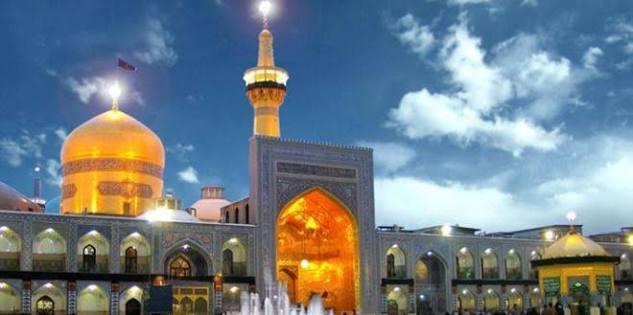
The Imam Reza Shrine is the mausoleum of Ali al-Rida, the eighth Imam in Shia Islam, located in Mashhad, the province of Razavi Khorasan, Iran. As one of the holiest sites in Shia Islam, the shrine attracts millions of visitors and pilgrims each year. Unfortunately, many people don’t have the opportunity or resources to visit the shrine physically. That is where Imam Reza AI prompts come in. With the help of these prompts, you can easily create engaging visuals of this sacred place. In this guide, we’ll mention some of the best and trending Imam Reza AI prompts to help you create realistic and detailed visuals within seconds.
Part 1: Imam Reza Shrine History

Imam Reza Shrine, located in Mashhad, Iran, is centered on the only tomb of Ali al-Rida (Imam Reza), the eighth Imam in Twelver Shia Islam. The shrine complex has developed over centuries and has become one of the most important religious, cultural, and architectural landmarks in the region. Following the death of Imam Reza in 818 CE, his burial site gradually became an important destination for pilgrims.
The shrine covers an area of 1,200,000 square meters, making it the largest mosque in the world after Masjid al-Haram in Mecca and the Prophet’s Mosque in Medina. Its golden dome has become one of the most recognizable landmarks of Mashhad and an important symbol for pilgrims.
Part 2: 6+ Best Imam Reza AI Prompts to Try
Looking for the best Imam Reza AI prompt Gemini? Look no further! Below, we’ve listed the top 6 Imam Reza AI prompts that will help you create engaging visuals of the shrine within seconds.
1. Golden Dome at Sunrise
“Create a photorealistic view of the Imam Reza Shrine in Mashhad during sunrise, with the magnificent golden dome illuminated by warm morning sunlight. Show elegant minarets, expansive courtyards, intricate Islamic tilework, and detailed architectural patterns. Add a soft golden sky with subtle clouds and gentle rays of sunlight falling across the courtyard. Capture the scene from a wide-angle perspective with realistic textures, natural lighting, sharp architectural details, cinematic depth, ultra-high resolution, and professional travel photography aesthetics.”
2. Sunrise Through Islamic Arches
“Create an artistic yet photorealistic scene of the Imam Reza Shrine viewed through a series of enormous ornate Islamic arches. In the distance, the golden dome rises majestically against a soft sunrise sky filled with subtle orange, pink, and golden tones. Capture intricate geometric tile patterns, carved architectural details, hanging lanterns, and polished marble surfaces. Sunlight streams through the arches, creating dramatic shadows and depth. Use symmetrical composition, cinematic perspective, realistic materials, fine architectural details, volumetric light, ultra-high resolution, 8K quality, serene and majestic spiritual atmosphere.”
3. Grand Shrine Courtyard Panorama
“Generate an epic panoramic aerial view of the Imam Reza Shrine complex in Mashhad, showcasing its magnificent golden dome, multiple towering minarets, enormous courtyards, intricate turquoise-and-gold architecture, and surrounding cityscape. Capture hundreds of worshippers moving peacefully through the expansive sacred complex while maintaining realistic scale and proportions. Use warm sunset illumination to highlight the golden architectural elements and create long cinematic shadows across the marble courtyards. Photorealistic aerial photography, ultra-detailed Persian-Islamic architecture, realistic atmospheric depth, cinematic composition, 8K resolution, majestic and peaceful visual storytelling.”
4. Prayers Beneath Ornate Chandeliers
“Create a realistic interior scene inside the Imam Reza Shrine showing worshippers performing prayer beneath magnificent crystal chandeliers. Surround the prayer area with elaborate turquoise, blue, and golden Islamic tilework, decorative arches, intricate calligraphy-inspired patterns, and polished marble flooring. Soft golden illumination creates a tranquil atmosphere while subtle reflections appear across the floor. Use a low perspective that emphasizes the enormous ceiling and architectural scale. Cinematic photography, realistic human proportions, detailed craftsmanship, volumetric lighting, natural shadows, ultra-realistic textures, 8K resolution, deeply peaceful mood.”
5. Mirror Reflections Inside the Shrine
“Create a photorealistic interior-inspired view of the Imam Reza Shrine featuring magnificent mirrorwork, ornate Islamic decorations, elegant arches, and sparkling chandeliers. Focus on the intricate reflective surfaces creating mesmerizing patterns throughout the sacred interior. Include subtle glimpses of turquoise tilework and golden architectural details. Use warm ambient illumination, realistic reflections, natural shadows, cinematic depth of field, and extremely detailed textures. Capture the composition with professional architectural photography, balanced exposure, realistic materials, and an atmosphere of peaceful grandeur.”
6. Marble Courtyard After Rain
“Generate a dramatic photorealistic view of an Imam Reza Shrine courtyard immediately after rainfall. Show the golden dome and illuminated minarets reflected perfectly across the wet polished marble floor. Visitors slowly walk beneath the surrounding covered arches while small puddles capture the colorful architectural details. Dark clouds begin separating as soft evening sunlight breaks through above the shrine. Use a ground-level perspective, cinematic reflections, realistic water droplets, detailed mosaics, natural atmospheric haze, dramatic lighting, ultra-realistic architecture, 8K resolution, peaceful and emotional visual atmosphere.”
Part 3: 6+ Imam Reza Shrine AI Photo Editing Prompts
People without the opportunity or resources to visit the shrine in person can use these prompts to create realistic visuals. Here are the top 6 Imam Reza Shrine AI photo editing prompts.
1 Praying in the Shrine Courtyard
“Transform my uploaded image into a realistic scene of me respectfully praying in the courtyard of the Imam Reza Shrine. Place the magnificent golden dome and elegant minarets clearly in the background, surrounded by beautiful Islamic tilework and spacious marble courtyards. Keep my facial features, body proportions, and natural appearance consistent with the original photograph. Add soft evening illumination, realistic architectural details, natural shadows, and a peaceful spiritual atmosphere. Make the final image look like a professionally captured travel photograph.”
2 Walking Through the Shrine Courtyard
“Convert my photo into a realistic scene of me peacefully walking through an expansive courtyard of the Imam Reza Shrine. Show the magnificent golden dome, towering minarets, intricate blue and turquoise tilework, and ornate entrances in the background. Maintain my original facial identity, clothing details, and natural body proportions. Add soft morning sunlight, realistic shadows, polished marble reflections, and subtle depth of field. Create an authentic travel-photography appearance with highly detailed architecture and natural environmental lighting.”
3 Evening Visit to the Shrine
“Transform my uploaded photo into a stunning evening visit to the Imam Reza Shrine. Place me naturally within the spacious courtyard with the illuminated golden dome and minarets glowing beautifully behind me. Preserve my original facial features, hairstyle, clothing structure, and body proportions. Add realistic nighttime lighting, subtle reflections on the marble floor, intricate architectural details, and a deep blue twilight sky. Use balanced exposure and cinematic photography techniques to create a highly realistic image that captures the majestic atmosphere of the shrine.”
4 Shrine Courtyard After Rain
“Transform my image into a realistic scene at the Imam Reza Shrine shortly after rainfall. Show me standing respectfully in the courtyard with the golden dome and illuminated minarets behind me. Add wet marble flooring with natural reflections, tiny water droplets, cloudy evening skies, and beautifully detailed Islamic architecture. Keep my face, expression, and recognizable characteristics faithful to the original image. Use realistic environmental lighting, cinematic depth, natural shadows, and highly detailed textures to create an atmospheric yet authentic pilgrimage photograph.”
5 Entering the Shrine
“Convert my uploaded photo into a photorealistic scene of me respectfully entering the Imam Reza Shrine through a magnificent decorated entrance. Show intricate turquoise and golden tilework, ornate Islamic patterns, grand arches, and beautifully illuminated architectural details. Keep my face, body proportions, and recognizable appearance consistent with the original image. Add warm natural lighting, realistic shadows, subtle depth of field, and detailed textures. Make the image resemble a professionally captured pilgrimage photograph with an authentic and peaceful atmosphere.”
6 Looking at the Golden Dome
“Turn my uploaded image into a cinematic photograph of me standing in the shrine courtyard while looking toward the magnificent golden dome of Imam Reza Shrine. Position the dome prominently against a beautiful sunset sky with elegant minarets surrounding it. Preserve my original identity, facial details, clothing, and natural proportions. Add warm golden-hour lighting, realistic architectural textures, soft shadows, and subtle atmospheric haze. Create a visually emotional yet respectful composition with professional photography quality and natural environmental details.”
Part 4: Best Tool to Create Realistic Imam Reza Shrine Visuals Online
With AI technology, you can now create realistic images of the Imam Reza Shrine without requiring advanced photography or editing skills. Edimakor AI is a useful AI-powered tool that lets users generate and edit images with simple text prompts. With its Text-to-Image and Image-to-Image features, users can turn creative ideas into detailed visuals or transform existing photos with shrine-inspired backgrounds and elements. The best part of this tool is that it offers a wide range of AI models, each with unique features and capabilities. Available models on this tool are Nano Banana, Nano Banana Pro, Flux, Midjourney, Stable Diffusion, Seedream, and more. Edimakor AI also offers advanced image and video editing features, allowing users to customize images according to their requirements.
Create NowKey Features of Edimakor AI
- Text-to-Image: With the help of this tool, you can easily create realistic and engaging Imam Reza Shrine visuals with a simple text prompt — no editing skills required.
- Image-to-Image: Edimakor AI also includes an Image-to-Image feature, enabling users to create images with Imam Reza Shrine in the background.
- Advanced Customization: The program offers advanced customization features, allowing users to adjust images according to their requirements.
- Multiple AI Models: This tool offers multiple AI models, such as Nano Banana Pro, Nano Banana 2, Flux, Midjourney, Stable Diffusion, Seedream, and Imagen 4.
- Intuitive Interface: Edimakor AI offers an easy-to-use interface, which is ideal for non-tech and beginner users — no editing experience or professional help required.
Step-by-Step Guide:
Here is how to create realistic and engaging Imam Reza Shrine visuals using Edimakor AI:
1.Text-to-Image
Step 1: Navigate to the Edimakor AI official site and log in with your account. Choose the “Text-to-Image” feature from the main interface and select the “AI Model.” Enter the Imam Reza AI prompt ChatGPT in the prompt box.
Step 2: Next, choose the image settings, such as aspect ratio, output number, resolution, and more. Finally, click on the “Generate” button to begin the image creation process.
Step 3: Within seconds, Edimakor AI will convert your text into engaging visuals. Preview the results, then go to the “My Creation” page and download the image.
2. Image-to-Image
Step 1: Visit the Edimakor AI official site and select the “Image-to-Image” feature from the main interface. Upload the reference image and enter the Imam Reza AI prompt.
Step 2: Choose the AI model and adjust the image settings, such as aspect ratio, resolution, and output quantity. Click on the “Generate” button to begin the image creation process.
Step 3: After a few seconds, your AI image will be ready. Go to “My Creation” to download the results to your PC.
Final Thoughts
In this guide, we’ve mentioned the top 12 Imam Reza AI prompts that will help you create engaging and high-quality visuals of the shrine. We recommend using these prompts with Edimakor AI. It is one of the best AI video editors with amazing image creation capabilities.


Leave a Comment
Create your review for HitPaw articles