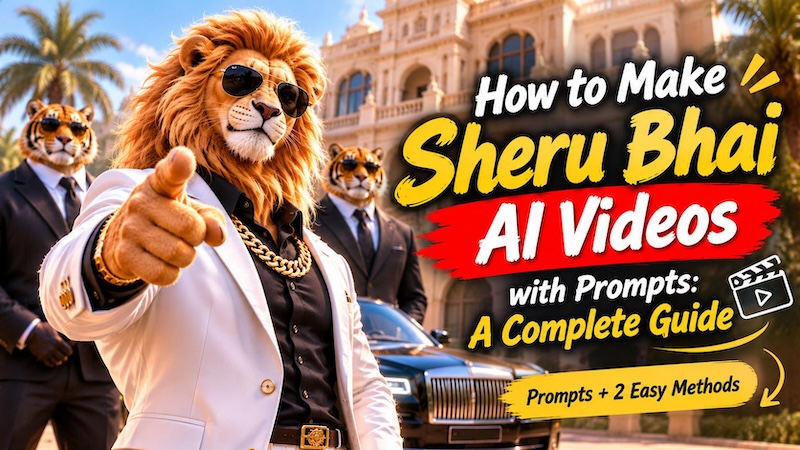
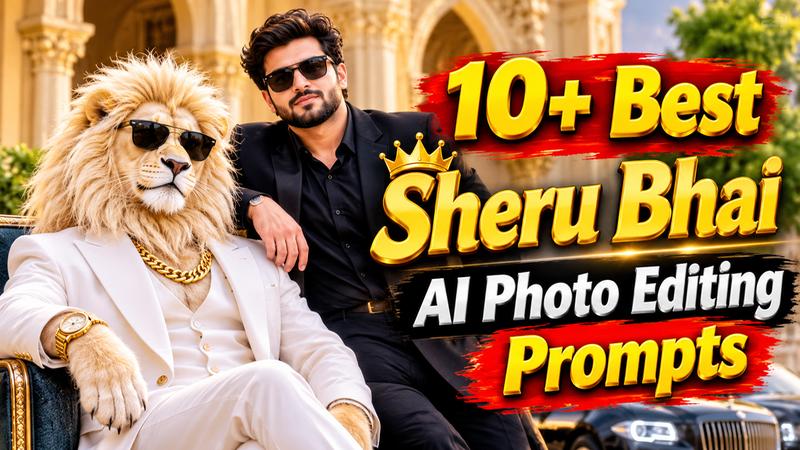
Have you seen the funny Sheru Bhai AI photos on social media? This popular AI character features a stylish lion with a rich, boss-like personality. You can create similar pictures with simple text prompts and your own photos. A good Sheru Bhai AI photo editing prompt helps you create realistic and creative scenes. You can pose with Sheru Bhai, add him to group pictures, or create a movie style portrait. In this guide, you will find 10+ Sheru Bhai AI photo prompts to try with your favorite AI image generator.
What Is the Sheru Bhai AI Photo Trend?
Sheru Bhai is an AI generated character that looks like a powerful lion with a human-like appearance. He usually wears a white three piece suit, a thick gold chain, a luxury watch, and black sunglasses. His confident expressions and rich lifestyle make him look like a movie boss.
The Sheru Bhai AI photo trend lets people create pictures with this stylish lion character. Some users place Sheru beside themselves, while others create solo portraits or funny group scenes. You can also choose different locations, outfits, and photography styles.
AI image generators use your text prompt and reference photo to create these scenes. The final result can look like a professional photoshoot, a movie poster, or a fun social media edit.
10+ Best Sheru Bhai AI Photo Prompts to Copy and Try
Want to create your own Sheru Bhai AI pictures? These 10+ best Sheru Bhai prompts cover different styles, locations, and occasions. Upload your photo where needed, copy a prompt, and adjust the scene to match your idea.
Sheru Bhai Solo Photo Prompts
These solo prompts are best when you want the lion character to be the main visual partner. Choose a portrait or full body photo and keep the background simple before editing.
"Create an ultra-realistic cinematic portrait of me standing beside a majestic white lion. Use my uploaded photo as the exact face, identity, hairstyle, and outfit reference. Keep my facial features, skin tone, expression, body shape, and clothes unchanged. Place the lion beside me with a thick white mane, calm eyes, and one paw near my shoulder. Dress the lion in a royal white suit, a gold watch, and stylish black sunglasses. Set the scene at a grand palace entrance with marble pillars and warm evening light. Use DSLR photography, an 85mm lens, realistic details, and a soft blurred background. Vertical 4:5 format, 8K quality. No text or watermark."

"Create a luxury fashion portrait of me standing beside Sheru Bhai. Keep my uploaded face, hairstyle, skin tone, body shape, and original outfit exactly the same. Dress the white lion in a royal black suit, gold chain, gold watch, and black sunglasses. Add a beautiful palace hallway with cream marble walls, soft lights, and shiny floors. Place a little greenery in the background. Have both of us face the camera with confident, natural expressions. Use cinematic lighting, realistic lion fur, and sharp details. Vertical 4:5 format, 8K quality. No text or watermark."
Sheru Bhai with Me Photo Prompts
These ideas create a friendly or adventurous image with you and Sheru Bhai together. They work especially well with a clear half body portrait and a natural smile.
"Create a realistic, high resolution selfie of me standing close to a friendly white lion named Sheru Bhai. Use my uploaded photo to keep my face, skin tone, hair, smile, outfit, and identity unchanged. Make the lion look gentle, happy, and friendly. Dress Sheru Bhai in a premium black designer hoodie for a cool look. Place us side by side in a beautiful green garden. Add soft morning sunlight, green leaves, and a blurred background. Use natural poses, realistic fur, and smartphone photography. Vertical 4:5 format, 8K quality. No text or watermark."
"Create an ultra-realistic adventure portrait of me and Sheru Bhai on a rocky mountain trail. Keep my uploaded face, hairstyle, skin tone, outfit, and accessories exactly the same. Show Sheru Bhai as a tall, muscular white lion standing upright. Give him a realistic lion face, a thick white mane, and a premium black adventure jacket. Make both of us stand side by side and look at the camera. Add misty mountains, golden sunrise light, and soft clouds in the background. Use cinematic 35mm photography, natural colours, and sharp details. Vertical 4:5 format. No text, logos, or watermark."
Sheru Bhai with Friends Photo Prompts
Group edits need clear photos with faces that are not hidden or heavily shadowed. Mention each person’s position so the AI keeps the composition organised.
"Create a realistic group celebration photo of me, my friends, and Sheru Bhai standing in the centre. Keep everyone's face and identity the same as in the uploaded photos. Make Sheru Bhai a tall, muscular white lion with a realistic lion face, thick mane, human arms, and an upright body. Dress him in a premium black suit and an elegant bow tie. Place everyone in a beautiful event hall with warm lights, balloons, and green decorations. Give everyone happy expressions and natural poses. Use professional DSLR photography, cinematic lighting, and sharp details. Vertical 4:5 format. No text or watermark."
"Create a realistic street-style group photo of me, my friends, and Sheru Bhai walking together. Keep everyone's face and identity unchanged. Make Sheru Bhai a tall, muscular white lion with a realistic lion face, thick mane, human arms, and an upright body. Dress him in a dark designer jacket, gold chain, and stylish sunglasses. Add textured walls, shop lights, and light mist to the city background. Give everyone relaxed expressions and natural walking poses. Make sure the hands, faces, and shadows look realistic. Use vertical 4:5 framing. No text, logos, or watermark."
Sheru Bhai Festive Photo Prompts
Festive edits look strongest when the background has a clear colour palette. Use warm lights for celebration scenes and keep the clothing instructions specific.
"Create a realistic Diwali portrait of me celebrating with Sheru Bhai outside a beautifully decorated home. Keep my uploaded face, hairstyle, skin tone, outfit, and accessories unchanged. Make Sheru Bhai a tall, muscular white lion with a realistic lion face, thick mane, human arms, and an upright body. Dress him in a royal cream jacket with a gold collar. Add glowing diyas, marigold flowers, colourful rangoli, and fairy lights. Show both of us smiling naturally. Use cinematic DSLR photography, warm golden light, and realistic details. Vertical 4:5 format. No text or watermark."
“Create an ultra realistic wedding portrait of me and Sheru Bhai at a luxurious wedding venue. Preserve my exact uploaded face, hairstyle, skin tone, outfit, jewellery, and body proportions. Make Sheru Bhai a tall, muscular white lion with a realistic lion face, thick mane, and human arms. Dress him in a luxurious ivory sherwani with elegant gold embroidery. Both standing confidently together at an elegant wedding venue with floral arches and golden chandeliers. Cinematic DSLR photography, sharp details, vertical 4:5. No extra people, text, or watermark.”
Sheru Bhai Travel Photo Prompts
Travel edits can turn an ordinary portrait into a memorable destination scene. Keep the location description vivid, but protect the original person and outfit if you want a believable result.
“Create an ultra realistic summer desert road trip portrait of me and Sheru Bhai. Preserve my exact face, hairstyle, and identity. Make Sheru Bhai a tall, muscular white lion with a realistic lion face, thick mane, and human arms. Dress both of us in stylish matching white linen shirts, beige cargo pants, and white sneakers. Add sunglasses, stylish watches, and gold chains. Pose us confidently beside a luxury off-road jeep on a golden desert highway at sunset. Cinematic DSLR photography, natural colours, sharp details, vertical 4:5. No text or watermark.”
“Create a premium beach holiday portrait of me and Sheru Bhai. Preserve my exact uploaded face, hairstyle, skin tone, and identity. Make Sheru Bhai a tall, muscular white lion with a realistic lion face, thick white mane, broad shoulders, and human arms. Dress him in a stylish white linen beach shirt and summer trousers. Both relaxing together on a tropical beach with turquoise water, palm trees, golden sunset light, and wet sand reflections. Relaxed poses, cinematic DSLR photography, realistic details, natural colours, vertical 4:5. No text or watermark.”
Sheru Bhai Cinematic Photo Prompts
Cinematic prompts are useful for posters, thumbnails and dramatic social posts. Describe the mood, camera angle and lighting so the final image feels intentional rather than random.
"Create an ultra realistic action movie portrait of me and Sheru Bhai on a dramatic city street. Keep my exact face, hairstyle, skin tone, outfit, and identity unchanged. Make Sheru Bhai a tall, muscular white lion with a realistic lion face, thick flowing mane, broad shoulders, and strong human arms. Show him standing upright in a premium white leather jacket. Add a rainy city street, soft smoke, and glowing lights. Use dramatic blue and gold lighting for a movie-style effect. Add realistic details and professional 35mm photography. Vertical 4:5 format. No text or watermark."
How to Create Sheru Bhai AI Photos
Creating Sheru Bhai AI photos is simple when you have the right prompt and image generator. You can turn your ordinary pictures into creative AI portraits in just a few steps.
Edimakor AI is an online platform for creating AI images and videos with ease. It helps you turn simple text prompts into beautiful visuals. You can also upload your own photo and transform it with the Image to Image feature.
1 Why Use Edimakor AI?
Here are useful features for creating Sheru Bhai pictures:
- Text to Image for creating original Sheru Bhai portraits.
- Image to Image for editing your existing photos.
- Multiple AI models for different visual styles.
- Realistic image generation with detailed textures and lighting.
- Reference images for guiding your photo edits.
- Multiple aspect ratios for social media portraits.
- Different resolution options for sharper image results.
- AI image effects for creative photo transformations.
- Browser based workflow with no advanced skills
- Options for personal and commercial creative projects.
2 How to Create Sheru Bhai AI Photos with Edimakor AI
Follow these steps to generate your favourite Sheru Bhai pictures.
Step 1: Select an AI Model
Visit Edimakor AI and choose "Image to Image" to upload your own photo. Select an AI model to create realistic results.
Try It Online
Step 2: Enter Your Prompt
Write or paste your ‘Sheru Bhai photo prompt’ into the text box. Describe the scene, background, clothing, lighting, and pose you want. Choose the resolution and aspect ratio, like 16:9 for YouTube or 9:16 for Instagram Stories.
Step 3: Click Generate and Export
Click the "Generate" button and wait for Edimakor AI to create your image. Review the results and "download" your favorite Sheru Bhai photo. You can now share it on Instagram, Facebook, or WhatsApp.
FAQs About Sheru Bhai AI Photo Prompts
A1: The best prompt depends on your goal. A strong prompt names the subject, location, clothing, pose, lighting, mood, camera style, and quality. The Cinematic Sheru Bhai Portrait prompt is an easy starting point for a two person image.
A2: Yes. Use a selfie you own or have permission to edit, then explain where Sheru Bhai should appear. Ask the tool to preserve your facial features and natural skin texture. Review the image before sharing it.
A3: Use specific details and avoid adding too many unrelated ideas. Include phrases such as “natural expression,” “accurate hands,” “realistic skin texture,” and “preserve facial identity.” A clear, well lit source photo also helps.
A4: Yes. State the exact number of people and where each person should stand. Ask for visible faces, accurate hands, balanced spacing, and no extra people. Group edits may need more than one attempt.
A5: You can try Edimakor AI, Gemini, or other AI image generators that support photo uploads and text prompts. Edimakor AI offers Text to Image and Image to Image features for creating and editing pictures.
Conclusion
The Sheru Bhai photo trend gives you a fun way to explore creative AI editing. There are many styles to try, from luxury portraits to friendship pictures. These 10+ prompts make it easy to turn your ideas into unique images. Choose a Sheru Bhai AI photo editing prompt you like, then customize it with your own details. Try Edimakor AI to explore creative photo ideas. Start creating and share your favorite results with friends!


Leave a Comment
Create your review for HitPaw articles