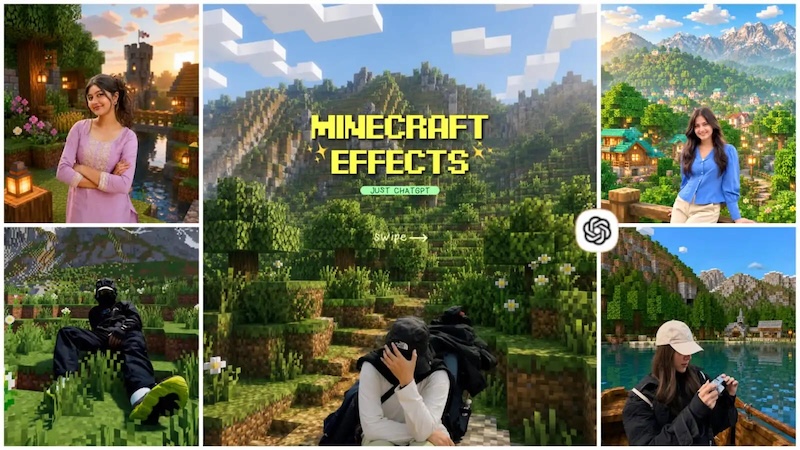
Minecraft’s iconic blocky world has inspired countless creative ideas, from massive landscapes and imaginative builds to memorable character scenes. With ChatGPT, you can turn these ideas into detailed prompts to generate stunning AI images without advanced design skills. Whether you want to recreate a Minecraft-inspired adventure, design unique structures, or experiment with cinematic scenes, the right prompt can make a big difference. In this article, we’ll explore some of the best ChatGPT Minecraft prompts for creating eye-catching AI images without professional help or editing experience.
Part 1: About Minecraft

Minecraft is a 3D sandbox game developed by Mojang Studios where players interact with a fully modifiable three-dimensional environment made of blocks and entities. The game lets players explore vast worlds, gather resources, craft tools, build structures, and create their own adventures. Players can also choose from different game modes, including Survival, Creative, Adventure, and Spectator, each offering a different way to experience the Minecraft world. The game is available on multiple platforms, including Linux, macOS, Windows, PlayStation, and Xbox.
Part 2: 11 ChatGPT Minecraft Prompts to Generate Amazing Images
Looking for the trending Minecraft AI photo editing prompts? Look no further! Below, we’ve mentioned the top 11 Minecraft AI photo editing prompt ChatGPT that can help you transform ordinary images into creative Minecraft-inspired visuals.
1 Minecraft Village Adventure
“Transform the uploaded photo into a fully Minecraft-themed village adventure scene. Preserve the person’s facial features, pose, body proportions, and recognizable appearance while converting the surroundings into a blocky Minecraft world. Place the subject standing near wooden houses, farms, lanterns, crafting tables, and villagers. Add green pixelated grass, mountains, trees, and a bright blue sky in the background. Use authentic Minecraft-inspired block textures, vibrant colors, soft cinematic lighting, sharp details, and a playful adventure atmosphere while keeping the subject naturally integrated into the environment.”
2 Minecraft Ocean Monument
“Convert the uploaded image into an underwater Minecraft adventure at a massive ocean monument. Keep the person recognizable, preserving their facial features, pose, and overall appearance while placing them in a vibrant underwater environment. Surround the subject with Minecraft-style prismarine blocks, glowing sea lanterns, coral reefs, tropical fish, kelp, and mysterious underwater structures. Add realistic underwater lighting, floating particles, blue atmospheric tones, and cinematic depth. Maintain the iconic blocky Minecraft aesthetic while creating a visually immersive scene that feels like an exciting underwater exploration mission.”
3 Minecraft Creeper Night Scene
“Turn the uploaded image into a thrilling nighttime Minecraft survival scene. Keep the subject’s facial characteristics, body proportions, and pose recognizable while placing them in a blocky forest illuminated by moonlight and torches. Add several Minecraft-inspired Creepers hiding between pixelated trees, grass blocks, flowers, and wooden structures. Create a dramatic night sky filled with stars and a bright square moon. Use cinematic lighting, atmospheric fog, vibrant textures, and strong depth. Make the final image feel suspenseful and adventurous while preserving the recognizable appearance of the original subject.”
4 Minecraft Ender Dragon Battle
“Transform the uploaded image into an epic Minecraft Ender Dragon battle scene. Preserve the subject’s recognizable facial features, pose, and overall appearance while placing them on a massive End island surrounded by obsidian towers and glowing End crystals. Show the Minecraft-inspired Ender Dragon flying dramatically across the purple sky behind the subject. Add particle effects, dark clouds, dramatic lighting, and blocky terrain. Give the subject a subtle Minecraft-style adventurer outfit while retaining their identity. Create a cinematic, high-energy composition with sharp details and an authentic Minecraft-inspired visual aesthetic.”
5 Minecraft Jungle Temple Expedition
“Convert the uploaded photo into an adventurous Minecraft jungle temple expedition. Preserve the subject’s facial features, identity, pose, and recognizable appearance while placing them deep inside a lush Minecraft-style jungle. Add a massive jungle temple built from mossy blocks, vines, stone pathways, waterfalls, parrots, and hidden treasure chests. Include sunlight filtering through dense pixelated trees and subtle mist around the environment. Use vibrant colors, cinematic lighting, detailed block textures, and strong depth to create an exciting exploration scene inspired by classic Minecraft adventures.”
6 Minecraft Village Raid
“Turn the uploaded photo into an action-packed Minecraft village raid. Preserve the subject’s recognizable face, pose, and appearance while placing them in the center of a blocky village under attack. Add Minecraft-style villagers, Iron Golems, wooden houses, farms, bells, and defensive structures throughout the scene. Include distant hostile mobs approaching the village and dramatic clouds overhead. Use dynamic lighting, flying particles, motion effects, vibrant colors, and detailed block textures. Make the subject appear like a brave Minecraft hero defending the village during an intense nighttime battle.”
7 Minecraft Ancient City
“Convert the uploaded image into a mysterious Minecraft Ancient City exploration scene. Keep the subject’s identity, facial characteristics, pose, and proportions recognizable while placing them deep underground among enormous ancient structures. Add Minecraft-inspired deepslate buildings, glowing soul lanterns, sculk blocks, ruined pathways, and mysterious blue lighting. Include subtle darkness and atmospheric particles to create suspense without obscuring the subject. Use cinematic shadows, detailed block textures, dramatic depth, and high visual clarity. Make the final image feel like a tense Minecraft expedition into a forgotten underground civilization.”
8 Minecraft Potion Laboratory
“Transform the uploaded image into a magical Minecraft potion laboratory. Keep the subject’s facial identity, pose, and recognizable appearance while placing them inside a detailed block-based brewing room. Add Minecraft-inspired brewing stands, potion bottles, bookshelves, chests, enchanting tables, glowing crystals, and colorful magical effects. Surround the room with dark stone walls and warm lantern lighting. Include floating particles and subtle green, purple, and blue potion glows. Use cinematic composition, sharp details, and authentic block-style textures to create the appearance of a powerful Minecraft alchemist preparing mysterious magical potions.”
9 Minecraft Zombie Survival
“Convert the uploaded photo into a dramatic Minecraft zombie survival scene. Preserve the subject’s face, identity, pose, clothing, and overall appearance while placing them inside a blocky village surrounded by Minecraft-inspired zombies at night. Add wooden houses, torches, farms, fences, cobblestone paths, and a large square moon in the sky. Create suspenseful lighting with glowing torches illuminating the environment. Add subtle fog, dramatic shadows, particle effects, and detailed block textures. Make the subject appear ready to survive the night in an intense Minecraft adventure.”
10 Minecraft Woodland Cottage
“Turn the uploaded photo into a cozy Minecraft woodland cottage scene. Preserve the subject’s identity, facial characteristics, pose, clothing, and recognizable appearance while placing them beside a charming block-built cottage surrounded by flowers, trees, mushrooms, and wooden fences. Add a small garden, stone pathway, lanterns, a campfire, and friendly Minecraft animals. Use soft golden-hour sunlight and warm glowing lights from the cottage windows. Create a peaceful, colorful atmosphere with crisp block textures and cinematic depth, making the scene feel like a relaxing Minecraft survival home.”
11 Minecraft Jungle Waterfall
“Transform the uploaded image into a breathtaking Minecraft jungle waterfall scene. Keep the subject’s identity, facial features, pose, clothing, and proportions recognizable while placing them beside a huge cascading block-style waterfall. Surround the area with dense jungle trees, vines, flowers, parrots, bamboo, stone cliffs, and small pools. Add soft sunlight passing through the leaves and mist rising from the water. Use vibrant colors, detailed Minecraft-inspired textures, cinematic lighting, and atmospheric depth to create a peaceful yet adventurous tropical world.”
Part 3: Best Tool to Turn ChatGPT Minecraft Prompt into Engaging Visuals
Hundreds of tools are available online that enable users to turn ordinary images into Minecraft-inspired visuals. However, nothing compares to Edimakor AI. It is an online AI video editor that includes a range of AI-powered tools, including image-to-image, text-to-image, image-to-video, and more. With the help of this tool, you can easily turn ordinary images into Minecraft-inspired visuals with a simple text prompt — no editing experience required. Edimakor AI also allows you to experiment with different creative styles, environments, characters, and visual effects to make your images more engaging. You can combine your own ideas with a detailed ChatGPT prompt to create unique Minecraft-style artwork in just a few moments.
Create NowKey Features of Edimakor AI
- Image-to-Minecraft Visuals: Edimakor AI includes image-to-image features that can transform images into any visual style, including Minecraft. Simply enter the Minecraft background prompt ChatGPT, choose the AI model, and click on the “Generate” button.
- Text-to-Image: The program also includes text-to-image capabilities, allowing users to create high-quality visuals with a simple text prompt — no editing experience or professional help required.
- Multiple AI Models: Edimakor AI offers a wide range of AI models, such as Nano Banana, Nano Banana Pro, Stable Diffusion, Flux, Midjourney, Seedream, Imagen 4, and more.
- Advanced AI Editor: The main purpose of this tool is image and video editing, allowing users to customize visuals according to their requirements. Users can change the background, remove unwanted objects, adjust aspect ratio, and apply different styles.
- Easy-to-Use: One of the standout features of this tool is that it offers an intuitive interface, allowing non-tech and beginner users to create high-quality visuals with ease. No professional help or editing experience is required.
Step-by-Step Guide:
Edimakor AI offers a user-friendly interface, allowing users to create Minecraft-inspired visuals with a simple ChatGPT Minecraft prompt copy and paste. Here is how to do it:
Step 1: Visit the Edimakor AI official site and sign in with your account. Select the “Image-to-Image” tool from the left panel and upload the reference image. Choose the AI model to begin the image creation process.
Step 2: Next, Minecraft AI photo editing prompt copy and paste in the prompt box. Adjust the image settings such as aspect ratio, output number, and resolution. Click on the “Generate” button.
Step 3: Within seconds, Edimakor AI will transform your ordinary image into a Minecraft-inspired visual. Preview the results and go to “My Creation” and download the desired image.
Final Thoughts
In this guide, we’ve mentioned the top 11 ChatGPT Minecraft prompts to help you create unique and engaging AI-generated visuals. From transforming ordinary photos into blocky Minecraft-inspired scenes to creating cinematic landscapes and creative character design, these prompts offer plenty of possibilities for experimentation. With a tool like Edimakor AI, turning these creative prompts into stunning visuals becomes even easier.


Leave a Comment
Create your review for HitPaw articles