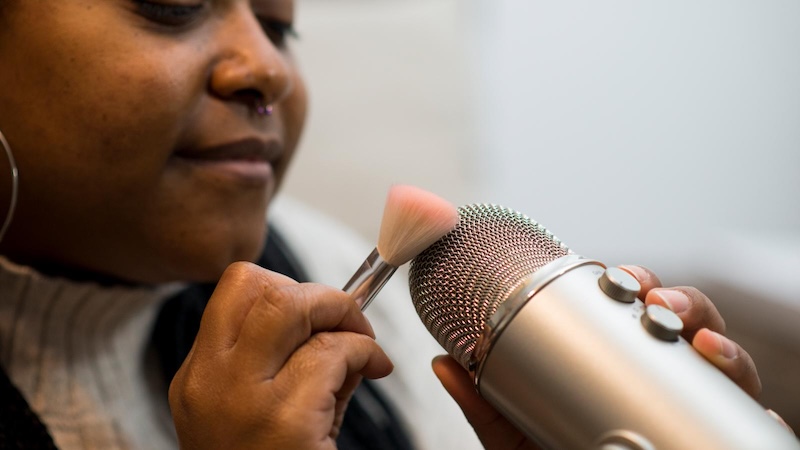
If you’re new to streaming platforms like YouTube, TikTok, or Instagram Reels, and want to capture your audience’s attention instantly, ASMR videos are one of the best content formats to try. Their relaxing sounds, visually satisfying scenes, and high replay value make them incredibly engaging for viewers. In 2026, creating ASMR videos no longer requires expensive equipment or advanced editing skills. With the right prompt, you can generate high-quality ASMR videos in minutes. Follow this guide to discover the best ASMR prompts and how to transform them into stunning, high-quality visuals using the latest AI technology.
Part 1: What are ASMR Videos?

ASMR stands for “Autonomous Sensory Meridian Response.” It’s a sensory phenomenon characterised by a tingling sensation that starts at the head and travels down the spine – it’s been described as ‘low-grade euphoria’! ASMR videos are designed to trigger this response through soothing sounds, gentle movements, and visually satisfying actions. Popular triggers include whispering, tapping, crinkling paper, water pouring, cutting soap, stretching slime, and more. One of the best parts of ASMR videos is that they are widely popular on streaming platforms like YouTube, TikTok, and Instagram Reels. Millions of users watch this type of content daily to relax, improve focus, or fall asleep.
Part 2: 11 Must-Try ASMR Prompts for AI Video Generators
As we have mentioned earlier, ASMR videos are trending on the internet, capturing millions of views daily. If you want to join this trend, we have the right ASMR AI prompts for you. These prompts will help you create high-quality videos within seconds without professional help. Here are the top ASMR prompts for Veo 3, Pixverse V6, Kling, and more.
1. Crystal Fruit Cutting ASMR
“Create an ultra-realistic macro ASMR video of transparent crystal fruits arranged on a marble table. A polished chef's knife slowly slices through crystal apples, strawberries, grapes, and oranges, producing clean cuts, sparkling shards, and mesmerizing reflections. Every slice creates satisfying glass-like sounds with soft echoes. Use cinematic lighting, shallow depth of field, slow-motion close-ups, and smooth camera movements. The background remains minimal and elegant, emphasizing the realistic textures, crisp audio, and hypnotic visual details for a premium ASMR experience.”
2. Rainbow Soap Carving ASMR
“Generate a relaxing ASMR video featuring colorful handmade soap bars stacked neatly on a wooden surface. A sharp carving tool slowly cuts perfect layers from each soap, revealing vibrant rainbow patterns inside. Capture satisfying scraping, slicing, and crumbling sounds with crystal-clear audio. Use soft natural lighting, macro cinematography, slow-motion effects, and seamless transitions between different soap colors. Every cut should feel smooth, relaxing, and visually satisfying while maintaining an ultra-realistic appearance.”
3. Slime Stretching and Bubble Popping ASMR
“Create a realistic ASMR video featuring glossy transparent slime mixed with glitter, beads, and colorful pearls. Hands gently stretch, fold, twist, and squeeze the slime, creating satisfying bubble pops and sticky sounds. Focus on close-up macro shots with soft lighting and smooth camera movement. Highlight realistic slime elasticity, reflective textures, and crisp audio. Alternate between different slime colors and textures to keep the visuals fresh, relaxing, and highly engaging.”
4. Water Droplet Symphony ASMR
“Generate a calming ASMR video featuring crystal-clear water droplets falling onto different glass bowls, stones, leaves, and reflective surfaces. Every droplet creates unique ripple patterns and soothing sounds. Capture ultra-slow-motion splashes with macro cinematography and realistic reflections. Use peaceful ambient lighting, subtle nature backgrounds, and gentle camera movement. The visuals should feel tranquil, elegant, and immersive, delivering a relaxing experience suitable for sleep and meditation.”
5. Floral Jelly Cutting ASMR
“Create an elegant ASMR video featuring transparent jelly desserts containing realistic edible flowers suspended inside. A delicate knife slowly slices each jelly into perfectly smooth layers, creating gentle wobbling movements and soft cutting sounds. Use pastel backgrounds, soft daylight, macro cinematography, and ultra-realistic textures. Showcase multiple flower varieties and colorful jelly flavors while maintaining a peaceful, luxurious atmosphere that feels visually satisfying and incredibly relaxing.”
6. Candle Wax Peeling ASMR
“Generate a soothing ASMR video showing colorful handmade candles slowly melting before their cooled wax layers are gently peeled away by hand. Capture soft peeling, cracking, and stretching sounds with immersive audio. Use warm ambient lighting, close-up macro shots, and cinematic slow motion. Showcase candles in different colors, shapes, and fragrances while emphasizing smooth textures, satisfying movements, and a cozy atmosphere throughout the video.”
7. Moon Sand Layer Slicing ASMR
“Create an ultra-realistic ASMR video featuring colorful moon sand compressed into perfectly layered blocks. A polished blade slowly slices through the layers, revealing clean patterns and soft cascading sand. Record crisp cutting, crumbling, and brushing sounds using immersive binaural audio. Use macro shots, pastel lighting, shallow depth of field, and slow-motion effects. Alternate between different color combinations to keep every slice visually unique and relaxing.”
8. Glass Marble Organization ASMR
“Produce a satisfying ASMR video where hundreds of colorful glass marbles are sorted into elegant glass containers. Capture gentle tapping, rolling, clinking, and pouring sounds with crystal-clear audio. Use overhead and macro camera angles, soft diffused lighting, and smooth transitions. Showcase marbles of different colors, sizes, and transparent patterns arranged into perfect gradients. The video should feel clean, organized, visually hypnotic, and highly engaging for ASMR audiences.”
9. Colorful Pencil Shaving ASMR
“Create an ultra-realistic macro ASMR video featuring premium colored pencils arranged in a rainbow gradient on a clean wooden desk. A sharp precision sharpener slowly creates long, delicate wood curls while exposing vibrant pencil cores. Capture crisp shaving sounds, gentle tapping, and soft rolling noises with immersive binaural audio. Use cinematic lighting, shallow depth of field, and slow-motion close-ups. Every shaving should produce perfect spiral curls and satisfying textures that create a calming, visually mesmerizing experience.”
10. Rainbow Foam Cube Cutting ASMR
“Generate a visually satisfying ASMR video featuring colorful memory foam cubes stacked into geometric towers. A razor-sharp blade slowly slices through each cube, revealing smooth layers and vibrant color gradients. Record soft cutting, compression, and expansion sounds with realistic binaural audio. Use macro close-ups, pastel backgrounds, cinematic lighting, and slow camera movements. Every cut should feel clean, soft, and oddly satisfying while showcasing the foam's realistic texture and movement.”
11. Sugar Crystal Crushing ASMR
“Create a hyper-realistic ASMR video featuring giant colorful sugar crystals arranged on a marble countertop. A polished metal press slowly crushes each crystal into sparkling fragments, producing crisp cracking sounds and shimmering particles. Capture ultra-detailed macro shots, slow-motion effects, and cinematic lighting. Emphasize the vibrant crystal colors, satisfying crunching audio, and realistic reflections to deliver a luxurious and visually captivating ASMR experience.”
Part 3: Create Viral ASMR Videos With Edimakor AI Using Text Prompts
If you don’t have the editing skills to create ASMR videos, don’t worry — AI has made the process easier than ever. With Edimakor AI, you can turn simple text prompts into realistic ASMR videos within minutes. The program only required an ASMR prompt free to create engaging videos, so no editing experience or professional help was required. The best part of this tool is that it offers an intuitive interface, allowing non-tech and beginner users to create high-quality videos with ease. In addition, the program includes popular AI models, such as Google Veo 3.1, Kling 3.0, PixVerse, Happy Horse, and more.
Key Features
- Text-to-Video: Edimakor AI enables users to create high-quality and engaging videos with simple text prompts, meaning users can generate ASMR videos with ASMR prompt ideas — no expensive camera, production teams, or professional help required.
- Multiple AI Models: The program isn’t limited to a single AI model. Instead, it provides access to a wide range of advanced AI video generation models, including Google Veo 3.1, Kling 3.0, Seedance, PixVerse, Happy Horse, and Wan.
- Image to Video: The standout feature of Edimakor AI is that it also includes Image-to-Video capability. You can upload a single image and transform it into a realistic animated video with smooth motion and cinematic camera effects.
- Compatibility: Edimakor AI works seamlessly with multiple devices, including Android, iOS, Windows, and macOS. This web-based tool also supports popular web browsers, such as Google Chrome, Firefox, Opera, Microsoft Edge, and more.
- Intuitive Interface: The program offers a clean and beginner-friendly interface designed for users of all skill levels. All of its AI tools and editing features are organized, making it easy to create videos without editing experience or professional help.
How to Create an ASMR Video With Edimakor AI?
Follow the instructions below to learn how to create an ASMR video with Edimakor AI using ASMR prompts:
Step 1: Navigate to Edimakor AI's official site and log in with your account. Choose the “Text-to-Video” option from the left panel and enter the ASMR prompt into the prompt box. Users can also choose the desired AI model.
Step 2: Once you have entered the AI prompt, scroll down and select the video settings. Users can adjust the duration of the video, resolution, and aspect ratio.
Step 3: In the end, click on the “Generate” button to begin the video creation process. Within seconds, your AI ASMR video will be ready. Preview the results, and click on the “Download” button to save the video in a popular format, such as MP4.
Final Thoughts
With ASMR prompts and tools like Edimakor AI, users can easily create popular ASMR videos within seconds. Whether you’re producing relaxing soap-cutting clips, slime-stretching animation, or other trending ASMR content, AI eliminates the need for advanced editing skills or expensive equipment.


Leave a Comment
Create your review for HitPaw articles