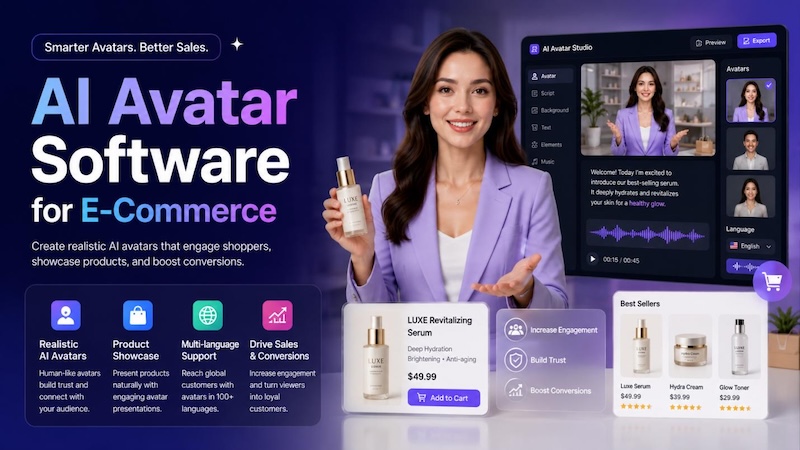
AI now runs much of the e-commerce marketing stack. It writes the email, picks the SMS send time, and personalizes the homepage. Now, AI avatars are taking product marketing to the next level by helping brands create engaging videos without expensive production teams or professional actors. From product demonstrations and tutorials to social media ads and personalized shopping content, AI avatars make video creation faster, easier, and more scalable. In this guide, we’ll mention the best AI avatar software for e-commerce in 2026 and how they can help businesses create professional product videos that attract customers.
Part 1: Quick Comparison: Best AI Avatar Software for E-Commerce
If you need AI avatar software for e-commerce, the right choice depends on how you plan to use it. Some tools focus on presenter-led product videos, while others are built around product ads, social commerce, or multilingual content. The table below compares the main features and use cases of seven AI avatar tools.
| Tool | Type | Best For | Key E-Commerce Features | Video Editing | Free Option |
|---|---|---|---|---|---|
| Edimakor | AI avatar + video editor | Product demos and presenter-led videos | AI avatars, voiceovers, captions, product footage, text, effects, and AI video tools | Built-in editor | Free version available |
| HeyGen | AI avatar video platform | Product videos and localized content | Product showcases, avatar demos, UGC-style ads, product images, multilingual video | Yes | Free plan available |
| D-ID | AI avatar and digital presenter platform | Product explainers and digital presenters | Talking avatars, custom presenters, lip sync, translation, interactive AI agents | Basic editing | Free trial available |
| Elai | AI presenter video generator | Product explainers and marketing presentations | AI presenters, script-to-video, customizable scenes, voices, and multilingual content | Yes | Free trial available |
| Synthesia | Business AI avatar platform | Professional product and brand videos | AI avatars, personal avatars, AI voices, branded videos, multilingual content | Built-in editor | Free plan available |
| Creatify | AI e-commerce ad generator | Product ads and social commerce creatives | Product URL-to-video ads, AI scripts, avatars, voices, product-focused creatives | Yes | Free option available |
| Pippit | AI e-commerce content platform | Product videos and social commerce content | Product content, AI videos, templates, marketing creatives, and social commerce tools | Yes | Free plan available |
Part 2: What Are AI Avatars for E-Commerce?

AI avatars for e-commerce are digital presenters that use artificial intelligence to create videos featuring a virtual person, voice, and facial expressions. Instead of filming a real presenter for every product video, businesses can use AI avatars to introduce products, explain features, and create promotional content from a script and product assets.
Depending on the platform, you can choose a ready-made avatar, create a custom digital presenter, add product images or video clips, and generate videos in different languages and formats. This makes AI avatars useful for creating product content at scale across online stores, social media, and marketing campaigns.
How AI Avatars Are Used in E-Commerce
- Product demos: Show how a product works, highlight key features, or demonstrate how to use it.
- Product explainers: Use an AI presenter to explain product benefits, specifications, or common customer questions.
- UGC-style ads: Create presenter-led videos with a more casual, creator-style format for platforms such as TikTok, Instagram, and YouTube.
- Social media videos: Produce short promotional videos, product announcements, seasonal campaigns, and other social content without recording a new presenter each time.
- Product page videos: Add short videos to product listings to introduce products, explain features, or show them in use.
- Multilingual content: Create localized versions of product videos using AI voices, lip sync, and multiple languages for different markets.
Part 3: 7 Best AI Avatar Software for E-Commerce in 2026
AI avatar tools are useful for more than presenter-led videos. Depending on the platform, e-commerce teams can create product demos, explainer videos, social ads, UGC-style content, and localized product videos without recording a new presenter for every campaign. The seven tools below cover different workflows, from dedicated AI avatar platforms to broader e-commerce video and ad creation tools.
1. Edimakor — AI Avatar Videos with Built-In Video Editing
Best for: Creating presenter-led product videos and editing them in the same workflow
Type: AI avatar and video editing software
Edimakor combines AI avatar generation with a broader video editing workflow. Instead of focusing only on generating a talking avatar, it lets users build an avatar-led video and then add product images, video clips, text, captions, music, transitions, and other elements in the editor.
This makes it useful for e-commerce creators who want an AI presenter to introduce a product but still need control over the rest of the video. For example, you can use an avatar to explain a product feature, then cut to product footage or images to demonstrate how the product works.


Key Features of HitPaw Edimakor
- Lifelike AI Avatars: One of the standout features of HitPaw Edimakor is that it offers a huge collection of AI avatars, each from different industries and roles. It includes avatars of salesmen, professionals, teachers, students, doctors, nurses, hosts, news reporters, and more.
- Text-to-Speech: HitPaw Edimakor Text-to-Speech feature enables users to create voiceover in multiple voices with a simple text prompt. Simply enter the product demo script, choose the AI voice, and click on the “Generate” button. It automatically generates synchronized lip movements that match your avatar’s speech.
- Customization Options: The program offers advanced customization options, allowing users to alter the product demo video according to their requirements. Users can change the background, add product images, insert text, include captions, adjust the avatar’s appearance, and add music.
- Text-to-Video: Another amazing feature of HitPaw Edimakor is its Text-to-Video. With this tool, users can create various types of videos with simple text prompts, such as product demos, tutorials, explainer videos, how-to guides, and more.
- Intuitive Interface: The best part of HitPaw Edimakor is that it offers an intuitive and simple interface, allowing users to operate the program's features without professional help.
How to Create Engaging E-Commerce Content With HitPaw Edimakor?
With HitPaw Edimakor’s AI Avatar feature, you can easily create engaging e-commerce content without hiring professional actors or spending hours recording and editing videos. Here is how to do it:
Step 1: Navigate to the HitPaw Edimakor official site and download the latest version of the program on your PC. Launch it and select the “AI Avatar” feature from the main interface.
Step 2: First, use the “Text-to-Speech” tool to create the AI Avatar voiceover. Enter the product demo script in the empty box and select the AI voice. The program offers hundreds of AI voice options to choose from. Plus, you can create your own voice effect using the “Voice Cloning” feature.
Step 3: Once the voiceover is ready. The next step is to choose the desired AI avatar. HitPaw Edimakor provides a variety of AI avatars, allowing you to select a presenter that best matches your product and target audience.
Step 4: After everything is ready, click on the “Generate” button. The AI avatar will deliver your script with synchronized speech and lip movements. Preview the video and, if satisfied, click on the “Download” button.
2. HeyGen — AI Avatar and E-Commerce Video Platform
Best for: Creating product videos, AI presenter videos, and localized e-commerce content
Type: AI avatar and e-commerce video generator
HeyGen offers both AI avatar creation and dedicated e-commerce video features. Users can start with product descriptions or product images, generate product videos, and add an AI spokesperson when a presenter-led format is needed. Its e-commerce workflow also supports product demos, social ads, product-page videos, and content for multiple markets.
For brands with a large product catalog, its ability to create variations from product information can be useful when producing video content at scale. HeyGen also provides multilingual video and translation features for businesses targeting different markets.
Key Features
- AI spokespersons and avatars
- Product videos from text prompts or product images
- Product photo-to-video generation
- UGC-style product ads
- AI voiceovers and captions
- Multilingual video localization
- Product placement with AI avatars
Pros
- Dedicated e-commerce video workflows
- Combines avatars, product visuals, and video generation
- Useful for product pages and social advertising
- Supports multilingual content creation
Cons
- Some advanced avatar and product-placement features are limited to paid plans
- May offer more functionality than needed for users who only want simple talking-avatar videos
3. D-ID — AI Presenters and Digital Avatars
Best for: Creating talking-avatar videos and interactive digital presenters
Type: AI avatar and digital human platform
D-ID focuses on AI-generated video presenters and interactive digital avatars. Users can create avatars from generated characters, photos, or their own recorded footage, then produce videos using text, audio, or scripts.
For e-commerce, D-ID can be used for product explainers, customer-facing presentations, tutorials, and other content where an on-screen digital presenter needs to communicate information. Its platform also includes interactive visual agents that can explain products or answer customer questions using uploaded knowledge.
Key Features
- AI-generated avatars
- Photo-based talking avatars
- Custom avatars from video footage
- AI-generated presenter videos
- Video translation and lip-sync
- Interactive visual agents
Pros
- Multiple ways to create and customize digital presenters
- Useful for product explainers and customer communication
- Supports multilingual video workflows
- Offers both video generation and interactive avatar experiences
Cons
- More focused on presenters and digital humans than product-specific video creation
- Some advanced capabilities are more relevant to business and enterprise workflows
4. Elai — AI Presenter Video Generator
Best for: Creating structured product explainers and presenter-led marketing videos
Type: AI avatar video generator
Elai is an AI video platform built around digital presenters. It can turn written scripts into presenter-led videos without requiring users to record themselves. This makes it suitable for product introductions, how-to content, feature explanations, and other structured e-commerce videos.
For brands that rely on educational product content rather than short-form ad creatives, an AI presenter can provide a consistent format across product tutorials, onboarding videos, and promotional explainers.
Key Features
- AI presenter avatars
- Script-to-video creation
- Customizable scenes and layouts
- AI voice and multilingual content
- Presenter-led product explainers
Pros
- Well suited to structured presenter-led videos
- Useful for tutorials and product explanations
- Supports multilingual content workflows
Cons
- More focused on presenter-based videos than product-focused ad generation
- May require additional editing or product footage for visually rich product demonstrations
5. Synthesia — AI Avatars for Business and Marketing Videos
Best for: Professional product explainers, marketing presentations, and branded video content
Type: Business-focused AI avatar video platform
Synthesia provides AI avatars designed for professional video communication. Its avatar library includes full-body presenters, while its Avatar Builder can generate realistic or stylized characters from prompts. Users can pair avatars with AI voices and use them in marketing, sales, training, and other business videos.
For e-commerce, Synthesia can be useful when a brand needs polished presenter-led videos to explain product features, demonstrate workflows, or communicate product information consistently across markets.
Key Features
- Full-body AI avatars
- Custom and personal avatars
- Prompt-based avatar creation
- AI voices and lip-sync
- Professional video templates
- Multilingual video creation
Pros
- Strong focus on professional presenter-led videos
- Offers both preset and custom avatar options
- Useful for branded product explainers and presentations
- Supports multilingual content
Cons
- More business-oriented than e-commerce-specific
- May be less suitable for highly visual product ads that require extensive product footage or creative effects
6. Creatify — AI Product Ads from Product URLs
Best for: Turning product pages into e-commerce video ads
Type: AI e-commerce ad and video generator
Creatify takes a different approach from traditional AI avatar platforms. Instead of starting with an avatar, you can provide a product URL and let the platform analyze the product information and visuals before generating video-ad concepts. You can then select a script, customize the visual style, voice, and avatar, and render the final ad.
This makes Creatify particularly relevant for e-commerce marketers who need to turn product listings into multiple advertising creatives rather than simply create a presenter video.
Key Features
- Product URL-to-video ad generation
- AI-generated ad scripts
- AI avatars and voices
- Product-focused video creatives
- Multiple ad variations
- Social advertising workflows
Pros
- Built around e-commerce advertising workflows
- Can start from an existing product URL
- Useful for testing multiple creative angles
- Combines product information, avatars, scripts, and video generation
Cons
- More focused on advertising than general-purpose AI avatar videos
- May not be the best fit for long-form product tutorials or traditional presenter-led content
7. Pippit — AI Product and Social Commerce Video Creator
Best for: Creating product videos and social commerce content at scale
Type: AI e-commerce content and video platform
Pippit is designed around e-commerce content creation rather than AI avatars alone. It can be useful for creating product-focused videos, social content, and promotional creatives, making it a broader option for brands that need both product presentation and marketing assets.
Compared with avatar-first platforms, Pippit is better considered when your workflow includes product content, social commerce, and multiple marketing formats rather than only presenter-led videos.
Key Features
- AI product video creation
- Product-focused templates and creative tools
- AI-generated marketing content
- Social commerce content creation
- Product image and video workflows
- AI avatars and presenter-style content
Pros
- Designed specifically around e-commerce content workflows
- Useful for product videos and social media creatives
- Supports multiple types of marketing content beyond avatar videos
- Suitable for brands producing content across multiple products and channels
Cons
- Broader e-commerce platform rather than a dedicated AI avatar tool
- Users looking specifically for advanced avatar customization may prefer an avatar-first platform
Part 4: How to Choose AI Avatar Software for E-Commerce
Not every AI avatar platform is designed for the same type of e-commerce content. Some focus on realistic digital presenters, while others are built around product ads, video editing, or multilingual content. Before choosing a tool, consider the following factors and match them to your content needs.
Avatar Realism
For product demos, testimonials, and presenter-led videos, the avatar should look and sound natural enough to keep viewers focused on the product. Pay attention to facial expressions, lip sync, gestures, voice quality, and how well the avatar handles different scripts.
Recommended: HeyGen and Synthesia are worth considering when realistic, professional-looking presenters are a priority. Creatify is another option for marketers who want realistic AI avatars within a product-ad workflow.
Product Integration
An avatar alone is not enough for most e-commerce videos. Look for tools that let you combine the presenter with product images, product footage, listing information, or other visual assets. This is especially important for product demos and ads where the product needs to remain the focus.
Recommended: Creatify is particularly suited to product-focused advertising because it can use a product URL to pull product information and media before generating an ad. HeyGen is also useful for product demos and product videos, while Edimakor works well when you want to combine an AI avatar with your own product footage, images, text, and other editing elements.
Video Editing
If your videos need more than a talking avatar, check whether the platform includes editing tools for adding product clips, images, captions, music, transitions, graphics, and other elements. A built-in editor can reduce the need to move between multiple applications.
Recommended: Edimakor is a good fit if you want avatar generation and traditional video editing in the same workflow. Synthesia also includes an online video editor with media, animation, branding, and AI-assisted editing features. Creatify is more suitable when the editing workflow is centered on creating and testing product ads.
Localization
For brands selling across multiple markets, look for AI avatar software that supports multiple languages, voices, accents, subtitles, and lip-sync translation. This lets you adapt an existing product video instead of recording a separate version for every market.
Recommended: HeyGen and Synthesia are strong options for multilingual content. HeyGen supports avatar videos and video translation across a broad range of languages, while Synthesia offers multilingual video creation and localization workflows.
Content Formats
Think about where your e-commerce videos will be published before choosing a platform. Product-page videos may need a different format from TikTok ads, Instagram Reels, YouTube videos, or marketplace content. If you plan to create several types of content, choose a tool that supports multiple aspect ratios and gives you enough control over the final video.
Recommended: Choose Creatify if your priority is short-form product advertising and social commerce creatives. HeyGen is a better fit for a broader mix of product demos, social videos, and presenter-led content. Edimakor is useful when you need more hands-on control over the final edit and want to combine avatars with your own footage and graphics. Creatify's current workflow supports product URLs, AI avatars, scripts, captions, and different ad formats, while HeyGen supports product demos, ads, and multiple video formats.
Pricing
Compare pricing based on how much content you actually need to produce rather than choosing a plan based only on the monthly price. Check the number of video minutes or credits included, avatar access, export quality, watermarks, commercial usage, localization features, and whether advanced tools are limited to higher-tier plans.
Recommended: For occasional product videos, start with a tool that offers a free plan or trial and test the output before subscribing. For frequent ad production, Creatify may be more relevant because its workflow is built around producing multiple product-focused ad creatives. For teams creating professional presenter-led content at scale, consider HeyGen or Synthesia. If you also need a broader video editing workflow rather than an avatar-only platform, Edimakor can be a more flexible option.
Part 5: FAQs about AI Avatar Software for E-Commerce
A1: AI avatars can replace some presenter roles, especially for product explainers, tutorials, announcements, and routine marketing videos. However, real creators or models may still be preferable when a campaign depends on authentic customer experiences, physical product demonstrations, or a strong personal connection.
A2: Not always. Some AI avatar tools can create a presenter video from a script alone. However, product photos, footage, screenshots, or other brand assets are useful when the video needs to show specific product details, features, or use cases.
A3: Commercial use depends on the platform, subscription plan, avatar, voice, and other assets used in the video. Before publishing an AI avatar video as an advertisement or product listing, check the tool's current licensing terms and confirm that the selected avatar, voice, music, and media are cleared for commercial use.
A4: They can be useful for product demonstrations and explanatory content, but the final video should follow the marketplace's current content, advertising, and listing requirements. Check the specific requirements for your product category and marketplace before publishing.
A5: The ideal length depends on the channel and purpose. Short social ads usually need a faster presentation, while product explainers and tutorials can be longer. Focus on delivering the key product information early and remove unnecessary dialogue or scenes.
Conclusion
AI avatar software can help e-commerce brands create product demos, explainers, social videos, and other marketing content without recording a presenter for every video. The right tool depends on your priorities, from avatar realism and product integration to editing, localization, content formats, and budget. Tools such as HeyGen, D-ID, Synthesia, Creatify, and Pippit serve different e-commerce workflows, while Edimakor is useful when you want to combine AI avatar generation with hands-on video editing. Compare the features that match your content workflow, then test the output before committing to a plan.
Leave a Comment
Create your review for HitPaw articles