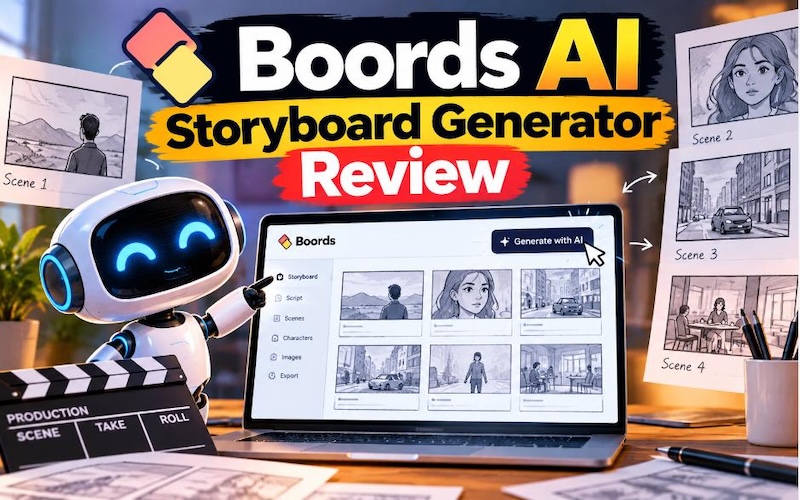
Boords AI Storyboard Generator helps creators turn written scripts and ideas into visual storyboards. It uses artificial intelligence (AI) to create scene images, organize shots, and plan videos before production. The tool also supports frame editing, character consistency, team collaboration, and client feedback. In this review, we will explore Boords' main features, pricing, pros, cons, and ease of use. We will also explain how to create a storyboard step by step. Finally, we will compare Boords with HitPaw Edimakor, an AI video tool that helps creators turn written stories into videos with AI-generated visuals, voices, and editing tools.
Part 1: What Is Boords AI Storyboard Generator?
Boords is an online storyboarding tool that helps people plan videos, films, advertisements, animations, and other visual projects. A storyboard shows how a story will appear on screen, one scene at a time. It gives creators a clear plan before they start filming or editing. The Boords AI Storyboard Generator can turn a written script or a short text brief into a structured storyboard. Users can add scene descriptions, generate images, adjust shots, and arrange frames in the correct order. They can also start with a blank storyboard and build each frame manually. Boords mainly supports the planning stage of video production. For example, a marketing agency can use it to show a client how a 30-second advertisement will look. A filmmaker can plan camera shots before filming, while an animation team can review character actions and scene order. The tool suits video producers, freelancers, creative agencies, filmmakers, and marketing teams.
Part 2: Boords Review — Main Features and Capabilities
Boords offers several features that help users create, review, and share storyboards.
1. AI Script-to-Storyboard
Boords can convert an existing script into a structured storyboard. Users can import a screenplay, paste written content, or describe a video idea. The AI then breaks the content into scenes and suggests suitable shots and visual directions. For example, a script about a student preparing for an exam might include scenes of studying, writing notes, and entering an examination room. Boords can help organize these moments into separate frames. This feature saves time during early planning. However, users should review the generated scenes because the AI may miss important actions or misunderstand parts of the script. Also, later script changes do not automatically update existing storyboard frames, so users must review and revise affected scenes.

2. AI Image Generation
Boords can generate images from text prompts and place them directly into storyboard frames. Users can describe a location, character, action, or camera shot to create a visual reference. The tool supports different visual styles, including sketch-style drawings, illustrations, and realistic images. Users can also upload their own pictures or use stock images and icons. This feature helps creators present their ideas without hiring an artist to draw every early concept. Still, some generated images may not match the original idea, so users should expect to make corrections.
3. Character Consistency
Keeping characters consistent across scenes can be difficult when users generate each image separately. A character might have different clothes, facial features, or hair in later frames. Boords lets users save characters, locations, and props in a shared library. They can reuse these assets across frames to help maintain a consistent look. This feature can help animation teams and filmmakers prepare visual references. However, users should inspect every frame to make sure the character's appearance matches the approved design.
4. Frame Editing and Camera Angles
Boords lets users adjust storyboard frames without rebuilding the entire project. They can change scene descriptions, refine images, and explore different camera angles. For example, a filmmaker can compare a wide shot with a close-up before deciding how to film a conversation. Users can also revise selected parts of an image while keeping the rest of the frame. These tools help teams review creative choices before production begins. They do not replace the need for a director or producer to make final decisions.
5. Collaboration and Feedback
Boords includes tools for sharing storyboards, collecting comments, and tracking approvals. Team members and clients can review frames and leave feedback on specific shots. This setup helps agencies manage client reviews without sending multiple files through email. Teams can also check which frames need changes and which ones have approval. For projects with several people involved, these features can make communication easier and reduce confusion about revisions.
6. Export Options
After completing a storyboard, users can share it online or export it for other production tasks. Boords supports formats and workflows that include PDFs, presentation slides, images, MP4 animatics, and shot lists. It also supports integrations with editing tools such as Adobe Premiere Pro, DaVinci Resolve, and After Effects. These options help production teams move from planning to filming and editing. The exact export options and restrictions may depend on the selected plan.
Part 3: Boords AI Storyboard Generator Review: Pros and Cons
Before choosing Boords, consider its main advantages and limitations.
 Pros
- Saves planning time: AI can turn scripts and ideas into an initial storyboard, reducing manual work.
- Supports visual planning: Generated images help teams understand how scenes may look before filming.
- Helps maintain consistency: Saved characters, locations, and props make it easier to keep a similar visual style.
- Supports teamwork: Comments, sharing links, and approval tools help clients and production teams review work.
- Offers useful exports: Storyboards and animatics can support presentations and later production stages.
- Works for different projects: Users can plan advertisements, films, animations, and educational videos.
 Cons
- Images need checking: AI may create incorrect details or visuals that do not match the script.
- Some revisions take time: Users still need to correct scenes, review characters, and update frames after script changes.
- Paid plans can cost more: Users who need more AI images, team access, or advanced production features may need a subscription.
- Focuses on pre-production: Boords mainly helps users plan and present videos. It does not replace a complete video creation and editing workflow.
- Free-plan limits apply: The free version has limits on active projects, sample AI image credits, and exports.
Overall, Boords is useful for storyboard planning, but creators should consider their budget and final production needs before subscribing.
Part 4: How Much Does Boords Cost?
Boords offers a free plan and several paid subscriptions. According to its official pricing page, the listed paid plans include Solo, Pro, Team, and Agency. Prices and included features can change, so users should confirm the latest details before purchasing.
The pricing page currently lists these options:
- Free: $0 per month, with five active storyboards, three active scripts, and eight one-time sample AI image credits.
- Solo: $39 per month when billed monthly, or $26 per month with annual billing. It supports one user and includes 250 AI images per month.
- Pro: $75 per month when billed monthly, or $50 per month with annual billing. It supports up to five users and includes 1,000 AI images per month.
- Team: $125 per month when billed monthly, or $85 per month with annual billing. It supports up to ten users and includes 2,000 AI images per month.
- Agency: $250 per month when billed monthly, or $165 per month with annual billing. It supports up to 30 users and includes 3,000 AI images per month.
The free plan suits users who want to test the basic workflow. Freelancers can consider Solo if they create storyboards regularly. Pro or Team may suit small production groups, while Agency targets larger creative teams. Remember that unlimited storyboard frames do not mean unlimited AI image generation. Check the current credit allowance, export restrictions, and billing terms before choosing a plan.
Part 5: Best Alternative to Boords for Creating Story Videos — HitPaw Edimakor
Boords is useful for planning scenes and organizing storyboards, but some creators want to turn their written ideas into finished videos. HitPaw Edimakor is worth considering for this purpose. Its Story to Video feature helps users develop written ideas into engaging story videos. The workflow combines AI script generation, character creation, storyboard generation, AI voice generation, and video editing tools. Users can create scenes, add narration, and combine visual elements into a complete video. This makes Edimakor a practical option for beginners, YouTube storytellers, and content creators who want to manage more of the video creation process in one workflow.


Key Features of HitPaw Edimakor
- AI Story and Script Generation: Users can start with a simple idea and develop it into a script. This feature can help beginners who have a story concept but need support with writing scenes and dialogue.
- AI Character Creation: Edimakor can generate characters for story-based videos. Users can prepare a cast and use generated visuals to represent characters throughout their content.
- AI Storyboard Generation: The tool can organize a story into scenes and generate storyboard images. This gives users a visual plan before they assemble the video.
- AI Voice Generation: Edimakor supports AI voices for narration and character dialogue. This can help creators make story videos without recording every line themselves.
- Video Editing and Export: Users can bring scenes, audio, and other visual elements together in the editing workflow. They can then review the result and export a video for their intended use.
Tips:
Want to turn your storyboard ideas into a complete video? Follow our step-by-step guide to creating videos with Edimakor Story to Video and learn how to bring your story to life with AI.
Boords vs. HitPaw Edimakor: Which Should You Choose?
| Comparison | Boords | HitPaw Edimakor |
|---|---|---|
| Main purpose | Storyboard planning | AI video and story-video creation |
| Script-to-scene workflow | Yes | Yes |
| Storyboard generation | Yes | Yes |
| AI voice generation | Supports voiceover and timing workflows | Offers AI voice generation |
| Finished story videos | Focuses on planning, animatics, and production handoff | Designed to create and edit story videos |
| Collaboration | Storyboard sharing, comments, and approvals | Video creation and editing workflow |
| Best for | Agencies and teams planning production | Creators making story-based videos |
The main difference is the intended result. Choose Boords if you need to organize scenes, present shots to clients, and receive approval before production. Choose HitPaw Edimakor if you want to create narrated story videos and edit the scenes into a finished video. Neither tool is automatically the best option for everyone. Compare their current plans, AI limits, and output quality before making your decision.
Part 7: Who Should Use Boords, and Who Should Choose an Alternative?
Different creators need different tools. Your main goal should guide your choice.
- Video production teams: Boords can help organize shots, review frames, and collect feedback before filming.
- Freelance filmmakers: It can help you present a clear visual plan to clients before starting production.
- Marketing teams: It can help plan advertisements, product videos, and campaign content.
- YouTube storytellers: HitPaw Edimakor may suit you better if you want to generate scenes, narration, and a complete story video.
- Beginners: Try the free options first, then compare ease of use, AI limits, editing needs, and total cost.
If you already use a separate video editor, Boords may fit your existing production process. If you want to handle more of the video creation process in one workflow, Edimakor may be a better starting point.
FAQs about Boords AI Storyboard Review
A1: Boords helps users turn scripts and ideas into visual storyboards. It supports scene planning, image generation, feedback, and production preparation.
A2: Yes. Boords offers a free plan with limits on active storyboards, scripts, and sample AI image credits. Some exports may include a watermark. Check its official pricing page for current terms.
A3: Its main benefits include AI-assisted planning, collaboration tools, character libraries, and export options. Its limitations include AI image errors, revision work, subscription costs, and its focus on pre-production.
A4: Yes. You can import a script or paste written content, and Boords can organize it into scenes and storyboard frames. You should review the results and update frames after script changes.
A5: Boords supports animatics and production handoff, but its main purpose is storyboard planning. Creators who want to generate and edit complete story videos may prefer a video tool such as HitPaw Edimakor.
A6: HitPaw Edimakor is an option for creators who want to combine script generation, characters, storyboards, AI voices, and video editing. The best choice depends on your budget and required features.
A7: Yes. Its Story to Video feature lets users enter a story or script, generate scenes and characters, add voices and audio, and prepare a finished video for export.
Conclusion
Boords AI Storyboard Generator is a useful tool for planning videos, organizing scenes, generating storyboard images, and collecting feedback. Its free plan gives beginners a way to test the workflow, while paid plans offer higher AI image limits and team features. However, users must still review generated images and handle changes when scripts change. Boords is best for creators who need a clear plan before production. If your main goal is to turn a written story into a narrated, edited video, HitPaw Edimakor is an alternative worth trying. Compare both tools before choosing the one that fits your work and budget.
Leave a Comment
Create your review for HitPaw articles