Ever wondered what your face would look like in another photo or video? AI swapping is no longer a trick for tech experts. Now, anyone can do it online in minutes.
The problem is that many tools feel clunky, limited, or packed with hidden costs. FaceFusion AI Swap stands out because it’s fast, web-based, and easy to try for free. Still, it has limits you should know before diving in.
This guide walks you through what FaceFusion is, how to use it, its pros and cons, and why Edimakor could be a smarter alternative if you want more control. Let’s dig in!
Part 1: What is FaceFusion?
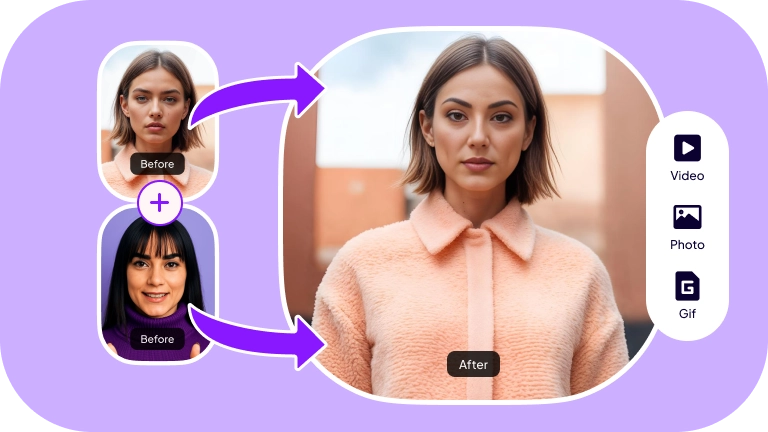
FaceFusion is a web-based app that swaps faces in photos. You open the site, choose two pictures, and it blends them in seconds. Nothing to install and no technical skills are required. It’s popular with people who like making memes, testing looks, or just playing around with images.

The layout feels familiar, more like a social app than an editor. You click, drag, and drop, that’s pretty much it. Once the pictures load, the swap happens automatically. It’s fast and surprisingly accurate for a free tool.
Most users try it for entertainment. But it can also be handy for creative projects. The appeal is its simplicity. Everything works in the browser, and the results appear almost instantly.
Part 2: How to Install and Use FaceFusion AI Swap?
Follow the steps below to use FaceFusion ai swap.
Reminder:
This guide is intended for informational use only and does not represent legal advice. Before accessing or using the relevant features, please confirm that:
- Consider consulting a qualified legal professional in your jurisdiction to understand any legal risks that may apply;
- Carefully read and fully understand the Edimakor Terms of Service and Edimakor Privacy Policy;
- Confirm that any generated content adheres to applicable local, state, and federal laws and regulations, particularly those concerning synthetic media and AI-generated content.
Step 1: Open FaceFusion in your browser. Check the address bar so you know you’re on the official page.
Step 2: Some versions ask you to sign up or log in. If you’d rather not, most will still let you try it without an account.
Step 3: Choose AI Swap from the features menu and click Photo AI Swap.
Step 4: Upload the image with the face you want to ai swap. Clear lighting and a straight-on angle make a big difference.
Step 5: Upload the second image by clicking on the + sign. Again, choose something with a clear view of the person’s face.
Step 6: Once both images are up, a preview shows what the swap will look like. This is where you’ll see if anything’s off.
Step 7: Choose the model, for example, Shape Transformer.
Step 8: Hit the AI Swap Now button. Wait a few seconds while FaceFusion processes the images.
Step 9: Check the finished picture. If it looks good, save it. If not, tweak and try again.
Part 3: Is FaceFusion Free?
FaceFusion lets you try ai swaps for free. You can upload photos and create basic swaps without paying anything. If you want more credits, higher limits, or extra features, you’ll need one of the paid packs.
FaceFusion Pricing Plans
Starter Pack – $13
Good for testing the service. You get 100 credits plus ai swap for videos, video generator, and HD results.
Value Pack – $59
A better choice if you use it more often. Includes 500 credits and the same features as the Starter Pack, but at a lower price per credit.
Pro Pack – $219
Made for creators and heavy users. You get 2000 credits with all the main tools, including a video generator and HD results.
Elite Pack – $499
The biggest bundle. 5000 credits with the full set of tools, ideal for people who use the platform a lot and want the lowest rate per credit.
Card, Coinbase, or direct crypto payment can pay for all plans.
Part 4: Pros and Cons of FaceFusion AI Swap
Have a look at the pros and cons of FaceFusion AI Swap.
Pros
- Easy to use with a clear interface.
- Works online, no software download needed.
- Quick ai swaps with instant previews.
- Supports both photos and videos.
- Multiple payment options, including crypto.
Cons
- The free version has limited credits and features.
- Requires a stable internet connection.
- Accuracy depends on photo quality and lighting.
- High-quality or bulk use requires paid plans.
- No advanced editing tools beyond ai swap.
Part 5: The Best Alternative to FaceFusion AI Swap
Some users find FaceFusion tricky when working with large files or higher resolution videos. These paid credits may also accumulate quickly when you are trying out a lot. Would you like a more streamlined experience with additional in-built features? Edimakor is worth a look.
Edimakor is a simple but powerful ai swap and editing platform built for people who want fast results without extra hassle. It works in your browser or as a desktop app. So you can choose what’s easiest. You post an image or a video, edit it, and almost instantly view the solution.
The design is clear and uncomplicated. It has transparent buttons and panels rather than hidden menus. You can change faces, adjust styles, or export in high quality without worrying about credits or strict limits.
Templates and smart previews save time, while real-time controls make it easy to tweak details. It’s a practical option for anyone frustrated with complicated workflows.


Standout Features of Edimakor AI Swap
- Swap single face or multiple faces in photos and videos.
- Quality ai swaps for both images and videos.
- Replace faces with mosiac, characters or funny memes/stickers.
- Replace faces between genders.
- Export in several resolutions such as HD and 4K.
Conclusion
FaceFusion AI Swap is an easy way to experiment with photos and videos. It works in your browser, gives quick results, and offers paid plans if you need more credits or higher quality. Still, its limits can feel restrictive if you edit a lot or handle large files.
That’s where Edimakor comes in. It combines ai swapping with powerful editing tools, real-time previews, and no confusing credit system. If you’re ready for something smoother and more flexible, Edimakor is a practical next step for creating high-quality swaps without extra hassle.
Leave a Comment
Create your review for HitPaw articles