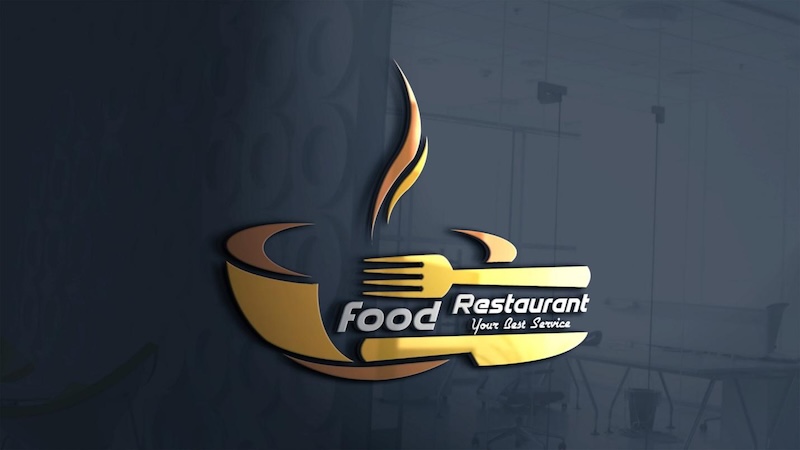
If you’re starting a restaurant business, one of the first things you should prioritize is your restaurant's logo design. Before customers experience your food quality or service, your logo is the first impression they have of your brand. A well-designed logo helps establish your restaurant’s identity, builds trust, and makes your business stand out in a competitive market. Today, in this guide, we’ll share restaurant logo design tips and introduce the best AI restaurant logo generators available in 2026. You’ll also discover powerful AI prompts that can help you create unique and professional restaurant logos that perfectly match your brand identity.
Part 1: Tips for an Amazing Restaurant Logo Design
Designing a restaurant logo is more challenging than it looks. A great logo isn’t created in just a few minutes — it takes hours of brainstorming, experimenting with different styles, and more. Whether you’re designing your first logo or refreshing an existing one, here are some tips that can help you create eye-catching logos:
- Keep It Simple: Logo design for restaurant should be simple and easy to recognize at a glance. Avoid using too many colors, fonts, or graphic elements.
- Identify Your Restaurant Field: The first step is to understand your restaurant's field. Your logo should reflect the type of cuisine and dining experience you offer.
- Pick a Suitable Font: Typography plays a major role in your restaurant’s branding. Choose a font that matches your restaurant’s personality while remaining clear and easy to read.
Part 2: Top 5 Restaurant Logo Design Prompts
If you want to create a high-quality restaurant logo design free, you’re in the right place. Below, we’ve mentioned the top 5 restaurant logo designs prompts that will help you create high-quality and engaging designs within seconds.
1. Modern Minimalist Fine Dining Logo

“Design a sophisticated minimalist logo for a luxury fine dining restaurant named 'The Velvet Table." Use a black, gold, and white color palette with elegant serif typography. Features a subtle fork and wine glass merged into a modern geometric emblem. The design should communicate exclusivity, premium service, and refined cuisine. Keep the composition clean with negative space, balanced proportions, and a timeless aesthetic suitable for menus, signage, business cards, packaging, social media, and upscale restaurant branding.”
2. Vintage Coffee Shop Logo
“Design a vintage-inspired logo for a cozy coffee shop named 'Morning Brew Café." Include a steaming coffee cup, roasted coffee beans, and subtle decorative flourishes. Use warm brown, beige, and cream colors with retro typography that feels welcoming and nostalgic. The logo should convey handcrafted coffee, comfort, and community while maintaining a clean, professional appearance. Make it suitable for takeaway cups, café signage, menus, merchandise, and digital marketing materials.”
3. Bold Fast Food Burger Logo
“Generate a vibrant and energetic logo for a burger restaurant named 'Stack House Burgers." Include a juicy burger, flames, and bold typography in red, yellow, orange, and black. The design should capture speed, flavor, excitement, and youthful energy. Use modern vector illustration with thick outlines and dynamic shapes to create a memorable brand identity. Ensure the logo looks eye-catching on food packaging, digital advertisements, restaurant signage, uniforms, and delivery apps.”
4. Luxury Steakhouse Logo
“Create a premium logo for a steakhouse named 'Prime Cut Grill." Incorporate a premium steak silhouette, grilling flames, and crossed chef knives within a refined emblem. Use black, dark red, charcoal, and gold colors with bold serif typography. The logo should convey strength, luxury, craftsmanship, and premium-quality meat. Design it with a classic yet modern appearance that works beautifully on restaurant entrances, leather menus, uniforms, branded merchandise, and digital advertisements.”
5. Playful Dessert & Bakery Logo
“Generate a cheerful and colorful logo for a bakery called 'Sweet Crumbs." Include cupcakes, macarons, donuts, or pastries in pastel pink, mint, cream, and light yellow. Use playful handwritten typography that feels fun and inviting. The logo should communicate sweetness, creativity, freshness, and family-friendly charm. Design a modern flat illustration suitable for cake boxes, bakery packaging, café signage, Instagram branding, business cards, menus, and promotional posters.”
Part 3: How to Turn Prompts into Engaging Restaurant Logo Designs
In 2026, you don’t need to hire a professional restaurant logo designer to create engaging and high-quality logos. With the help of tools like HitPaw Edimakor, anyone can design high-quality logos in just a few minutes. HitPaw Edimakor includes an advanced text-to-image feature that allows users to create high-quality restaurant logos with simple text prompts — no editing experience required. Simply, enter the logo prompts, choose the AI model, adjust the image settings, and click on the “Generate” button. Within seconds, HitPaw will generate an eye-catching logo. In addition, Edimakor also enables users to customize existing logo designs with ease. You can modify colors, fonts, icons, layouts, and shapes.
Key Features of HitPaw Edimakor
- Text-to-Image: Want to create a logo design of restaurant? HitPaw Edimakor enables users to generate high-quality and eye-catching logo designs with simple text prompts — no editing experience or professional help required.
- Image-to-Image: With this feature, users can transform existing logos into unique, modern restaurant logo designs. Simply upload your current logo or reference image, enter the new logo prompt, and click on the “Generate” button.
- Multiple AI Models: HitPaw Edimakor includes a wide range of AI models, each with unique capabilities and features. Available AI models on this program are Nano Banana, Nano Banana Pro, Flux, Midjourney, Stable Diffusion, and Seedream.
- Powerful AI Tools: This program isn’t limited to image generation. The tool offers a wide range of AI tools, each with unique features, such as text-to-video, text-to-speech, AI video enhancer, online video editor, headshot generator, and more.
- Intuitive Interface: One of the standout features of this tool is its easy-to-use interface, allowing non-tech and beginner users to generate restaurant logo designs without prior editing experience.


Step-by-Step Guide:
HitPaw Edimakor enables users to create high-quality restaurant logo designs with simple text prompts. Here is how to do it:
Step 1: Select Text to Image Option
Download, install, and launch HitPaw Edimakor on your PC. Choose the “Toolbox” option from the left panel and select the “Text-to-Image” tool.
Step 2: Choose The AI Model
Next, select the AI Model. The program offers a wide range of AI models, such as Google Nano Banana, Nano Banana Pro, Seedream, Flux, Midjourney, and more.
Step 3: Enter Restaurant Logo Design Prompt
Scroll down and enter the restaurant logo design prompt in the prompt box. Make sure to add detailed information, such as the restaurant’s name, cuisine type, icons, and overall design aesthetic.
Step 4: Generate and Download
Once all the requirements are complete, click on the “Generate” button. Preview the results and download the image in desired formats, such as PNG.
Conclusion
A well-designed restaurant logo is one of the most important elements of a successful brand. With the latest AI logo generators, users can easily generate high-quality restaurant logo designs. In 2026, HitPaw Edimakor is the best AI text-to-image generator available. With this tool, users can easily generate engaging logos with a simple text prompt.
Leave a Comment
Create your review for HitPaw articles