A lot of TikTok ads do not lose because the product is bad. They lose because the discount code is under the caption, the CTA is behind the share button, and the hook text sits exactly where TikTok puts its interface. This is where the TikTok safe zone becomes important. They help creators position text, logos, products, and other key elements where viewers can easily see them without being covered by TikTok’s on-screen controls. Whether you are creating ads, promotional videos, or regular TikTok content, understanding safe zones can improve visibility and make your videos look more polished. In this guide, we’ll explain TikTok safe zones and how to use them effectively.
Part 1: What is a TikTok Safe Zone?

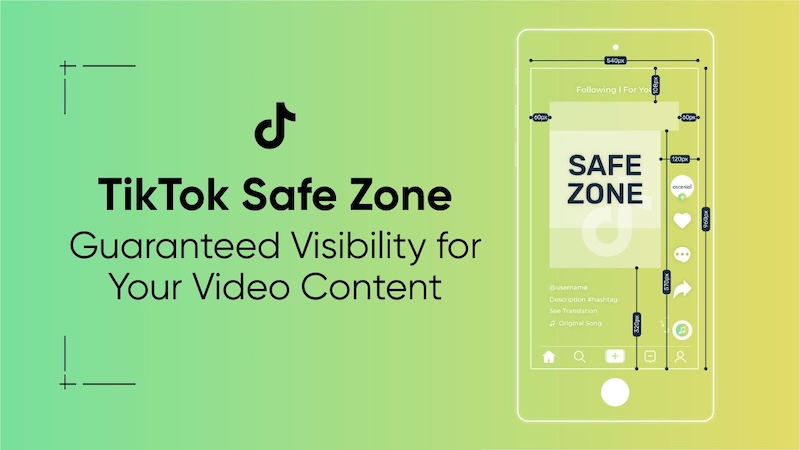
The TikTok safe zone is the center portion of your 1080 x 1920 video that stays fully visible once TikTok’s own interface is layered on top. The Following/For You tabs, profile information, captions, music details, like, comment, and share buttons can cover different parts of the screen. If you place important text in those areas, viewers may struggle to see them.
For this reason, creators should keep the most important parts of the videos, such as the main headline, CTA, product details, discount codes, logos, and faces, within the central safe area. A properly designed safe zone helps ensure that your message remains visible and easy to understand while viewers watch the video.
Part 2: What is the TikTok Safe Zone Size?
TikTok videos are designed primarily for vertical viewing, making the 9:16 aspect ratio the standard format for creating full-screen content. A 1080 x 1920 pixel resolution is commonly used because it provides sharp, high-quality visuals while fitting modern smartphone screens. Here is the Safe Zone TikTok size:
- Top band - username and sound label, about 150 - 200 pixel high.
- Right edge - like, comment, and share icons, roughly 120 pixels wide.
- Bottom area - caption bar and CTA button, another 250 - 300 pixels deep.
What remains in the center band in your TikTok screen safe zone, where creators should place the most important elements of their videos. This includes the main headline, product, person’s face, logo, discount code, and CTA.
Part 3: TikTok Safe Zones: Where Not to Place Content
Places where the TikTok interface overlays appear are commonly known as TikTok danger zones. These areas can contain buttons, captions, usernames, and other interface elements that may cover important parts of your video. Here are the three danger zones of TikTok:
- Bottom-Left: This area can contain the username, caption, and music ticker stacked vertically here, creating the largest single overlay area. A standard 2-line caption can cover 300 px from the button on the left half. A longer caption (3-4 lines) covers even more.
- Right Side: The engagement buttons, such as avatars, like, comment, bookmark, and share, are displayed along the right side of the TikTok screen. This column is always visible and can’t be hidden.
- Top: The For You / Following tabs and search icon cover the top -100 px. Less problematic than the bottom, but text or logos placed at the very top of the frame are partially obscured.
Part 4: TikTok UI Overlays Beyond Safe Zones Explained
Below, we’ve mentioned every element TikTok places on top of your video, mapped to exact positions on a 1080 x 1920 canvas:
| UI Element | Position | Coverage |
|---|---|---|
| Username + Follow Button | Bottom-left | 400 x 40 px |
| Caption Text 2 Lines | Bottom-left | 700 x 80 px |
| Caption Text 4+ Lines | Bottom-left | 700 x 200 px |
| Creator Avatar | Right side, upper | 60 x 60 px |
| Music / Sound Disk | Bottom-left | 500 x 30 px |
| Bookmark Button | Right side | 60 x 70 px |
| Share Button | Right side | 60 x 70 px |
| For You / Following Tabs | Top center | 400 x 50 px |
| Search Icon | Top right | 40 x 40 px |
| Progress Bar | Very bottom edge | Full width x 4 px |
Part 5: Why Are TikTok Safe Zones Important?
TikTok safe zones are important because they help ensure that the most valuable parts of the video remain visible while users watch and interact with your content. Even if your video looks perfect in an editing program, TikTok’s interface can cover text, logos, products, or a call to action after it is uploaded.
Staying within the TikTok safe zone overlay can help you:
- Build Trust: Visibility helps your audience trust you and take action. When your brand name, product details, pricing, or message is clearly visible, viewers can understand your content without guessing what you are offering.
- Keep Important Text Visible: The TikTok safe zone prevents headlines, subtitles, discount codes, and other important information from being covered by TikTok’s interface.
- Protect Your CTA: Keep buttons such as “Shop Now,” “Learn More,” or “Follow for More” away from areas where interface elements may appear. A clearly visible CTA makes it easier for viewers to understand what they should do next.
- Create Professional-Looking Videos: Ensure elements like captions, CTA, pricing, and product details are within the safe zone without overlapping TikTok’s interface. This creates cleaner and more professional-looking videos.
Part 6: Common TikTok Safe Zone Mistakes
As we all know, a well-edited TikTok video can lose its impact when important elements are placed outside the safe zone. Here are some common mistakes to avoid:
- Putting the main caption at the very bottom of the video. If your main message is placed too low, it can overlap with TikTok interface elements and become difficult for viewers to read.
- Adding “Shop Now,” “Learn More,” or “Follow for More” on the right side can cause these messages to overlap with TikTok’s Like, Comment, Bookmark, or Share buttons.
- A video may look perfectly positioned in an editing program but appear differently when viewed inside TikTok. Preview the final video on a mobile screen before publishing on TikTok.
Part 7: Best Tool for Creating TikTok Videos Within Safe Zones: HitPaw Edimakor
After reading about the TikTok Safe Zone, you may be wondering which tool can help you create and edit videos with proper content placement. HitPaw Edimakor is a beginner-friendly video editor that provides useful tools for creating safe zone videos for social media platforms like TikTok. It provides a TikTok safe zone template that enables users to test their video layout before publishing. Creators can use the template as a visual guide to identify areas where TikTok’s interface may appear and position important elements accordingly. The software also includes a range of AI-powered features, templates, effects, transitions, and editing tools that can help creators build engaging TikTok content without requiring advanced editing experience.


Key Features of HitPaw Edimakor
- TikTok Safe Zone Template: The program offers a built-in TikTok safe zone template, allowing users to adjust their video size, add captions, and move important elements before publishing on TikTok.
- AI Video Editor: One of the standout features of this tool is that it offers a powerful AI video editor. With the help of this tool, users can adjust the video dimensions, speed, aspect ratio, and positioning to create content suitable for TikTok.
- Multiple AI Tools: The program isn’t limited to AI video editing. It includes powerful AI tools, such as text-to-video, image-to-video, AI voice changer, AI video enhancer, voice cloning, and more.
- Compatibility: HitPaw Edimakor works seamlessly with multiple devices, including Windows and macOS. Supports all Windows versions, such as Vista, XP, 7, 8, 8.1, 10, and 11.
- Intuitive Interface: The best part of this tool is that it offers an easy-to-use interface, which is ideal for non-tech and beginner users. Users can edit their TikTok videos without editing experience or professional help.
How to Create a TikTok Safe Zone Video With HitPaw Edimakor
Creating a TikTok safe zone video with HitPaw Edimakor is simple. Follow the instructions below to do it:
Step 1: Download, install, and launch HitPaw Edimakor on your PC. Choose the “New Project” option from the main interface. Click the “Import” button and upload your TikTok video. Then go to Player > Toursmore > Safe Zones.
Step 2: Click on the “Safe Zones” option and select the TikTok from the drop-down menu. The program offers different social media safe zone templates, including Instagram, YouTube, and more.
Step 3: TikTok Safe Zone template will appear on your video. Now, you can add captions, CTAs, logos, product details, and other important elements while using the template as a visual guide. Once the editing is complete, click on the “Export” button to download the video.
Final Thoughts
If you want your videos to truly stand out on TikTok, then following the safe zone guidelines is an important part of the editing process. This article provides you with the complete TikTok Safe Zone guidelines, allowing users to create engaging and high-quality TikTok content. Plus, tools like HitPaw Edimakor make the process easier by providing editing features and a TikTok Safe Zone template.
Leave a Comment
Create your review for HitPaw articles