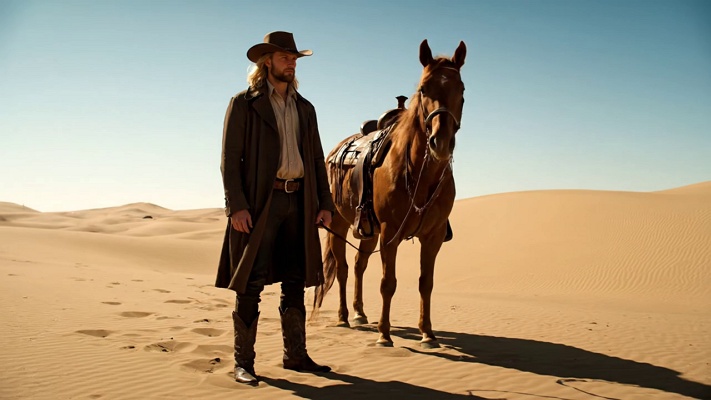
Scrolling through social media, you pause on a soft, glowing portrait filled with pastel light and calm energy. That’s the magic behind the aura farm photo prompt trend. By using carefully crafted AI prompts, creators can generate dreamy visuals that blend color, emotion, and atmosphere. This article explores how aura farm prompts work and how to use them to create visually soothing, aesthetic images.

Part 1. Best Aura Farm AI Photo Prompts for Image Editing
By pairing carefully written Aura Farm AI photo prompts with an aura photo frame upload. The following prompts focus on editing-friendly results, helping you achieve polished images without losing the vibe:
- Cinematic aura farm portrait of a rugged man walking a calm horse along a dusty countryside path, golden-hour light, soft haze, earthy tones, shallow depth, tranquil mood, realism, film grain.
- Dreamy aura farm scene featuring a confident rancher leading a glossy horse through open fields, pastel sky, warm sunlight, gentle dust, cinematic framing, relaxed posture, natural textures, photorealistic detail, and clarity.
- Soft-focus aura farm photography of a stylish man and horse walking together, rural trail, muted colors, airy atmosphere, balanced composition, emotional calm, lifestyle editorial look, cinematic lighting, subtle motion, blur.
- Golden aura farm visual capturing a man in a leather jacket guiding a horse, sunlit meadow, long shadows, warm palette, peaceful energy, depth-of-field, storytelling vibe, premium realism, slow-walk motion, cinematic clarity.
- Aesthetic aura farm portrait with countryside elegance, man and horse strolling a dirt road, soft clouds, natural light bloom, earthy fashion, confident stride, serene mood, cinematic realism, fine grain, texture.
- Moody aura farm image of a lone ranch figure walking a horse, expansive landscape, distant hills, neutral tones, soft contrast, contemplative feeling, editorial photography style, realistic skin tones, quiet movement.
- Serene aura farm composition showing a man and horse in harmony, rural pathway, glowing afternoon sun, gentle breeze effect, natural shadows, lifestyle aesthetic, cinematic crop, warm highlights, authentic realism, depth.
- Classic aura farm photo prompt with masculine elegance, man leading horse calmly, open countryside, soft dust particles, filmic tones, relaxed confidence, balanced light, storytelling atmosphere, high-detail realism, cinematic clarity, focus.
- Warm aura farm aesthetic portraying a modern cowboy walking a horse, rustic trail, sun-kissed grass, subtle haze, confident body language, editorial vibe, cinematic depth, realistic textures, timeless mood, harmony, and balance.
- Dreamlike aura farm imagery of countryside companionship, man and horse aligned in motion, pastel sky gradients, soft sunlight diffusion, calm pacing, fashion-forward styling, cinematic realism, peaceful storytelling, gentle contrast, and tones.
Part 2. Best Aura Farm AI Photo Prompts | Text to Photo
To generate photos using Aura Farm photo prompts, you can use tools like Gemini . This AI-powered assistant lets you generate images from text prompts effortlessly. If you do not know how to use this tool for efficient image generation, read the steps provided next:
- To begin the process, open Gemini on your web browser and access its
Image Creation
option. Next, input your text prompt within the text field provided by the tool. Select the mode of generation from the write and press the
Send
icon to begin the generation.
- Once the image is generated, preview it within the tool and press the
Download
icon to save it successfully to your device. If you do not like the generated image, press the
Redo
icon to start the generation again.
Part 3. Create Aura Farm AI Photo with Prompts
With HitPaw Edimakor , users get the ability to convert their simple text prompts into an incredible aura for photos. You can generate fully customized images using this incredible tool. The advanced functionality of HitPaw Edimakor provides the ability to create beautiful aura photo frame setup. To learn how to use this tool’s Text to Image feature for generating images, follow the steps mentioned next:
Step 1. Begin by Accessing the New Project Option
To start the process, launch Edimakor on your device and choose the New Project tab from the homepage.


Step 2. Choose AI Image Generation
Now, access the AI Image section from the left and input the text prompt within the interface. Configure settings such as Resolution and Aspect Ratio and hit the Generate button.
Step 3. Preview Generated Image and Save
Once the image is generated, preview it within the tool’s interface and save it to your device using the Export button.
Conclusion
To sum it up, this article provided a complete guide on how to generate incredible photos and videos using Aura Farm AI photo prompts. NAMEhough there are many tools available nowadays that let you create these masterpieces, HitPaw Edimakor is one of the most suitable tools. This advanced AI-powered editor allows you to generate incredible videos with images as well as text.
Leave a Comment
Create your review for HitPaw articles