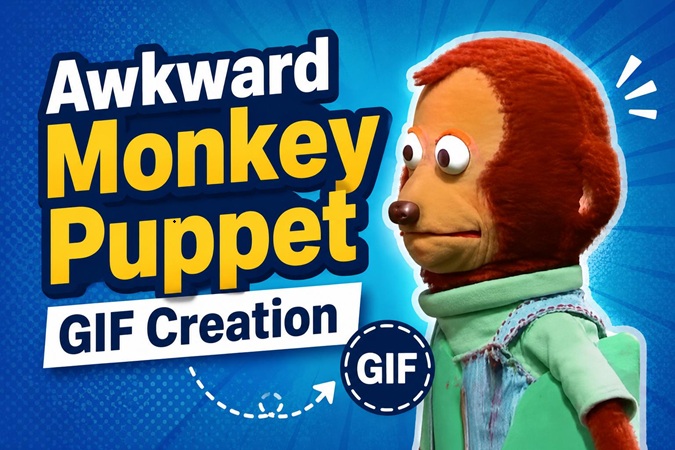
That sideways glance. Those shifting eyes. The Awkward Monkey Puppet has become a true internet staple. It captures social missteps and secondhand embarrassment better than words ever could.
This article covers all you want to know about the monkey: its meaning, why it went viral, and more memes starring this puppet. You'll also get a step-by-step guide on creating your own hilarious AI-generated monkey puppet GIFs using the latest tools available.
Part 1: What is the Awkward Monkey Puppet Meme?
At its core, the meme is an uncomfortable-looking monkey puppet with eyes averted to the side. The character is Kento, a puppet from the Japanese children's show Ōkiku Naru Ko.
Yet the Awkward Monkey Puppet meme we use now isn’t the new viral clip. The iconic side-eye glance was skillfully Photoshopped in 2016. It perfectly fits anything suspicious or painfully awkward. Before long, the edited picture was more of a fixture than the show it originated in.
Part 2: Why Everyone Uses the Awkward Monkey Puppet Meme
- It is a universal reaction. Regardless of cultural background, people can instantly get that social cringe feeling.
- The side-eye can suggest guilt, confusion, suspicion, or discomfort without needing a caption, which makes it work across almost every occasions.
- There is something oddly human about the puppet expression, making it feel more relatable and reusable than polished reaction images or stock memes.
- Thanks to AI tools, animating the monkey puppet is now within anyone's reach. The subtle expressions come to life. The cringe feels more real than ever.
Part 3: How to Create High-quality Monkey Puppet Meme GIFs
Since the classic Awkward Monkey meme is made from two key images, it’s incredibly easy to combine them into a smooth, looping GIF. With an AI-powered tool like HitPaw Edimakor , you can create a natural-looking animation in just minutes.


Step 1: Download and launch the program
Install HitPaw Edimakor, then open the AI Transition feature from the Toolbox section.

Step 2: Use the Multi Frame feature
Import your images, then write a prompt describing exactly what you want. The more specific the description, the better the results. Not sure what to write? Use the built-in prompt generator. Then click “Generate”.
Step 3: Add Trendy Captions
Drag the video from the “ My Creations ” folder onto the timeline. Add a line above or below the picture, but keep it simple. You can also have the captions line up with your transitions.
Step 4: Export as GIF
When you are done editing, click Export and choose GIF. Pick your prefer frame rate and resolution. If you want the loop to be smooth for social media without bloating the file size, opt for a higher frame rate. HitPaw Edimakor has a full run-down on the process of how to make a GIF from a video.
Part 4: 5 More Awkward Monkey Memes for Every Situation
The original side-eye is just the beginning. Here are five more monkey puppet memes currently trending across TikTok, Instagram, Reddit, and Discord.
1 “Oh no” Monkey Puppet Meme
Visuals:
A wide-eyed monkey puppet with its mouth agape in total shock and panic.
Perfect For:
Sudden “oh no” moments, such as receiving unexpected bad news, or any situation where panic is about to hit.
2 Angry Monkey Puppet
Visuals:
An angry puppet monkey clams up to convey a lack of words and discontent.
Perfect For:
Moments when words simply fail you, such as reacting to absurd, infuriating, or utterly baffling news.
3 Monkey Looking Away Quickly
Visuals:
A monkey puppet from shock and disbelief to suspicion and finally stunned silence.
Perfect For:
Reacting to news or facts so absurd or outrageous that your brain just shuts down.
4 Eyes What Monkey Reaction
Visuals:
A close-up of a monkey puppet with a look of astonishment on its face.
Perfect For:
You are in a quiet spot and catch some gossip you weren’t meant to hear.
5 Stupefied Monkey Puppet Loop
Visuals:
A well-made animation showing the monkey puppet’s disbelief.
Perfect For:
Feigning disinterest while you watch the drama play out online.
FAQs
A1: It goes back to Kento the Monkey, a puppet from the 1950s Japanese show Ōkiku naru Ko .
A2: It is your way of showing silent judgment, discomfort, or embarrassment in response to whatever is happening online.
A3: The puppet was there, but the viral image you see around was put together and popularised by the internet.
A4: Sure. With AI transitions and effects in HitPaw Edimakor, you can make your own custom GIFs.
Conclusion
There is no end to the appeal of the awkward monkey puppet because the reaction is so easy to relate to. A single glance says it all. For those looking to make a static image into a proper reaction GIF for YouTube Shorts or TikTok, HitPaw Edimakor is the way to go.
Its AI tools and multi-frame transitions mean your edits will come out looking professional with very little effort. Start by creating an Awkward Monkey Puppet GIF and experience the ease of editing with Hitpaw Edimakor.
Leave a Comment
Create your review for HitPaw articles