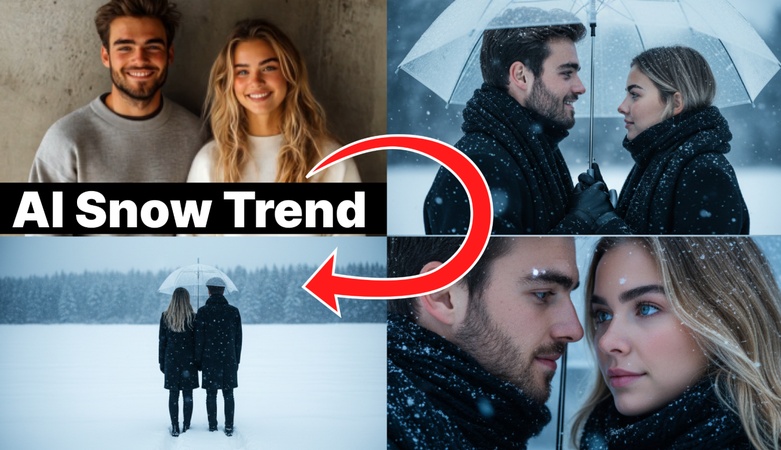
The Snowy Night filter currently trending on social media is from Meitu, the famous photo app. These photos, bursting with emotion and reminiscent of a quiet Hokkaido countryside village, make perfect KakaoTalk or Instagram profile pictures.
While Meitu's snow photo AI filter is great, if you want to create unique, moody profile pictures or videos for the winter season, this article will guide you step-by-step on how to make your own snow photo filter using the latest AI technology. Follow along slowly.
Part 1. ‘Snowy Night Filter’ AI Winter-Themed Photo Features

The Snowy Night filter is one of Meitu's popular filter effects that uses AI technology to transform ordinary photos into an emotional winter atmosphere. It features a cozy and romantic ambiance reminiscent of a winter night street in snowy Sapporo, Japan. The subtle falling snowflakes combined with warm lighting effects create a scene straight out of a movie.
Particularly, the Snowy Night filter works well not only for portraits but also for pet and landscape photos, making it fun to use. Many people are trying it out because it allows you to create stunning images or short live videos using your own photos with just a few clicks, without needing complex editing skills.
Part 2. The ‘Snowy Night’ Filter Trend That's Taking Over
During the winter season, ‘Snowy Night’ is a filter brimming with elements that stir the soul. Particularly popular right now is the snowy AI filter from the Meitu app, which has been spreading like wildfire.
Emotional photos featuring this snowfall filter are gaining huge traction on Instagram and Facebook. It creates a cozy, romantic atmosphere reminiscent of a snowy countryside village at dusk, making it especially popular during the winter season.
The snow filter isn't just for portraits; it works wonderfully on pet photos, couple shots, and even everyday landscape pictures. Plus, it perfectly captures the year-end mood, making it especially popular for SNS profile pictures.
So this winter, try sprucing up your profile with a stunning image. Now, let's dive into how to create that snowy night effect.
Part 3. Create Your Own Snowy Night AI Profile Picture with Edimakor
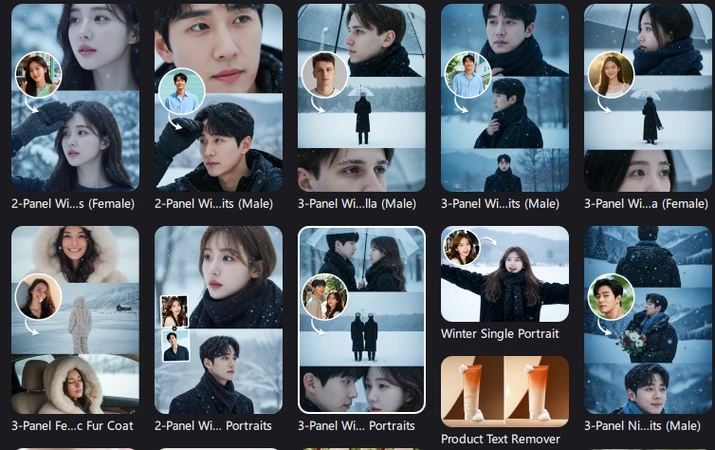
Since Meitu is an app, its templates are somewhat limited. If you want to create a unique snowy night effect that stands out from others, try using HitPaw Edimakor introduced in this part. Edimakor is an AI-based image and video generation program. How to Create a Snowy Night Effect Even if you don't know how to create a snowy night scene, Edimakor supports more diverse templates than Meitu, allowing you to whip up an atmospheric winter photo with just a few clicks. Like Meitu, it supports a Korean interface, making it easy for beginners to use.
It also offers various AI features, so you can do more than just apply simple snow filters like Meitu. You can create videos from images, turn them into videos within a single program, or utilize various editing functions.
Key Features
- AI-powered automatic filter application and video creation all in one go
- Provides diverse winter-themed templates and snow photo filters
- Instant results with real-time preview functionality
- Supports a wider variety of snowfall filters than Meitu
- All-in-one program for editing images and videos simultaneously
How to Easily Create an AI ‘Snowy Night’ Filter
Then, let me guide you step-by-step on how to create an emotional snowfall filter photo using Edimakor. Create your own snow photo filter!
Step 1: Download HitPaw Edimakor from the official website and proceed with the installation. The program supports both Windows and Mac, so choose the version compatible with your operating system.


Step 2: Once the Edimakor program launches, click the ‘Toolbox’ on the left. To use the eye photo filter among the various AI features, click ‘Image’ in the top menu, then click ‘Image Effects’.
Step 3: Clicking the feature will take you to ‘Image Effects’ as shown in the example image. Click ‘All’ here to view all Snowy Night templates. Click each one to preview them.
Hover your mouse over the filter you want to create. When “Create” appears, click it as shown in the example image.
Step 4: Now it's time to upload an image to transform your face like in Meitu's Snowy Night. Note that Edimakor allows uploading up to 3 images, but uploading just one is fine. Please upload the image you want to apply the snow photo filter to. The template has a basic prompt applied. After selecting the image ratio and number of outputs, click the ‘Generate’ button.
Step 5: Once Edimakor's AI generates the image, you can view it in ‘My Creations’. Check the image with the eye filter applied. To drag the image to the timeline and save the file, click the ‘Export’ button. If you want to turn that image into a moving video, save the file and then use the ‘AI Video’ feature to generate a video as well. If you want to upload it as content, try creating a video version too.
Step 6: Once all edits are complete, click the ‘Export’ button in the upper-right corner. For YouTube uploads, click the ‘Social Media’ section, complete the title and description, then click the ‘Publish’ button to finish the upload.
Part 4. Creative Applications for the Snowy Night Filter
Now that we've covered the detailed steps for creating a snowy night effect, it's time to explore various creative applications. This section introduces stylish ideas to help you craft your own unique content.
1. Creating Holiday Season Greeting Cards
When making Christmas or New Year's greeting cards, use the snowfall filter to create a special atmosphere. Apply a snowfall filter to family photos or pictures of your pets, then add a warm message. This creates cards that are fun for the sender and even more touching for the recipient. Get ready for the holidays by preparing these in advance.
2. Stylishly Curate Your SNS Feed
Applying a consistent snow filter to multiple photos creates a unified Instagram feed. Using the same filter style on all photos posted during the winter season is especially recommended, as it makes your entire profile look like one cohesive, moody portfolio.
3. Enhance Memorable Photos
Try applying a snowy night effect to your old winter photos. Even vintage shots can be reborn with a fresh feel when edited to match current trends. This revives memories while creating new content.
Final Thoughts
We've explored the popular snowy night filter trend and how to create moody photos using AI in detail. While the snowy night effect is quite simple, if you found it too basic or your photos looked identical to others, try using HitPaw Edimakor introduced in this article. Edimakor lets you apply various snowy photo filter effects with its intuitive interface, no complex editing knowledge required. Try it out in different ways.
Leave a Comment
Create your review for HitPaw articles