One of the most popular visual trends of 2026 is AI selfies. Users can create realistic iPhone selfies, celebrity shots, romantic photos, and popular Instagram content without a camera by using the appropriate iPhone Selfie Ai Photo Prompts. This guide covers the best prompts, ideas, styles and tutorial you need to generate beautiful AI selfie images, from ChatGPT and Gemini to iPhone AI selfie apps.
Part 1: Best AI Selfie Prompts for Girls
Girls' AI selfie prompts typically highlight natural beauty, gentle lighting, crisp backdrops, and lifelike iPhone camera effects. These prompts are compatible with ChatGPT, Gemini, iPhone AI selfie apps, and AI selfie prompt generators like Edimakor. With these prompts, you can turn your photo into perfect iPhone selfie with a portrait and an image of any iPhone product.
Here are some distinct AI prompts for a girl’s mirror selfie:
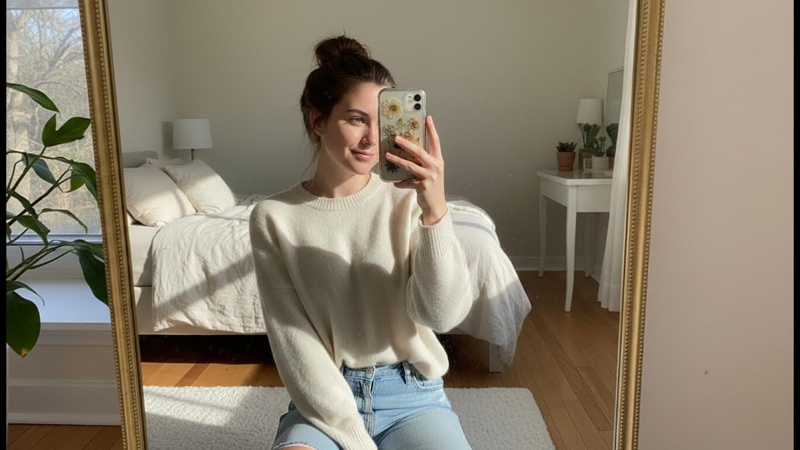
Prompt 1: The Cozy Urban Loft iPhone AI Selfie Prompts for Girls
This is a full-body mirror selfie shot within the large, gold-framed arched mirror, set against the minimalist white wall. The scene must include the natural window light and shadows cast on the wall and floor. The person from the input image stands in the exact pose: holding a smartphone in their right hand to take the photo, with their left hand in the front pocket of their light blue jeans. The composition includes the white textured pot with the large monstera plant to the right of the person. While preserving the unique features and style of the person's face from the input image, they are integrated seamlessly into this established aesthetic and composition, maintaining the clothing and overall look from the image.

Prompt 2: The Minimalist Studio iPhone AI Selfie Prompts for Girls
A crisp mirror selfie of a girl in a professional photo studio setting. She is holding a

   Silver iPhone

        with a clear case. She is dressed in a sleek black turtleneck and high-waisted denim. The background is a clean, "Ins-style" concrete gray with soft studio lighting creating a subtle rim light on her hair. Minimalist vibes, sharp focus on the phone’s camera lenses, contemporary vibe.
Prompt 3: The Chic Parisian Hotel iPhone AI Selfie Prompts for Girls
A mirror selfie of a girl in a luxury hotel room. She is standing in front of a vintage gilded gold mirror, holding a

   Gold iPhone

        . She is wearing a silk slip dress. The background is elegant "Ins-style" with white crown molding, sheer white curtains blowing in the wind, and a small marble table with a vase of peonies. Dreamy, soft-focus aesthetic, airy and bright.
Prompt 4: The Retro Y2K Vibe iPhone AI Selfie Prompts for Girls
A flash-photography mirror selfie of a girl in a bedroom filled with "Ins-style" Gen-Z decor. She is holding a

   Pink iPhone

        , wearing a colorful baby tee and butterfly clips. The mirror is decorated with cute stickers. The background includes a neon "love" sign, a checkered rug, and a shelf of vinyl records. High contrast, direct flash effect, vibrant colors, trendy social media aesthetic.
Part 2: Best 3 Selfie AI Prompt For Boys
Men's AI selfie prompts emphasize mirror selfie angles, realistic lighting, confidence, and crisp facial features. These prompts are well-liked on Instagram and Gemini AI.
Prompt 1: Selfie AI Prompt for Boys
A realistic iPhone selfie of a young man taken with the front camera, confident expression, casual streetwear outfit, natural daylight, sharp facial focus, subtle background blur, Instagram-ready composition, authentic smartphone selfie angle, and lighting.Prompt 2: AI Selfie Blurry Prompt
A slightly blurry iPhone selfie of a man captured in motion, natural camera shake effect, low-light indoor environment, candid selfie moment, realistic lens blur, soft noise, unedited smartphone selfie look with genuine imperfections.Prompt 3: Gemini AI Mirror Selfie Prompt (Boys)
A mirror selfie of a boy taken using an iPhone, gym or bedroom mirror, relaxed posture, realistic reflection, indoor lighting, natural shadows, casual outfit, high-detail facial texture, Instagram-style mirror selfie with Gemini AI realism.
Part 3: Best 3 AI Selfie Prompts With Kids
AI selfie prompts with children are popular for lighthearted iPhone selfie prank ideas, humorous edits, and family-friendly content. Joy, safety, and organic expressions are the main themes of these prompts.
Prompt 1: Family iPhone Selfie
A happy iPhone selfie taken with kids, bright outdoor daylight, joyful smiles, natural expressions, playful energy, realistic skin tones, front camera perspective, family-friendly Instagram selfie with authentic smartphone photo quality.Prompt 2: AI Selfie Prompt with Kids Trend
A trending iPhone selfie with kids, soft natural lighting, candid joyful moment, cheerful expressions, casual environment, realistic selfie camera distortion, warm tones, Instagram reel-style family selfie popular in current AI trends.Prompt 3: Funny iPhone Selfie Prank
Part 4: Best 3 AI Selfie Couple Prompts
In 2026, a couple of selfies will rank among the most popular AI photo formats on TikTok and Instagram. With the use of AI selfie pair suggestions, users can produce romantic, authentic, and natural iPhone selfies that appear genuine, emotionally attached, and ideal for social media sharing.
Prompt 1: Romantic Couple Selfie
A realistic iPhone selfie of a couple smiling closely together, soft natural daylight, warm romantic tones, relaxed facial expressions, subtle background blur, front camera angle, Instagram aesthetic with authentic smartphone selfie realism.
Prompt 2: Gemini AI Couple Selfie Prompt
A couple of mirror selfies taken with an iPhone, cozy indoor lighting, casual outfits, natural reflections, balanced composition, soft shadows, intimate vibe, realistic selfie camera details, Instagram-ready couple photo using Gemini AI style.Prompt 3: AI Selfie Couple Prompt
Part 5: Best 3 AI Celebrity Selfie Prompts
On Instagram, Reddit, and TikTok, celebrity AI selfies are becoming viral. With minimal retouching, these suggestions produce authentic celebrity-style selfies.
Prompt 1: AI Selfie Celebrity Prompt
A realistic iPhone selfie taken with a celebrity, casual setting, front camera angle, natural lighting, balanced facial proportions, authentic smartphone selfie look, and an Instagram-quality photo that appears naturally captured, not staged.
Prompt 2: AI Selfie with Celebrity Prompt Reddit
A candid iPhone selfie standing next to a celebrity, relaxed pose, everyday environment, realistic shadows, natural expressions, selfie camera distortion, genuine smartphone photo feel, popular Reddit-style celebrity selfie realism.
Prompt 3: Celebrity Selfie AI Prompt Generator
Part 6: Best 3 Airport Selfie Ideas
Selfies taken at airports are becoming increasingly popular in travel and leisure material. Creators can produce fashionable iPhone airport selfies with the AI selfie prompt Gemini that captures motion, confidence, travel vibes, and realistic settings perfect for Instagram posts and reels.
Prompt 1: Airport iPhone Selfie
A realistic iPhone selfie at an airport terminal, travel outfit, daylight streaming through glass windows, blurred travelers in the background, front camera selfie angle, natural skin tones, Instagram travel selfie aesthetic.
Prompt 2: Cool AI Selfie Prompt
A stylish airport selfie taken with an iPhone, luggage nearby, confident pose, cinematic lighting, shallow depth of field, modern travel vibe, sharp facial focus, Instagram-worthy selfie with realistic smartphone camera details.
Prompt 3: Gemini AI Self Portrait Prompt
A self-portrait iPhone selfie at the airport, front camera realism, balanced lighting, soft background blur, natural facial features, clean composition, ultra-realistic Gemini AI style suitable for Instagram travel content.
Part 7: Best 2 AI Selfie Prompt For Holiday
AI selfie prompts for the holidays are ideal for festive content. With seasonal lighting, decorations, and Instagram-ready holiday vibes, Christmas AI selfie prompts assist users in taking warm, comforting, and happy iPhone selfies.
Prompt 1: Christmas AI Selfie Prompts
A Christmas-themed iPhone selfie with warm fairy lights, cozy winter outfit, festive indoor background, soft golden lighting, cheerful expression, realistic selfie camera quality, Instagram holiday photo with natural smartphone details.Prompt 2: Halloween Selfie AI Prompts
Part 8: Best Way To Turn a Photo Into Selfies With AI
Here are the steps to turn a normal photo into a selfie using Edimakor's reference image tool:
Step 1: Open Edimakor and Access the Reference Image Tool
Launch HitPaw Edimakor on your computer. From the main interface, go to the Toolbox section and select the Reference Image tool.


Step 2: Upload Your Photo
Choose Google Nano Banana as a model and then upload your clear photo from your device. This image will be used as the base for generating realistic AI selfies.
Step 3: Enter One of the Above Given Prompts
In the prompt box, write or paste one of the generated selfie prompts that appear automatically. You can also slightly modify the prompt to change the selfie style, such as casual, studio, outdoor, or cinematic.
Step 4: Adjust Image Settings
Select the aspect ratio, image style, and output quantity according to where you want to use the selfies, such as Instagram or profile photos.
Step 5: Preview and Export the Selfies
Preview the generated AI selfies to ensure they look natural and realistic. Once satisfied, export the images and share them on social media or use them as profile pictures.
To Sum Up
In 2026, iPhone Selfie Ai Photo Prompts have transformed the process of taking selfies. Users can quickly create realistic, celebrity, relationship, child, and holiday selfies with the correct prompts. With the help of AI tools like HitPaw Edimakor (Video Editor) , anyone can produce excellent selfies that are suitable for Instagram.
Leave a Comment
Create your review for HitPaw articles