Nano Banana 2 is gaining widespread popularity for its powerful AI image-generation capabilities. With the right prompts, creators can produce unique, viral visuals. In this article, you will find the best trending Nano Banana 2 prompts to try in 2026.
Part 1: 5 Best Nano Banana 2 Insane Prompts
Nano Banana 2 is quickly becoming one of the most talked-about AI image generation models in 2026. Creators, designers, and social media artists are using it to produce visually stunning content with very detailed prompts. Below are five of the best Nano Banana 2 prompts trending among creators.
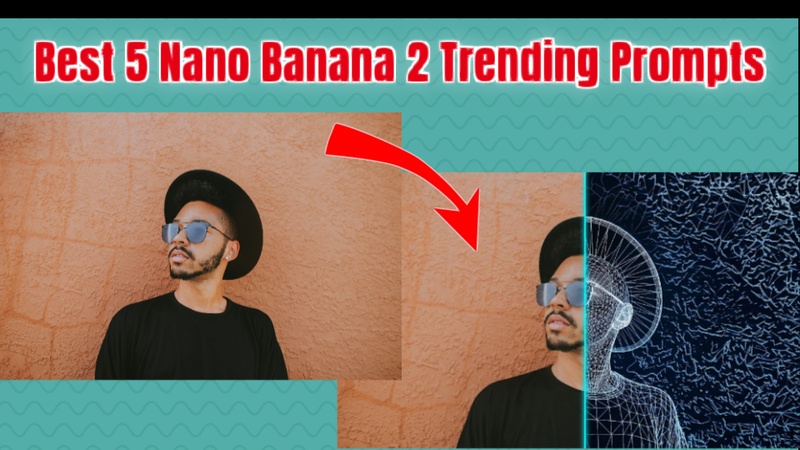
Prompt 1: 3D Model Wireframe Split
The 3D model wireframe split prompt creates a futuristic design effect that shows both the realistic image and its digital blueprint.
Image to Image
Transform this image into a stylized 3D model wireframe split view. Create a precise vertical or diagonal division down the center of the image. The left side must maintain the photorealistic appearance of the original subject, while the right side transitions sharply into a raw, digital 3D polygonal wireframe mesh. This wireframe view should display the underlying topology, showing all vertices, edges, and polygons as thin, glowing white or electric blue lines on a dark, geometric background, revealing the structural blueprint of the subject.

Text to Image
A sleek, modern supercar positioned diagonally. The left half is a high-gloss metallic red render with realistic reflections, while the right half transitions into a glowing neon blue digital wireframe grid. Cinematic lighting, dark studio background.
Prompt 2: Torn Paper Effect
The torn paper effect prompt is one of the most creative Nano Banana 2 prompt ideas. It produces an artistic collage style that looks like physical paper has been ripped to reveal another layer underneath.
Image to Image
Transform this image into a layered torn paper collage. Apply a jagged, hand-torn edge effect that splits the composition, revealing a different scene or texture underneath the "rip." Ensure the paper edges are rough and fibrous with visible white pulpy textures. Add realistic drop shadows beneath the torn layers to create a 3D sense of depth, making it look like physical paper is being peeled away from the surface.
Prompt 3: Character Consistency Comic
One of the most impressive abilities of Nano Banana 2 is character consistency. The model can keep characters looking the same across multiple scenes while still allowing different poses and emotions.
Text to Image
Create an image of a funny 6-panel story with 3 fluffy animal friends building a treehouse together. The story is thrilling, with emotional highs and lows, ending on a happy note. Keep each character’s identity and clothing consistent across all 6 scenes, but vary their expressions and camera angles.
Prompt 4: Pet Meme Sticker
Pet meme stickers are extremely popular on messaging platforms and social media. Nano Banana 2 can easily transform a normal pet photo into a cartoon-style sticker with expressive emotions and bright colors. This prompt works especially well for dogs, cats, hamsters, or any expressive animal photo.
Image to Image
Turn this pet photo into a funny, die-cut meme sticker. Isolate the pet against a plain background with a clean, thick white border. Capture a highly expressive face (like extreme judgment or dramatic shock). Use a vibrant 2D vector style with bold outlines and a playful color palette, perfect for a digital messenger app.
Text to Image
A tiny hamster with its paws on its cheeks, mouth wide open in a dramatic "gasp." Flat design sticker, pastel colors, high contrast, minimalist but expressive.
Prompt 5: Crayon Travel Journal
The crayon travel journal prompt creates a nostalgic illustration style inspired by children’s drawings. This style gives photos a playful and emotional look, making them feel like pages from a personal travel diary.
Image to Image
Turn this photograph into a crayon travel journal entry. Replicate the image as a child-like illustration using a waxy crayon texture, bold outlines, and scribbled coloring. Add handwritten notes about the destination in the corner and include smudge marks or finger traces on the paper background.
Part 2: How to Create AI Images with Nano Banana 2
Once you understand the best Nano Banana 2 prompt ideas, the next step is generating the images using an AI tool. There are multiple platforms that allow users to experiment with Nano Banana 2 prompts. Two of the easiest methods include generating images through AI creative software like Edimakor or directly using the Gemini Nano Banana 2 interface.
Method 1: Using Edimakor
HitPaw Edimakor offers a simple and beginner-friendly way to create AI visuals using advanced image generation models. It provides tools for text-to-image creation, visual effects, and even image-to-video conversion. With Edimakor, users can experiment with Nano Banana 2 prompt text and instantly generate high-quality images.
Step 1: Open Edimakor and Access Text to Image Tool
Launch HitPaw Edimakor on your computer and open the Toolbox section. From the available AI Image tools, you can select the text to image feature or Reference Image feature to begin creating visuals.


Step 2: Choose Nano Banana 2 as the Model, Upload the Image, and Write Prompt
- Select Nano Banana 2 as the model.
- Then upload your reference image. You can upload more than one reference image for better results.
- Choose the prompt from the available list of prompts above. Paste it into the prompt box.
- Then, customize your generation settings such as aspect ratio, image resolution, and image quantities. These settings help refine the final visual output.
- Click the Generate button and allow the AI engine to process the prompt.
Step 3: Export the AI Image
Within seconds, the system will create a detailed AI-generated image based on your description. You can find the image in the My Creations section and then select the folder icon appearing at the right top of image to find its location in your device.
Step 4: Perform Further Functions
You can even perform more AI functions on the output image. Right-click on the output image, and here you can re-edit the image, convert it into a video or enhance the image.
Method 2: Using Gemini Nano Banana 2
Another method is to use the Gemini AI platform that supports Nano Banana 2 generation capabilities.
-
Open Google Gemini on your device. You can simply search for it on any browser and open it.
-
Here, you will see Create Image option, choose it, and you will see some images created by Gemini that you can use as a reference.
-
Write your chosen prompt into the search bar. You can also use the microphone feature, if you dont like typing.
-
After a few seconds, you will see the generated image according to the prompt you provide. Preview it, and then hit the Download button to save the image to your device.
Wrapping Up
Nano Banana 2 is quickly becoming one of the most powerful AI image generators for creative design and viral visuals. With the right Nano Banana 2 prompts, users can create unique styles such as wireframe designs, meme stickers, comic stories, and artistic travel illustrations. By using tools like HitPaw Edimakor (Video Editor) or Gemini Nano Banana 2, creators can easily transform simple prompts into stunning AI-generated artwork.
Leave a Comment
Create your review for HitPaw articles