Artificial intelligence has changed how visual content is created across digital platforms. What once required professional designers, photo editors, animation tools, and long production cycles can now be achieved within minutes. AI avatar generators have made video creation easier by allowing users to create realistic digital presenters for different purposes. Whether it’s marketing campaigns, educational tutorials, social media content, or product showcases, these tools offer ready-made templates that simplify the entire process. Users can select a suitable layout, customize their AI avatars, add scripts, and generate professional-looking videos without advanced editing skills. The article explores the best AI avatar generators with a rich template library in 2026.
Part 1: What is an AI Avatar Generator With a Rich Template Library?
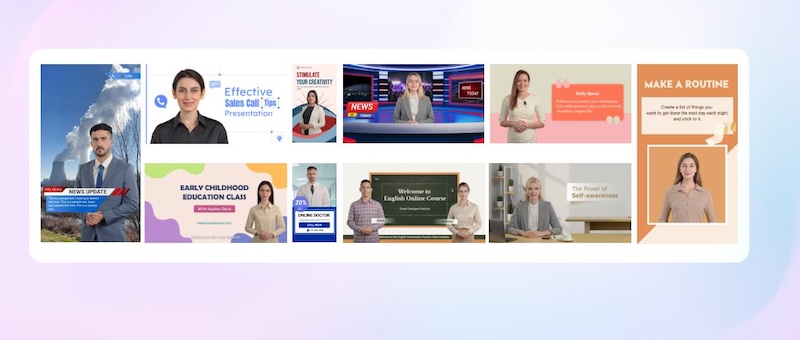
An AI avatar generator is a platform that creates videos using digital presenters, synthetic voices, scripts, and visual scenes. A rich library adds structure to that process. Instead of building every video from scratch, users can choose from a collection of pre-designed templates tailored to different content requirements. These templates include marketing advertisements, educational presentations, product demonstrations, corporate training videos, and social media posts. Users can customize these ready-made layouts by adding their preferred AI avatars, scripts, backgrounds, text, images, and voiceovers. Some platforms also provide different aspect ratios, branding options, and scene transitions to make video more engaging.
Part 2: Top 3 AI Avatar Generators With Extensive Template Libraries in 2026
AI avatar generators with extensive template libraries can be a bit hard to find, especially when you need a platform that offers ready-made designs for different types of content. While many tools allow users to create video with digital presenters, not all provide enough template variety to meet specific creative requirements. To make your search easier, we’ve mentioned the top three AI avatar generators with a rich template library:
1. HitPaw Edimakor
As mentioned earlier, finding an AI avatar generator with extensive templates can be challenging, especially when you need ready-made designs for different content creation scenarios. HitPaw Edimakor makes this process easier by combining AI-powered video creation tools with a user-friendly editing interface. It allows users to create engaging avatar videos for marketing campaigns, educational content, social media platforms, and more. One of the standout features of this tool is that it offers thousands of templates. Each template comes with a ready-made avatar, voice, background, and subtitle styles, so you can create professional-looking videos in minutes. Plus, the program also includes advanced video editing capabilities, allowing users to customize templates according to their creative needs. Users can change background visuals, modify subtitle styles, add transitions, and more.
Key Features of HitPaw Edimakor
- Extensive Template Library: HitPaw Edimakor includes thousands of pre-designed templates, allowing users to create various types of videos, such as how-to guides, explainer videos, product demos, tutorials, and more.
- Realistic AI Avatars: One of the standout features of this tool is that it offers 1000+ AI avatars, each from different roles and industries. Further, users can create custom AI avatars by uploading their own images.
- Text-to-Video: With the help of HitPaw Edimakor, users can create high-quality AI avatar videos with a simple text prompt — no editing experience or professional help required.
- AI Video Editor: Apart from AI video creation, HitPaw Edimakor offers a wide range of video editing capabilities, allowing users to customize their generated videos according to their creative requirements.
- Easy-to-Use: The best part of this AI avatar generator with a rich template library is that it offers an intuitive and simple interface, making it ideal for non-tech and beginner users. Simply choose the template, AI avatar, and AI voice, and click on “Generate.”


How to Create an AI Avatar Video With a Template?
HitPaw Edimakor offers a wide range of AI avatar templates, allowing users to create professional-looking videos without starting from scratch. Here is how to do it:
Step 1: Choose an AI Avatar Template
Download, install, and launch HitPaw Edimakor on your PC. Choose the “AI Avatar” feature from the main interface. Next, select the “Video Template” option from the left panel and select a template that fits your needs.

Step 2: Add Speech for Your Avatar
Each template comes with a ready-made AI avatar and voice. You only have to add its dialogue or script. Enter your AI avatar script in the prompt box. If you’re not satisfied with the ready-made voice, then click on the “AI Voice” option and select your desired voice effect.
Step 3: Generate Your AI Avatar Video
Describe any changes you want to make to the template. Once all the requirements are complete, click on the “Generate” button. Within seconds, HitPaw Edimakor will create your AI avatar video. Preview the results and click on the “Export” button to download the video.
2. HeyGen
HeyGen is an advanced video platform using generative AI to simplify video creation. With this tool, users can effortlessly produce studio-quality videos with AI-generated avatars and voices. What makes this tool stand apart from others is its collection of pre-designed video templates that cater to different content creation needs. Users can explore templates for marketing campaigns, business presentations, educational tutorials, social media posts, product promotions, and more.
Pros
- Offers over 100 customizable AI avatars representing diverse ages and styles.
- A huge collection of video templates, including tutorials, product demos, and more.
- Provides various customizable options, including background, design, and text overlays.
Cons
- Video generation can take time, particularly for longer projects.
- Customization options may feel limited compared to professional video editing.
3. Vidnoz AI
If you want an AI avatar video generator with a wide range of video templates, Vidnoz AI is another excellent option to consider. The program offers over 2800+ video templates, allowing users to create different types of videos, including how-to guides, tutorials, product demos, explainer videos, and more. Users can select a suitable template, add their preferred AI avatar, insert a script, and generate engaging videos without spending hours on manual editing.
Pros
- Provides 2800+ video templates for various types of videos, including how-to guides.
- Also offers 1900+ AI avatars, 2000+ AI voices, and features like voice cloning.
- Web-based tool, meaning no software downloading or installation is required.
Cons
- Requires a stable and active internet connection.
- Free version comes with limited video templates, avatars, and voices.
Part 3: AI Avatar Library Comparison Across Different Use Cases
Not every AI avatar generator offers the same type of templates or customization options. Some platforms focus on marketing and promotional videos, while others are better suited for educational tutorials.
| Use Cases | HitPaw Edimakor | HeyGen | Vidnoz AI |
|---|---|---|---|
| Marketing Videos | Templates Available | Templates Available | Templates Available |
| Educational Videos | Templates Available | Templates Available | Templates Available |
| Social Media Content | Templates Available | Not Available | Templates Available |
| Product Showcase | Templates Available | Templates Available | Not Available |
| Customization | Advanced Video Editing | Standard Tools | Standard Tools |
| Avatar Variety | 1000+ AI Avatars | 230+ AI Avatars | 1900+ AI Avatars |
Final Thoughts
AI avatar generators have made video creation faster, easier, and more accessible for businesses, marketers, educators, and content creators. With these AI avatar generators with a rich template library, you don’t have to build every scene from scratch or spend hours editing videos. Among them, HitPaw Edimakor is the best option with advanced video editing capabilities.
Leave a Comment
Create your review for HitPaw articles