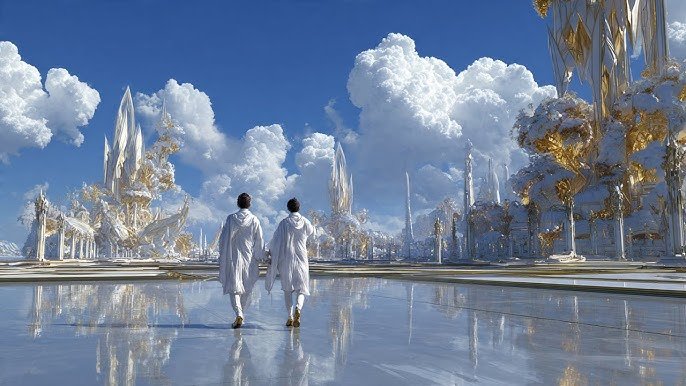
Have you ever seen a video that feels truly otherworldly? A scene so ethereal and captivating it transports you to another realm? That’s the power of the AI Heaven Effect. Thanks to the latest AI video generators, creating cinematic heaven-inspired visuals is no longer limited to professional VFX artists or expensive editing software. With a simple text prompt, anyone can generate stunning celestial videos in just a few minutes. Whether you’re creating content for YouTube, TikTok, Instagram Reels, music videos, or creative art projects, AI can help bring your imagination to life. In this complete guide, you’ll learn everything you need to know about making AI heaven videos. We’ll share the best AI heaven video prompts, recommend the top AI tools, and explain how to generate high-quality heavenly scenes within seconds.
Part 1. What Is an AI Heaven Video?

An AI Heaven video is a digitally generated video that recreates the appearance of a heavenly or celestial world using artificial intelligence. These videos are popular across social media platforms, gaining millions of views daily. What makes the AI Heaven video interesting is their ability to combine realistic lighting, cinematic camera movements, glowing clouds, divine landscapes, majestic angels, golden gates, and peaceful atmospheres into scenes that feel both magical and immersive.
Popular Types of AI Heaven Videos
- Hug from Heaven AI Video
- Stairway to Heaven AI Video
- AI Video Going to Heaven
- Fantasy Heaven Scenes
- Memorial Tribute Videos
Part 2. Best AI Heaven Video Prompt Examples
If you want to create a stunning AI heaven video, you need a detailed AI prompt. The quality of your prompt directly affects the final output, helping the AI understand the scene, atmosphere, lighting, and visual style you want to achieve. Here are the top AI heaven video prompts:
1. Hug From Heaven
“Create a cinematic AI video of a person standing quietly beneath a glowing sky as a radiant loved one descends from heaven surrounded by golden light and soft clouds. They share a heartfelt embrace while angelic feathers gently fall around them. Warm sun rays, floating light particles, emotional facial expressions, slow-motion camera movement, volumetric lighting, ultra-realistic, highly detailed, peaceful atmosphere, 4K HDR, soft orchestral music, dreamy cinematic color grading, emotional and inspiring ending.”
2. Stairway to Heaven
“Generate a cinematic AI video of a magnificent white marble staircase rising through endless glowing clouds toward radiant golden gates. Divine sunlight streams through the sky, illuminating floating islands, crystal pillars, and shimmering waterfalls. Gentle doves soar overhead while glowing particles drift through the air. Use a slow aerial camera movement with volumetric lighting, ultra-realistic textures, cinematic depth of field, peaceful orchestral atmosphere, 4K HDR, and a breathtaking heavenly ambiance.”
3. Heaven Transition Video
“Create a cinematic AI video of a person slowly walking toward a horizon filled with glowing white clouds and radiant golden light. As they move forward, the surroundings seamlessly transition into a breathtaking heavenly realm with majestic gates, floating clouds, angelic rays, and shimmering particles. Soft feathers drift through the air while warm sunlight illuminates the scene. Use slow-motion camera movement, volumetric lighting, emotional atmosphere, ultra-realistic visuals, cinematic depth of field, 4K HDR, peaceful orchestral music, and a smooth, inspiring transition into heaven.”
Part 3. How to Make AI Heaven Videos (3 Methods)
Wondering how to make AI heaven video? The good news is that you don’t need professional video editing skills or expensive software to create high-quality AI heaven videos. Below, we’ve mentioned the top 3 methods that will help you create engaging AI video going to heaven for free:
Method 1: Use CapCut Templates
The first method to create an AI Heaven Video in 2026 is via CapCut. CapCut is an advanced video editing tool that offers a wide range of ready-made templates, AI-powered editing features, and more, making it easy for beginners to create eye-catching videos in just a few minutes. The platform offers multiple ready-made AI Heaven video templates, allowing users to create high-quality videos with a single click. Simply, go to the CapCut official site, search “AI heaven video” template, select the desired template, and customize it according to your requirements.
Pros
- No professional video editing experience is required.
- Ready-made AI Heaven templates, including Angel Effect, Cloud Heaven, and more.
- Web-based tool, no software downloading or installation required.
- Enables users to create AI videos within seconds.
Cons
- CapCut offers limited customization features.
Method 2: AI Image Generator + Video Editing
The next method to create an AI-generated heaven video is by combining an AI image generator with a video editing tool. This method will give you greater creative freedom than using a ready-made template. However, this method can be time-consuming and requires multiple AI tools.
Workflow:
- First, select an AI image generator like Midjourney or Stable Diffusion to create high-quality heaven-themed artwork.
- Next, download AI images and import them into a video editing tool such as CapCut, Adobe Premiere Pro, and more.
- Customize the video according to your requirements. Users can add motion effects, background music, and text.
- Finally, click on the “Generate” button to convert the AI images into an engaging AI Heaven Video.
Pros
- Offers advanced customization options compared to CapCut.
- Best for YouTube Shorts, Instagram Reels, and more.
- Support multiple styles, such as Fantasy, Realistic, 3D, and Anime.
Cons
- Time-consuming process.
- Requires multiple AI tools.
Method 3: Use an AI Video Platform (Best Option)
The two methods mentioned above are effective for creating AI video going to heaven, but each comes with certain limitations. If you’re looking for the easiest way to create high-quality AI heaven videos with minimal effort, use Edimakor AI. It is one of the best AI Video Generators that enables users to create high-quality videos with a simple text prompt, including AI Heaven Video. Instead of generating images first and then animating them manually, Edimakor AI handles the entire creation process in one place, saving both time and effort. One of the standout features of this tool is that it offers an intuitive interface, making it ideal for non-tech and beginner users. Plus, it offers advanced customization features, allowing users to fine-tune every aspect of their AI heaven videos.
Create NowKey Features of Edimakor AI
- Text-to-Video: Edimakor AI enables users to create high-quality AI videos with simple text prompts, meaning users can transform their ideas into cinematic videos within minutes.
- Advanced Customization Options: The program offers advanced personalization features, allowing users to adjust the AI video according to their requirements. Users can easily adjust the video style, duration, resolution, and more.
- Multiple AI Models: Edimakor AI offers a wide range of AI models, including Google Veo, Kling AI, Runway, Sora 2, Pika, and Seedance. Each AI model has its unique capabilities and features.
- Powerful AI Tools: The program isn’t limited to AI Video Generation; it also includes multiple AI tools such as Text-to-Image, Image-to-Video, Text-to-Speech, AI Video Enhancer, Image-to-Image, and Online Video Editor.
- Intuitive Interface: This tool offers an easy-to-use interface, allowing users to create high-quality and engaging videos with a simple text prompt — no video editing experience or expensive studio required.
Part 4. How to Make an AI Heaven Video with Edimakor AI (Step-by-Step)
With Edimakor AI, creating a high-quality AI Heaven video is simple. Follow the instructions below to learn how to do it:
Step 1: Choose Text to Video from the Main Interface
Open your web browser and go to Edimakor AI's official site. Choose the “Text-to-Video” option from the left panel. Copy-paste the AI Heaven video prompt in the prompt box and select the “AI Model.”
Step 2: Adjust The Video Settings
Scroll down and choose the video settings. Edimakor enables users to adjust the video settings according to their requirements, such as duration, aspect ratio, and resolution.
Step 3: Generate and Download
Once all the requirements are complete, click on the “Generate” button to begin the video creation process. Edimakor AI will turn text prompts into an engaging AI Heaven video within seconds. Preview the results and hit the “Download” button to save the video in MP4 format.
Part 5. Tips to Make Your AI Heaven Video Go Viral
Once you have successfully created your AI heaven video, the next step is to maximize its reach and engagement. Here are some tips that you can use to make your AI heaven video go viral.
- Create an emotional storytelling, such as loss, reunion, hope, redemption, or remembrance. These types of storylines are always trending on social media platforms.
- Combine your AI heaven video with trending or popular background music to make it more engaging and increase its chances of reaching a wider audience.
- Keep duration 10 - 30 seconds. Short-form videos or reels perform better on platforms like TikTok, Instagram Reels, and YouTube Shorts.
- Export your AI Heaven video in a 9:16 aspect ratio to ensure it displays perfectly on smartphones and fills the entire screen on platforms like TikTok and Facebook.
Conclusion
AI heaven videos combine the emotional power of storytelling with the latest advancements in artificial intelligence, enabling anyone to create high-quality celestial scenes without professional editing skills. There are multiple ways to create AI heaven videos, but the best and easiest way is via Edimakor AI. Its intuitive interface, powerful AI video generation capabilities, and advanced customization features make it an excellent choice for beginner users.


Leave a Comment
Create your review for HitPaw articles