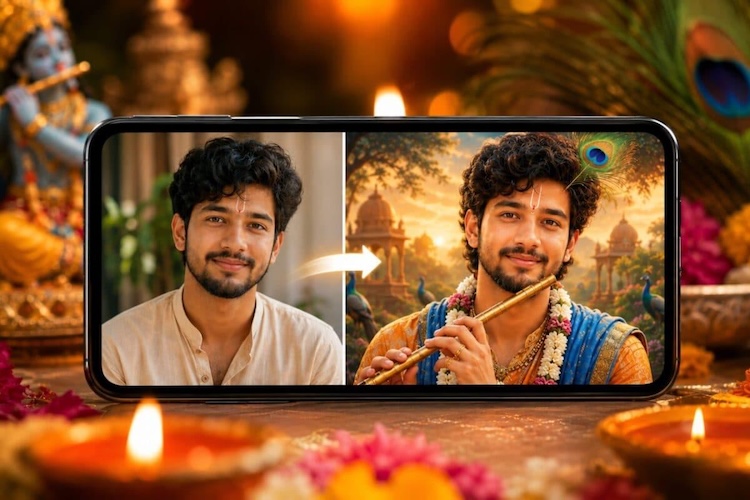
Janmashtami 2026 is just around the corner, and many users are looking for creative ways to celebrate the festival. Thanks to AI image generation, it’s now possible to transform an ordinary photo into a festive Krishna-themed portrait in just a few minutes. From traditional outfits and peacock features to divine backgrounds, colorful decorations, and festive lighting, AI makes it easy to give your photos a unique Janmashtami-inspired look. In this guide, we’ve covered some of the best Krishna Janmashtami AI photo editing prompts to try in 2026. You can use these prompts with popular AI image generators to create stunning images.
Part 1: Top 3 Krishna Janmashtami AI Photo Editing Prompts for Girls
In Janmashtami celebrations, girls can give their ordinary photos a beautiful and traditional Krishna-inspired makeover using AI photo editing tools. Here are three Krishna Janmashtami AI photo editing prompts for girls that you can try in 2026.
1 Girl Decorating for Krishna Janmashtami

“Use the uploaded photo of the girl as the main subject and transform it into a realistic Krishna Janmashtami celebration scene. Keep her face, facial features, skin tone, hairstyle, and identity unchanged. Dress her in a colorful traditional lehenga with intricate embroidery, bangles, earrings, and a beautiful dupatta. Show her decorating a Krishna temple with marigold garlands, flowers, diyas, and colorful decorations. Add a festive home interior, warm golden lighting, realistic details, natural skin texture, and a joyful Janmashtami atmosphere.”
2 Performing Puja in Front of Krishna
“Transform the uploaded girl’s photo into a realistic Krishna Janmashtami puja scene while preserving her exact facial identity and natural appearance. Dress her in an elegant traditional saree with beautiful embroidery, jewelry, bangles, and flowers in her hair. Place her sitting or standing respectfully in front of a beautifully decorated Lord Krishna idol while holding a puja thali containing flowers, diya, incense, and kumkum. Add marigold garlands, temple decorations, glowing diyas, and warm cinematic lighting for an authentic festive atmosphere.”
3 Girl as Radha
“Use the uploaded image as the base and transform the girl into a beautiful Radha-inspired Janmashtami portrait. Preserve her original face, facial structure, skin tone, and recognizable identity. Dress her in a traditional colorful lehenga with detailed embroidery, elegant jewelry, bangles, anklets, and floral hair decorations. Create a dreamy Vrindavan-inspired background with flowers, greenery, a decorated swing, peacock feathers, and subtle temple architecture. Use soft golden light, realistic textures, natural skin details, and a graceful festive appearance without changing her identity.”
Part 2: Top 3 Krishna Janmashtami AI Photo Editing Prompts for Boys
Boys can also turn their ordinary photos into something special. Below, we’ve mentioned the top Krishna Janmashtami AI photo editing prompts for boys.
1. Boy Dresses as Krishna
“Use the uploaded boy’s photo as the main reference and transform him into a charming Bal Krishna-inspired character. Preserve his original face, facial features, skin tone, hairstyle, and identity. Dress him in a traditional yellow dhoti with an ornate blue and gold shawl, beautiful jewelry, a peacock-feather crown, and traditional accessories. Place him in a colorful Vrindavan-inspired setting surrounded by flowers, greenery, and soft golden light. Add a gentle smile, realistic textures, natural proportions, cinematic lighting, and a festive Janmashtami atmosphere.”
2. Boy Resting on Krishna’s Lap
“Transform the uploaded boy’s photo into a peaceful devotional Janmashtami scene while keeping his original facial identity and appearance unchanged. Show the boy peacefully resting his head on the lap of a divine Krishna figure, creating a warm and comforting composition. Dress the boy in a simple traditional Indian outfit and add subtle festive accessories. Surround them with flowers, peacock feathers, diyas, and a beautifully decorated temple. Use soft golden lighting, realistic skin texture, natural expressions, detailed clothing, and a serene spiritual atmosphere.”
3. Boy Celebrating Dahi Handi
“Use the uploaded boy’s photo as the reference and transform it into an energetic Dahi Handi celebration. Preserve his facial features, skin tone, and recognizable identity while changing his clothing into a traditional yellow dhoti with a colorful waist sash and festive accessories. Show him joyfully participating in the celebration beneath a decorated hanging matki. Add colorful flowers, traditional decorations, cheering festival participants, and warm daylight. Create realistic movement, natural proportions, detailed clothing, cinematic photography, sharp facial details, and an exciting Krishna Janmashtami atmosphere.”
Part 3: 3 Best Krishna Janmashtami AI Photo Editing Prompts for Couples
Janmashtami is a wonderful occasion for couples to create memorable and festive photos together. With AI, you can easily transform a regular couple photo into a beautiful Krishna-themed portrait. Here are the best Krishna Janmashtami AI photo editing prompts for couples.
1. Krishna and Radha
“Use the uploaded couple photo as the primary reference and transform them into a beautiful Krishna and Radha-inspired portrait. Preserve both individuals’ original facial features, skin tones, identities, and natural expressions. Dress the man as Krishna in a yellow dhoti, blue-toned traditional styling, jewelry, and a peacock-feather crown. Dress the woman as Radha in an elegant, colorful lehenga with traditional jewelry and floral accessories. Place them in a dreamy Vrindavan setting with flowers, greenery, warm golden lighting, and cinematic details.”
2. Celebrating Janmashtami Together
“Transform the uploaded couple photo into a vibrant Krishna Janmashtami celebration while keeping both individuals recognizable and natural. Dress the man in a traditional embroidered kurta inspired by Krishna’s festive style, complete with subtle peacock-feather accessories. Dress the woman in a colorful Indian lehenga with bangles, earrings, and floral decorations. Show them celebrating beside a beautifully decorated Krishna idol with flowers, diyas, rangoli, and festive ornaments. Add warm glowing lights, realistic skin textures, natural expressions, detailed clothing, and an authentic joyful festival atmosphere.”
3. Janmashtami Puja
“Transform the uploaded couple photo into an elegant Krishna Janmashtami puja scene. Preserve both individuals’ faces, identities, skin tones, and recognizable features. Dress the man in a traditional cream and gold kurta with subtle Krishna-inspired accessories, while the woman wears a beautiful saree with intricate embroidery, jewelry, bangles, and flowers in her hair. Show them performing puja together before a decorated Krishna idol, holding a flower-filled thali and diya. Add marigold garlands, rangoli, glowing lamps, warm lighting, realistic textures, and a peaceful devotional mood.”
Part 4: 3 Cute Krishna Janmashtami AI Photo Editing Prompts for Baby
As Janmashtami is approaching, every parent dreams of seeing their kids as cute Bal Krishna or beautiful little Radha Rani. To make this dream a reality, we’ve mentioned some of the best Krishna Janmashtami AI photo editing prompts for baby:
1. Baby as Bal Krishna
“Use the uploaded baby photo as the main reference and transform the baby into an adorable Bal Krishna-inspired character. Preserve the baby’s original facial features, skin tone, expression, and recognizable appearance. Dress the baby in a bright yellow dhoti with a small peacock-feather crown, delicate traditional jewelry, and a floral garland. Place the baby in a beautifully decorated Vrindavan-inspired setting with flowers, greenery, butter pots, and glowing diyas. Use soft natural lighting, realistic baby skin texture, gentle colors, and a heartwarming Janmashtami atmosphere.”
2. Krishna Playing Flute
“Transform the uploaded baby photograph into a cute Bal Krishna-inspired scene while keeping the baby’s face, identity, skin tone, and natural appearance unchanged. Dress the baby in a traditional yellow dhoti, colorful waistband, tiny jewelry, and a beautiful peacock-feather crown. Show the baby holding a small decorative flute in a natural, age-appropriate pose. Create a peaceful Vrindavan garden background filled with flowers, greenery, butterflies, and soft sunlight. Add realistic textures, gentle expressions, cinematic depth of field, and a charming Janmashtami celebration atmosphere.”
3. Little Radha
“Use the uploaded baby girl’s photo as the reference and transform her into an adorable little Radha-inspired character. Preserve her original face, facial features, skin tone, expression, and natural baby appearance. Dress her in a colorful traditional lehenga with delicate embroidery, tiny bangles, earrings, and floral hair accessories. Place her in a beautiful Vrindavan-inspired garden surrounded by flowers, greenery, decorated swings, and subtle festive ornaments. Add soft golden lighting, realistic baby skin texture, natural proportions, gentle colors, and a sweet Janmashtami-inspired atmosphere.
Bonus Tip: How to Convert Ordinary Images into Krishna Janmashtami AI Photos
Once you have the right Krishna Janmashtami AI photo editing prompt, the next step is to use it with an AI-powered image generation tool. That’s where Edimakor AI comes in. It is one of the best AI video editing program that also include image generation capabilities. With its Image-to-Image feature, users can easily turn their ordinary images into Krishna Janmashtami-themed photos without requiring advanced photo-editing skills. The best part of this tool is that it offers multiple AI models, including Nano Banana Pro, Nano Banana, Imagen 4, Flux, Midjourney, Stable Diffusion, and more. Another amazing feature of this tool is that it offers advanced image editing capabilities, allowing users to customize images according to their requirements.
Create NowKey Features of Edimakor AI
- Image-to-Image: Edimakor AI offers an advanced Image-to-Image feature, allowing users to convert images with a simple text prompt — no editing experience or professional help required.
- Multiple AI Models: The program offers a wide range of AI models, each with unique features and capabilities, such as Nano Banana, Nano Banana Pro, Imagen 4, Flux, and Midjourney.
- Advanced Customization: Edimakor AI offers advanced customization features, allowing users to customize images according to their requirements. Users can adjust the background, change aspect ratio, resolution, add effects, filters, text, and more.
- Compatibility: Edimakor AI is a web-based tool, meaning it works entirely online; no software downloading or installation is required. It works seamlessly with multiple browsers, such as Google Chrome, Microsoft Edge, and more.
- Intuitive Interface: The program offers an intuitive interface, which is ideal for non-tech and beginner users. No editing experience or professional help is required to edit images with Edimakor AI.
Step-by-Step Guide:
Follow the instructions below to learn how to convert ordinary images into Krishna Janmashtami-themed photos with Edimakor AI:
Step 1: Go to the Edimakor AI official site and log in with your free account. Choose the “Image-to-Image feature from the main interface and upload the reference image.
Step 2: Enter the Krishna Janmashtami AI photo editing prompt and select the image settings, such as aspect ratio, output numbers, and resolution. Click on the “Generate” button.
Step 3: Edimakor AI will convert your simple image into a Krishna Janmashtami-themed photo. Preview the results and go to “My Creation” to download the image.
Final Thoughts
If you want the best Krishna Janmashtami AI photo editing prompts, you’re in the right place. In this guide, we’ve mentioned the best AI prompts for girls, boys, couples, and babies. Plus, we have also introduced an AI photo editing tool known as Edimakor AI. With the help of this tool, you can convert images into multiple styles with a single text prompt.


Leave a Comment
Create your review for HitPaw articles