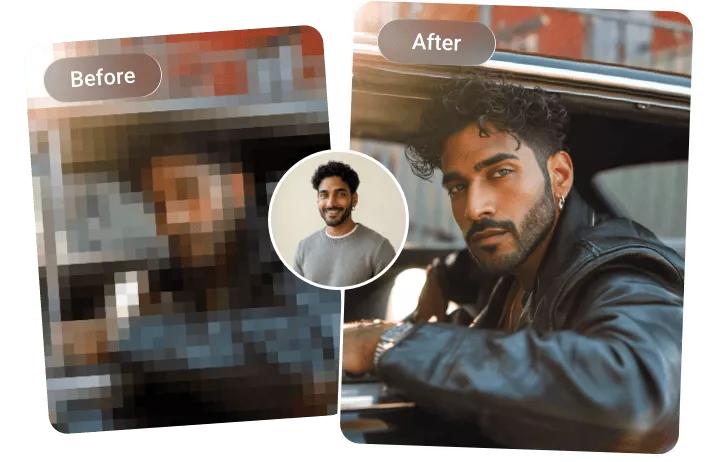
Mosaic effect and heavy pixelation can hide important details in a video. However, they can also reduce the overall visual quality, making the footage less suitable for social media platforms, YouTube, presentations, or professional projects. Fortunately, modern AI-powered video enhancement tools can help reduce mosaic from videos with minimal effort. If you’re looking for ways to remove mosaic from videos, you’ve come to the right place. In this guide, we will introduce the three best tools to remove mosaic from videos in 2026. Ensure you read this guide to the end and discover the best mosaic removal video tools available.
Part 1: What is Mosaic in Video?

A mosaic effect is a visual editing technique used to pixelate, blur, or cover a specific part of a photo or video. It replaces the selected area with large blocks of color, making faces, objects, text, license plates, or sensitive details difficult to recognize. It is commonly used to protect personal information and hide content that may be inappropriate for public viewing.
While the mosaic effect offers several advantages, it can also create problems that make it essential to remove it. Heavy pixelation can easily ruin video quality, making the footage less appealing and difficult to watch. This can reduce viewer engagement and make the video look unprofessional, especially when it is used for YouTube, social media, marketing campaigns, or presentations.
Part 2: 3 Best Video Mosaic Remover Tools to Try in 2026
Looking for the best mosaic removal video software? Look no further! After hours of research, we have found the best tools that will help remove mosaic blur from videos without sacrificing the original quality. Here are the top 3 video mosaic removers
1. HitPaw Edimakor
If you want to remove mosaic from video app without sacrificing the original quality, we recommend using HitPaw Edimakor's AI Mosaic Remover. It is a video editing software designed to be intuitive yet packed with features to help users create polished videos without the technical hurdles. The program offers one of the best AI Video Enhancers that can improve blurry, pixelated, or low-resolution footage. With the help of this tool, users can easily reduce mosaic-like pixelation, sharpen visible details, remove noise, enhance colors, and upscale videos to a higher resolution. The best part of HitPaw is that it offers an intuitive interface, allowing non-tech and beginner users to remove mosaic from videos without any professional help or editing experience.
Key Features of HitPaw Edimakor
- Remove Mosaic Video: HitPaw Edimakor Video Enhancer feature enables users to remove mosaic from videos without editing experience or professional help. Simply upload the video, and the program will automatically remove blurry and pixelated areas.
- Enhanced Video Quality: Once the mosaic effect is removed from the video. The program automatically enhances the video quality up to 4K, making it ideal for social media platforms, such as Instagram, YouTube, TikTok, Facebook, and more.
- Video Editing Toolkit: In addition to improving mosaic and pixelated footage, the software includes useful editing tools such as trimming, cropping, transitions, and background adjustment. Users can enhance and edit their videos within a single platform.
- Multiple Export Options: After the enhancement process is complete, users can preview the result and export the video in multiple resolutions and formats, such as MP4, MOV, AVI, WebM, and FLAC.
- Intuitive Interface: One of the standout features of HitPaw Edimakor is that it offers an intuitive interface, making it suitable for beginners and non-technical users. Its simple drag-and-drop interface reduces mosaic effects and improves video quality with minimal effort.


Step-by-Step Guide:
With the help of HitPaw, users can easily remove mosaic from videos. Follow the instructions below to learn how to do it:
Step 1: Download and Install HitPaw Edimakor
Go to the HitPaw Edimakor official site and download the program on your PC. Launch it and click on the “Toolbox” option from the left panel. Next, choose the “Video Enhance” tool.
Step 2: Upload the Mosaic Video
Click on the “Import Video” option and select the mosaic or pixelated video from your device. Users can upload videos in multiple formats, such as MP4, MOV, AVI, and more.
Step 3: Select “Remove Mosaic” Function
Navigate down and select the “Remove Mosaic” feature available in the Function section. Next, choose your preferred output resolution. HitPaw Edimakor allows users to enhance and export videos in a resolution of up to 4K.
Step 4: Generate and Download Video
Finally, click on the “Generate” button to begin the process. Within seconds, HitPaw will remove the mosaic effect from your video. Preview the results and click on the “Download” button.
2. Remini
Remini is an amazing platform to remove mosaic from video online. It uses advanced artificial intelligence to analyze low-quality footage, sharpen visible details, improve facial features, reduce noise, and enhance overall resolution. The platform is especially useful for restoring old recordings, compressed social media clips, and blurry mobile videos. One of the standout features of this tool is that it offers an beginner-freindly interface, which is ideal for non-tech and beginner users.
Pros
- Remove mosaic from videos without sacrificing the original quality.
- Works seamlessly with multiple devices, including Android, iOS, Windows, and macOS.
- Includes powerful AI tools, such as AI Video Enhancer, Mosaic Remove, Image Enhancer, and more.
- Improves blurry details, facial features, color sharpness, and overall video clarity.
Cons
- Requires a paid subscription to remove the mosaic from videos.
- Free version of Remini includes limited exports, processing restrictions, or watermarked results.
3. Let’s Enhance
Want to remove mosaic video online? Let’s Enhance is the best option. It is a web-based tool that enables users to transform low-quality videos and images into high resolution. The standout feature of this tool is that it can also remove mosaic from videos without editing experience. Simply, upload the mosaic video, choose the AI model, and click on the “Enhance” button. Within seconds, your video will be ready and available for download. Users can download Mosaic effect free videos in multiple formats, such as MP4, MOV, FLAC, and AVI.
Pros
- Video mosaic remover online, meaning no software downloading or installation required.
- Allows users to upscale low-resolution videos to HD, Full HD, 2K, or 4K quality.
- Let’s Enhance support popular video formats, including MP4, MOV, and WebM.
- Free version available with a wide range of features, such as Mosaic remover, video enhancer, and more.
Cons
- Requires a stable and active internet connection to remove mosaic from videos.
- Large or high-resolution video files may take longer to process.
Final Thoughts
Mosaic effect can easily ruin the video quality, making it less appealing to the audience. That is why it is essential to remove mosaic from videos. Above, we’ve mentioned the top three mosaic removers that will help you remove the blurry effect from video within seconds. Each tool offers different features, processing, and export options. Among them, HitPaw Edimakor is the best option. The program enables users to remove mosaic from videos without sacrificing the original quality — no editing experience or professional help required.
Leave a Comment
Create your review for HitPaw articles